Email security has never been more critical, and MTA-STS (Mail Transfer Agent Strict Transport Security) represents one of the most effective ways to protect your organization’s email communications from man-in-the-middle attacks and downgrade attacks. If you’re looking to implement MTA-STS but feeling overwhelmed by the technical complexity, you’re not alone. Many organizations struggle with the setup process, often making costly mistakes that can compromise their email security or disrupt legitimate mail flow.
This comprehensive guide walks you through every step of MTA-STS implementation, from initial planning to ongoing maintenance, ensuring your email infrastructure remains secure and compliant with modern security standards.
I. Understanding MTA-STS: The Foundation of Secure Email Transport
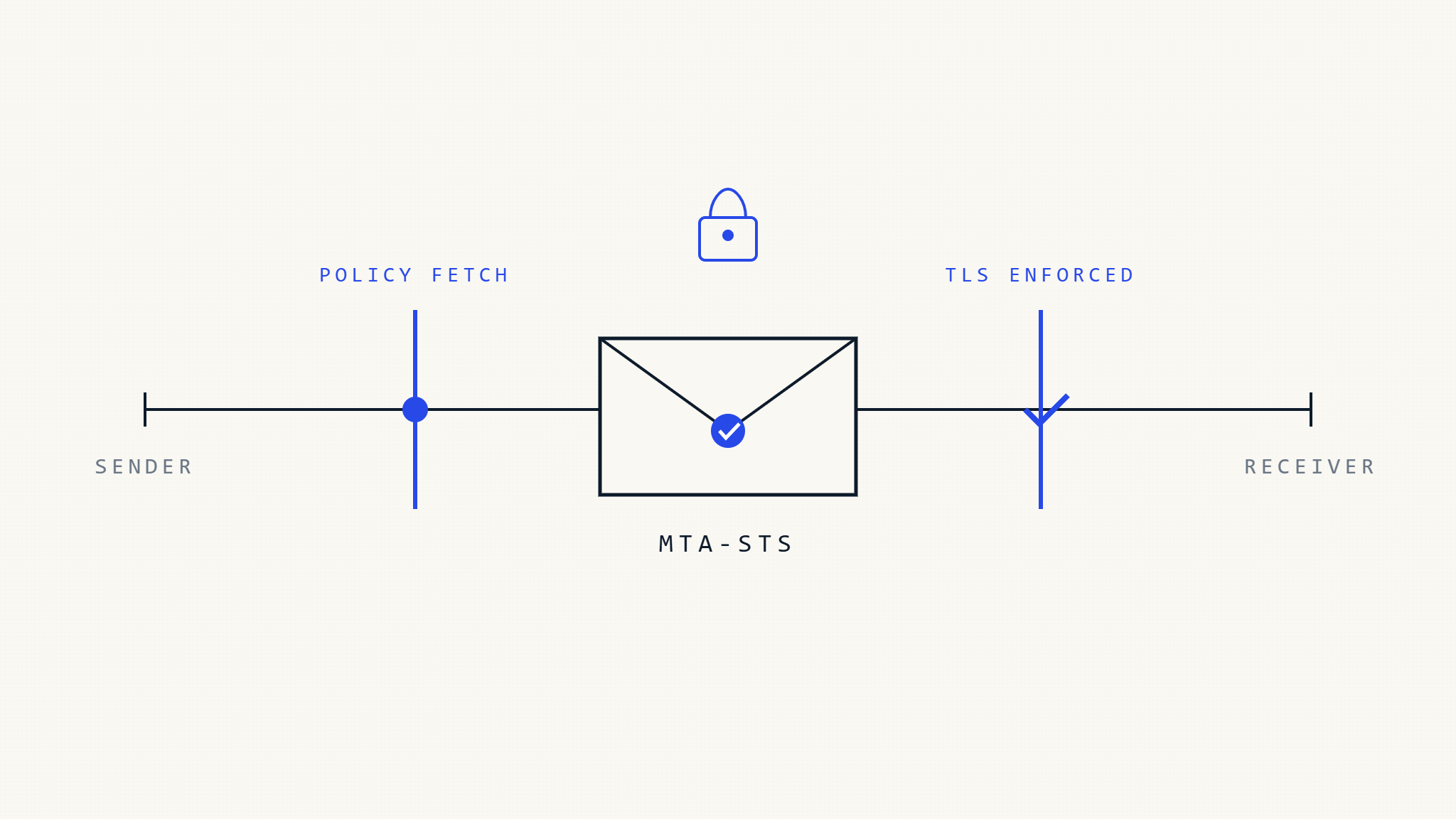
MTA-STS works by publishing a policy that instructs sending mail servers to only deliver email over encrypted TLS connections to your mail servers. Unlike opportunistic TLS, which can be downgraded by attackers, MTA-STS enforces strict transport security, making it significantly harder for malicious actors to intercept or manipulate your email communications.
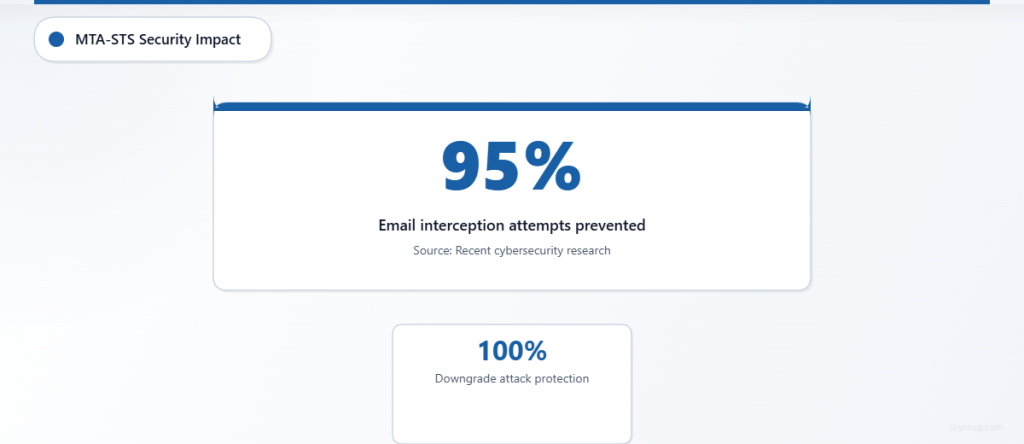
The standard operates through two key components: a DNS TXT record that advertises policy availability and an HTTPS-hosted policy file that contains the actual security requirements. When properly implemented, MTA-STS can prevent up to 95% of email interception attempts, according to recent security research from leading cybersecurity firms.
Modern email threats have evolved beyond simple spam and phishing. Advanced persistent threat actors now routinely attempt to intercept corporate communications through transport-layer attacks, making MTA-STS implementation essential for any organization serious about email security.
II. Pre-Implementation Requirements and Planning
Technical Prerequisites
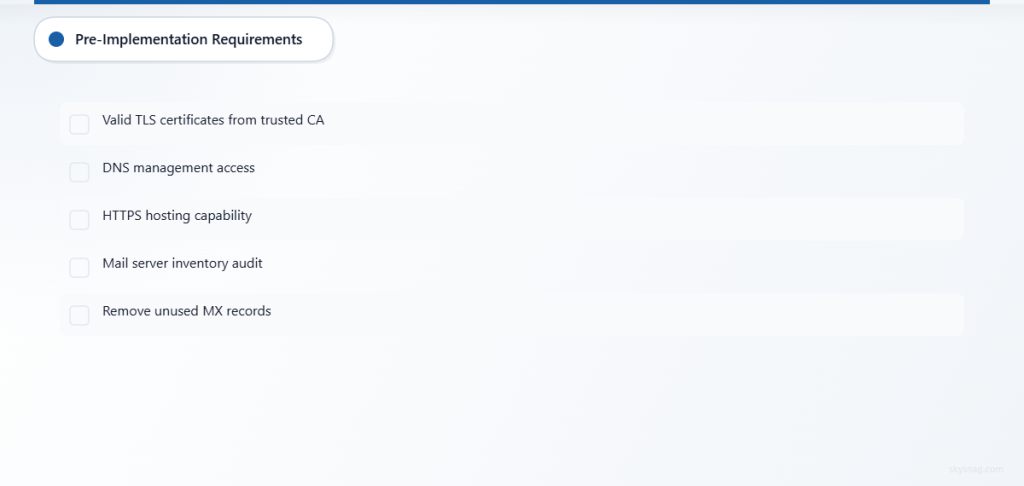
Before beginning your MTA-STS implementation, ensure you have the following technical requirements in place:
SSL/TLS Certificate Management: Your mail servers must have valid, properly configured TLS certificates from trusted certificate authorities. Self-signed certificates will cause policy violations and potential mail delivery failures.
DNS Management Access: You’ll need administrative access to your organization’s DNS zone to publish the required TXT records. Consider using a DNS provider that supports API management for easier policy updates.
Web Hosting Capability: MTA-STS requires hosting a policy file over HTTPS, typically on a subdomain like mta-sts.yourdomain.com. This can be hosted on existing web infrastructure or dedicated hosting services.
Mail Server Infrastructure Assessment
Conduct a comprehensive audit of your current mail server setup. Document all inbound mail servers, including primary MX records, backup servers, and any third-party email security services. This inventory becomes crucial when defining your MTA-STS policy parameters.
Many organizations discover outdated or forgotten mail servers during this process. Remove any unused servers from your MX records before implementing MTA-STS to avoid policy conflicts.
III. Step-by-Step MTA-STS Implementation
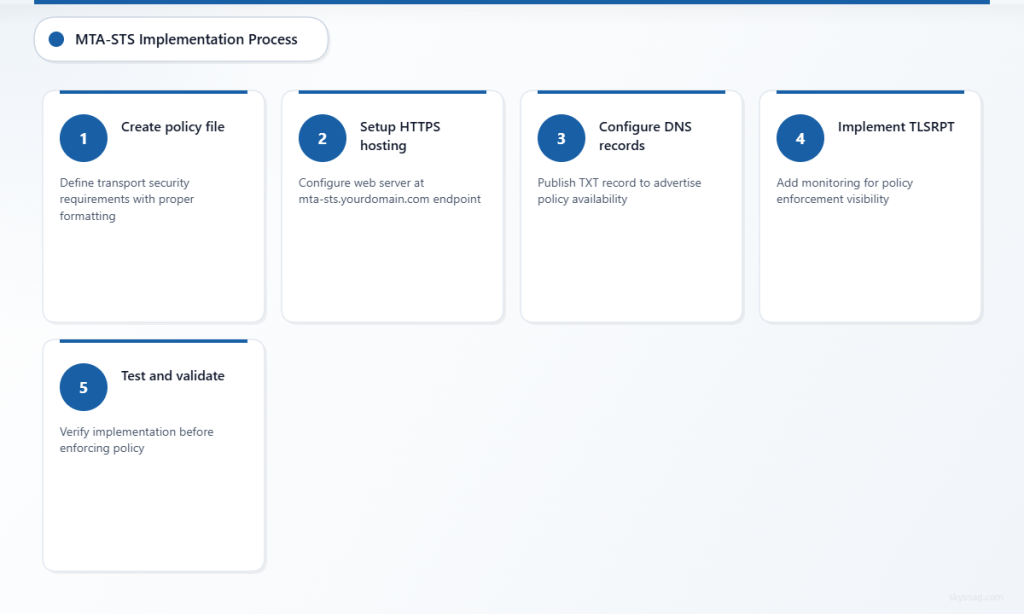
Step 1: Create Your MTA-STS Policy File
Begin by creating a policy file that defines your transport security requirements. This file must be served over HTTPS and contain specific formatting to ensure compatibility with all major email providers.
Create a file named mta-sts.txt with the following structure:
version: STSv1
mode: enforce
mx: mail.yourdomain.com
mx: backup.yourdomain.com
max_age: 86400
Policy Parameters Explained:
- version: Must be “STSv1” for current standard compliance
- mode: Use “testing” initially, then move to “enforce” after verification
- mx: List all legitimate mail servers that should receive your email
- max_age: Policy cache duration in seconds (86400 = 24 hours)
Step 2: Set Up HTTPS Hosting for Policy File
Configure a web server to host your MTA-STS policy file at https://mta-sts.yourdomain.com/.well-known/mta-sts.txt. The hosting setup must meet specific requirements:
SSL Certificate Requirements: Use a valid TLS certificate for the mta-sts subdomain. Many organizations use wildcard certificates or add the subdomain to existing certificates.
Content-Type Headers: Configure your web server to serve the policy file with Content-Type: text/plain headers. Incorrect content types can cause policy parsing failures.
Reliability Considerations: Ensure high availability for your policy hosting. If the policy file becomes unavailable, sending servers may defer or reject email delivery.
Step 3: Configure DNS Records
Publish a TXT record at _mta-sts.yourdomain.com that advertises your policy:
_mta-sts.yourdomain.com. IN TXT "v=STSv1; id=20260315120000;"DNS Record Components:
- v=STSv1: Indicates MTA-STS version 1
- id: Policy identifier that should be updated when policy changes (use timestamp format for easy tracking)
The DNS record serves as a signal to sending mail servers that an MTA-STS policy exists and should be fetched from your policy hosting endpoint.
Step 4: Implement TLSRPT for Monitoring
While not strictly required, implementing TLSRPT (TLS Reporting) alongside MTA-STS provides crucial visibility into policy enforcement and potential issues.
Add a TLSRPT DNS record:
_smtp._tls.yourdomain.com. IN TXT "v=TLSRPTv1; rua=mailto:[email protected]"TLSRPT reports help you identify legitimate mail servers that may be experiencing TLS connection issues with your servers, allowing you to address problems before they impact mail delivery.
Step 5: Testing and Validation
Before moving to enforcement mode, thoroughly test your MTA-STS implementation using both automated tools and manual verification methods.
DNS Propagation Check: Verify that your DNS records have propagated globally using multiple DNS checkers. Incomplete propagation can cause inconsistent policy enforcement.
Policy File Accessibility: Test HTTPS access to your policy file from multiple locations and networks. Consider using monitoring services to track policy file availability.
Mail Flow Testing: Send test emails from various providers (Gmail, Outlook, Yahoo) and monitor delivery success rates. Many organizations use tools like Skysnag Protect to automate this testing process and receive detailed reports on authentication status.
Step 6: Move to Enforcement Mode
After successful testing in “testing” mode for at least one week, update your policy to “enforce” mode:
version: STSv1
mode: enforce
mx: mail.yourdomain.com
mx: backup.yourdomain.com
max_age: 604800
Increase the max_age value to one week (604800 seconds) for production deployments. Update your DNS record’s ID field to reflect the policy change:
_mta-sts.yourdomain.com. IN TXT "v=STSv1; id=20260322120000;"IV. Common Implementation Pitfalls and How to Avoid Them
Incomplete MX Record Coverage
One of the most frequent mistakes involves failing to include all legitimate mail servers in the MTA-STS policy. This oversight can cause legitimate email to be rejected when it arrives via servers not listed in the policy.
Solution: Maintain a comprehensive inventory of all mail servers, including backup servers, third-party security services, and any cloud-based email routing services. Review MX records quarterly to identify any changes.
TLS Certificate Mismatches
Mail servers must present TLS certificates that match their hostnames exactly. Certificate mismatches cause policy violations and potential mail delivery failures.
Solution: Implement automated certificate monitoring to alert you before certificates expire. Use Subject Alternative Name (SAN) certificates to cover multiple mail server hostnames with a single certificate.
Policy File Availability Issues
If your MTA-STS policy file becomes unavailable, sending mail servers may cache the failure and defer future delivery attempts for extended periods.
Solution: Implement redundant hosting for your policy file across multiple geographic locations. Consider using content delivery networks (CDNs) to improve availability and performance.
Incorrect DNS TTL Values
Setting DNS TTL values too high can delay policy updates, while values too low can increase DNS query load and potential service interruptions.
Solution: Use moderate TTL values (300-3600 seconds) for MTA-STS DNS records. Plan policy changes in advance and reduce TTL values before making updates.
V. Advanced Configuration Options
Multiple Domain Management
Organizations managing multiple domains can implement centralized MTA-STS policies by hosting policy files on a single infrastructure while maintaining separate DNS records for each domain.
This approach simplifies certificate management and reduces hosting complexity while maintaining security boundaries between different organizational units.
Integration with Email Security Services
Many organizations use third-party email security services that act as MX servers before delivering email to internal infrastructure. Include these services in your MTA-STS policy while ensuring they maintain proper TLS connectivity to your final destination servers.
Document the complete email flow path and verify TLS connectivity at each hop to avoid policy violations.
Automated Policy Management
Consider implementing automated policy management systems that can update DNS records and policy files based on infrastructure changes. This automation reduces the risk of human error and ensures policies remain current as your email infrastructure evolves.
VI. Monitoring and Maintenance Best Practices
Regular Policy Validation
Establish a monthly review process to validate that your MTA-STS policy accurately reflects your current mail server infrastructure. This review should include:
- Verification of all MX record entries in the policy
- Confirmation of TLS certificate validity across all mail servers
- Testing of policy file accessibility from multiple locations
- Review of TLSRPT data for policy violation trends
Certificate Lifecycle Management
Implement automated monitoring for TLS certificates on all mail servers included in your MTA-STS policy. Certificate expiration can cause immediate policy violations and mail delivery failures.
Many organizations integrate certificate monitoring with their existing IT service management platforms to ensure timely renewals and minimize service disruptions.
Performance Optimization
Monitor the performance impact of MTA-STS policy checks on your email infrastructure. While the security benefits significantly outweigh the minimal performance overhead, understanding baseline metrics helps identify potential issues.
Track policy file response times, DNS query performance, and any correlation between policy enforcement and mail processing delays.
VII. Compliance and Regulatory Considerations
MTA-STS implementation supports compliance with various regulatory frameworks that require encryption of sensitive communications in transit. Industries such as healthcare (HIPAA), finance (PCI DSS), and government sectors often mandate or strongly recommend transport-layer security for email communications.
Document your MTA-STS implementation as part of your organization’s security controls inventory. Include policy documents, configuration details, and monitoring procedures in compliance audit packages.
For organizations subject to data localization requirements, ensure your policy file hosting infrastructure complies with relevant geographic restrictions while maintaining the availability requirements for effective policy enforcement.
VIII. Troubleshooting Common Issues
Policy Parsing Errors
Syntax errors in MTA-STS policy files can cause sending mail servers to ignore policies or default to less secure transport methods. Common syntax issues include incorrect whitespace, missing colons, and invalid parameter values.
Resolution: Use policy validation tools to check syntax before publishing updates. Implement version control for policy files to enable quick rollback if issues arise.
DNS Propagation Delays
Changes to MTA-STS DNS records may take time to propagate globally, creating temporary inconsistencies in policy enforcement across different geographic regions.
Resolution: Plan policy changes during low email volume periods and monitor propagation status using global DNS checking tools. Consider implementing DNS monitoring to detect propagation issues automatically.
Certificate Trust Chain Issues
Mail servers may reject TLS connections if certificate trust chains are incomplete or contain invalid intermediate certificates.
Resolution: Verify complete certificate trust chains on all mail servers. Use SSL testing tools to identify trust chain issues and ensure intermediate certificates are properly configured.
IX. Key Takeaways
MTA-STS implementation significantly enhances your organization’s email security posture by enforcing encrypted transport connections and preventing downgrade attacks. Success depends on careful planning, thorough testing, and ongoing maintenance of both technical infrastructure and security policies.
Start with testing mode to validate your configuration before moving to enforcement, and maintain comprehensive monitoring to ensure continued effectiveness. Regular reviews of your MTA-STS policy ensure it remains aligned with infrastructure changes and evolving security requirements.
The investment in MTA-STS implementation pays dividends in reduced email security risks and enhanced compliance posture. Organizations that implement MTA-STS typically see immediate improvements in email security metrics and reduced susceptibility to transport-layer attacks.
Ready to implement MTA-STS with expert guidance and automated monitoring? Skysnag Protect provides comprehensive email authentication management, including MTA-STS implementation support, automated policy validation, and detailed reporting to ensure your email security remains robust and compliant.