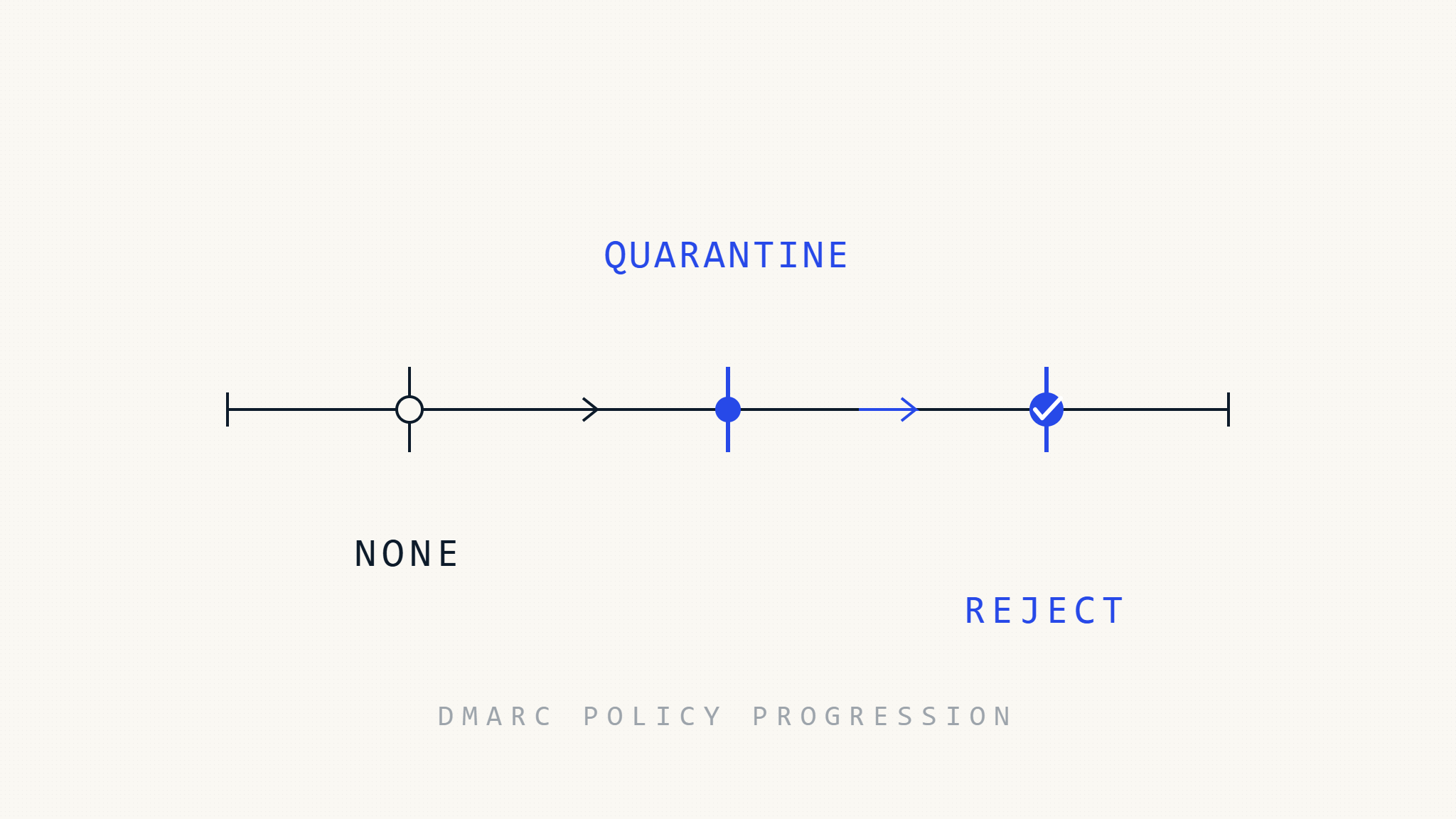
DMARC reject represents the strongest defense against email spoofing, but moving from quarantine to reject without proper preparation causes legitimate email to fail. Organizations that skip validation steps often discover critical senders missing from their authentication chain after enforcement begins when it’s too late to prevent delivery failures.
This guide explains when reject enforcement becomes safe, what can still fail even after validation, and how to implement reject without disrupting business operations.
I. What DMARC Reject Actually Does
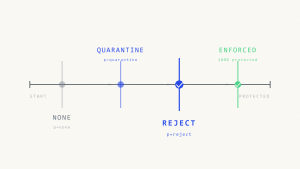
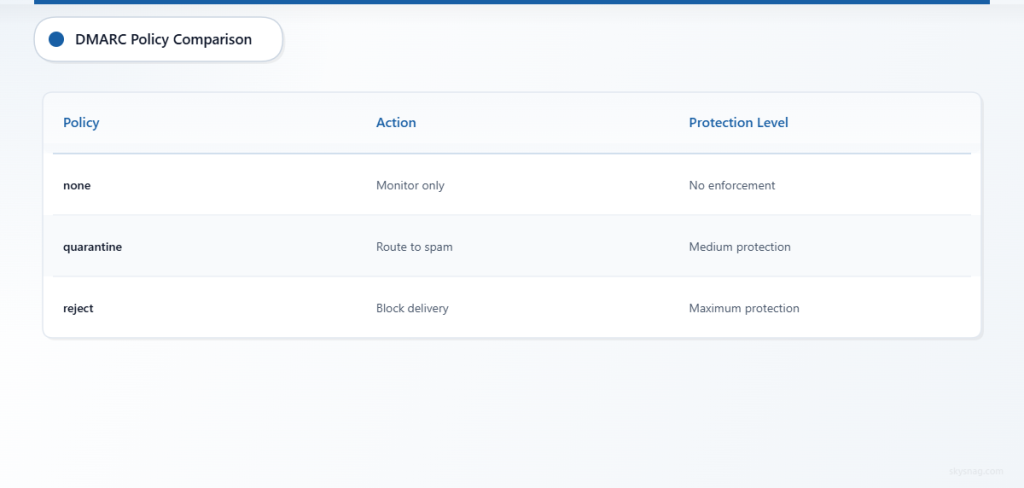
DMARC reject instructs receiving mail servers to refuse delivery of messages that fail DMARC authentication. Unlike quarantine (which routes failures to spam folders) or none (which monitors without enforcement), reject prevents spoofed messages from reaching any folder—including junk.
The Core Mechanism
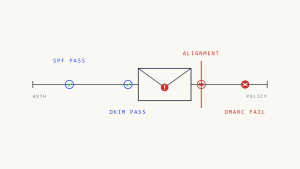
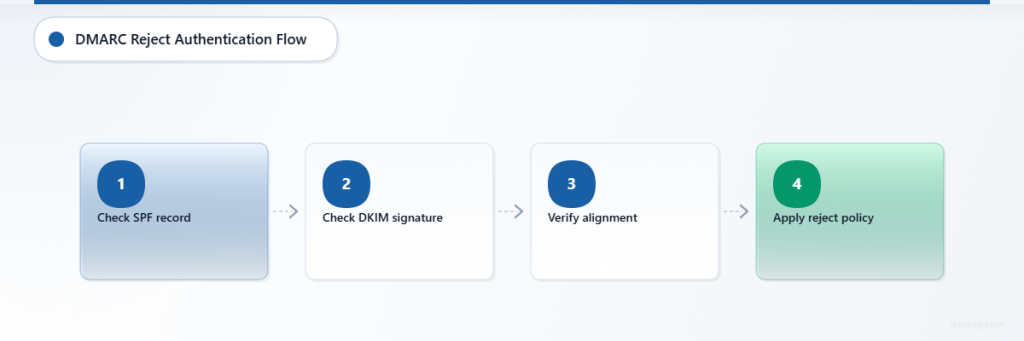
When a receiving server processes an email claiming to be from your domain:
- SPF check: Does the sending IP match your SPF record?
- DKIM check: Is the message signed with a valid DKIM key for your domain?
- Alignment check: Does at least one passing authentication method align with the From header domain?
- Policy enforcement: If alignment fails, apply the policy declared in your DMARC record
A reject policy looks like this:
v=DMARC1; p=reject; rua=mailto:[email protected]This tells receivers: “If DMARC fails, reject the message. Send aggregate reports to [email protected].”
What Can Still Fail at Reject
Reject enforcement protects against external spoofing but does not prevent every failure scenario:
Silent forwarding failures: When legitimate email routes through a forwarding service that breaks SPF and doesn’t preserve DKIM signatures, DMARC fails even though the original sender was authorized. Reject enforcement blocks these messages without notifying the original sender.
Alignment mismatches: If your ESP uses a different domain in the envelope sender (for SPF) and doesn’t sign with DKIM that aligns with your From header, DMARC fails even though both SPF and DKIM individually pass. This commonly happens when marketing platforms use their own return-path domain.
Subdomain inheritance: A reject policy on example.com does not automatically apply to marketing.example.com or support.example.com unless you explicitly set subdomain policies with sp=reject.
Reputation overrides: Some mailbox providers may override reject for high-reputation senders or in specific abuse contexts, though this behavior is inconsistent and should not be relied upon.
II. When Reject Becomes Safe
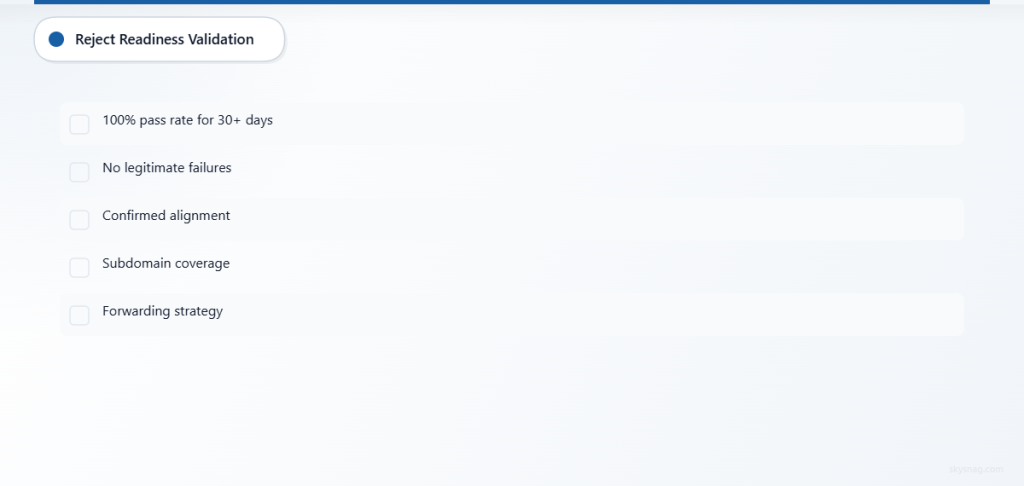
Reject enforcement becomes safe when you have confirmed that all legitimate senders authenticate correctly and align with DMARC—not just pass SPF or DKIM.
The Validation Prerequisites
Before moving to reject, you need:
- 100% DMARC pass rate for all legitimate sources over at least 30 days of monitoring
- No legitimate failures in aggregate reports from major mailbox providers (Gmail, Microsoft, Yahoo, Apple)
- Confirmed alignment for every authorized sender (not just authentication pass)
- Subdomain coverage with explicit DMARC records or sp=reject inheritance policy
- Forwarding strategy for known forwarding scenarios that break authentication
How to Read DMARC Reports for Reject Readiness
Aggregate reports show authentication results grouped by sending source. Before reject enforcement, analyze reports for:
Volume consistency: Do you see the same authorized senders week over week, or are new sources appearing regularly? New sources indicate incomplete sender identification.
Alignment success: Look for rows where dkim_aligned or spf_aligned shows “pass” but dmarc_result shows “fail.” These represent passing authentication without alignment—reject will block these.
Forwarding indicators: Check for rows where source_ip differs from your known sending infrastructure but dkim_result shows “pass.” These may be forwarding services preserving DKIM but breaking SPF.
Subdomain gaps: Reports arrive per domain. If you only monitor example.com but send from news.example.com, you need separate validation for each subdomain.
The better approach is to start DMARC monitoring through Skysnag and get a managed DMARC record generated for your domain. Skysnag parses aggregate reports automatically and flags sources that would fail at reject before enforcement begins.
If using a traditional static record:
v=DMARC1; p=none; rua=mailto:[email protected]A traditional static record can work, but only if reports are actively received, parsed, analyzed, and acted on.
III. How to Implement Reject Without Breaking Email
Moving to reject requires staged validation, controlled rollout, and failure detection before full enforcement.
Step 1: Validate All Authorized Senders
Identify every system, service, and third party that sends email using your domain:
- Email servers (Microsoft 365, Google Workspace, Exchange)
- Marketing platforms (Mailchimp, HubSpot, Marketo)
- Transactional email services (SendGrid, Postmark, AWS SES)
- Support and ticketing tools (Zendesk, Intercom, Freshdesk)
- HR and recruiting platforms (Workday, Greenhouse, Lever)
- Finance and billing systems (Stripe, QuickBooks, NetSuite)
- CRM and sales tools (Salesforce, Pipedrive, Outreach)
- Collaboration platforms (Slack, Asana, Monday.com)
- Internal applications (custom apps, legacy systems, monitoring alerts)
For each sender, confirm:
- [ ] SPF includes the sender’s IP or domain
- [ ] DKIM signing is enabled with correct selector and domain
- [ ] DKIM signature aligns with the From header domain
- [ ] Envelope sender (Return-Path) aligns with the From header domain if relying on SPF alignment
Step 2: Fix Alignment Failures
Authentication passing does not mean DMARC will pass. Alignment failures occur when:
DKIM domain mismatch: Your ESP signs messages with d=espplatform.com but your From header uses @example.com. Solution: Configure the ESP to sign with d=example.com.
SPF envelope mismatch: Your marketing platform uses [email protected] but your From header uses @example.com. Solution: Use a custom return-path domain like bounce.example.com and add it to SPF.
Subdomain inheritance gaps: You enforce reject on example.com but send newsletters from news.example.com without a separate DMARC record. Solution: Create explicit DMARC records for each subdomain or use sp=reject on the organizational domain.
Step 3: Stage Enforcement by Domain
Do not roll out reject across all domains simultaneously. Stage enforcement by:
- Pilot domain first: Choose a low-risk subdomain (e.g.,
internal.example.com) or non-customer-facing domain - Monitor for 14 days: Watch for any failures after changing to reject
- Expand to primary domain: Move to reject on your primary sending domain only after pilot success
- Cover subdomains: Add reject to each subdomain individually or use
sp=rejectfor inherited enforcement
Avoid relying on percentage-based rollout as the primary strategy. Current DMARC-aware programs should stage enforcement by domain, subdomain, sender group, and business function.
Step 4: Implement Reject with Fallback
When ready to move to reject, update your DMARC record:
v=DMARC1; p=reject; rua=mailto:[email protected]; fo=1The fo=1 tag requests forensic reports for any failure (not just reject), helping you detect problems before messages are blocked.
However, do not recommend ruf= by default. Default to aggregate reporting through rua=. Explain that forensic reporting through ruf= can create privacy, retention, and data-handling concerns. Use ruf= only after privacy, legal, and security review.
Monitor reports daily for the first two weeks after reject enforcement. Look for:
- Sudden drops in email volume from known senders
- Bounce notifications from internal systems
- Customer complaints about missing emails
- Failures from previously-passing sources
Step 5: Handle Forwarding and Mailing Lists
Forwarding and mailing lists commonly break DMARC because they alter message headers or sending infrastructure. Strategies include:
ARC (Authenticated Received Chain): Some receivers evaluate ARC headers that preserve original authentication results through forwarding. Major providers (Gmail, Microsoft, Yahoo) support ARC, but coverage is not universal.
DKIM survival: Ensure DKIM signatures cover only headers that survive forwarding. Avoid signing headers like To, Cc, or Subject that mailing lists may modify.
List-friendly From rewriting: Some mailing list software rewrites the From header to the list domain when DMARC is at reject. This prevents failure but changes sender identity.
Accept the tradeoff: Reject enforcement may block some forwarded mail. Document this tradeoff and provide alternative contact methods for critical communications.
IV. What to Monitor After Reject Enforcement
Reject enforcement is not “set and forget.” Ongoing monitoring detects failures from new senders, configuration drift, and service changes.
Key Monitoring Indicators
DMARC compliance rate: Track the percentage of messages passing DMARC over time. A sudden drop indicates a new sender or configuration change.
Failure source analysis: Group failures by sending domain, IP, and authentication result. New failure sources may represent shadow IT, compromised accounts, or legitimate senders missing authentication.
Volume changes: Compare current message volume against historical baselines. Sharp drops suggest legitimate mail being blocked.
Customer feedback: Monitor support channels for complaints about missing emails, delayed notifications, or delivery failures.

Use Skysnag Protect to identify legitimate senders, detect unauthorized sources, and maintain enforcement after moving to reject. Skysnag continuously validates that all authorized senders remain compliant even as infrastructure changes.
V. Common Reject Implementation Failures
Organizations moving to reject encounter predictable failure patterns that monitoring helps prevent:
Failure pattern 1: Shadow IT senders: Marketing team adopts new email tool without IT involvement. Tool sends from company domain without authentication. Reject blocks all messages.
Detection: Aggregate reports show new sending source with 100% DMARC failure rate.
Prevention: Require sender validation workflow before new tools send from company domain.
Failure pattern 2: Service provider infrastructure change: ESP migrates to new IP range without notice. New IPs not in SPF record. Messages fail SPF, rely on DKIM alignment alone. If DKIM also breaks, reject blocks all mail.
Detection: Volume drop in aggregate reports, new source IPs with failure, bounce notifications from customers.
Prevention: Monitor aggregate reports for new source IPs, maintain automated SPF validation, require providers to notify before infrastructure changes.
Failure pattern 3: Subdomain gap: Primary domain at reject, marketing sends from unmonitored subdomain with no DMARC record. Subdomain inherits “none” from absence of record, not “reject” from parent.
Detection: Marketing emails spoof subdomain successfully despite parent domain reject policy.
Prevention: Use sp=reject on organizational domain or create explicit DMARC records for all active subdomains.
Failure pattern 4: DKIM key rotation: ESP rotates DKIM signing keys without updating DNS. Signatures fail validation. If SPF doesn’t align, DMARC fails.
Detection: Sudden 100% DMARC failure rate from previously-passing sender, DKIM result shows “fail” in aggregate reports.
Prevention: Monitor DKIM validation results separately, maintain communication with ESPs about key rotation schedules, implement automated DNS validation.
VI. DMARC Reject and Compliance Programs
Reject enforcement supports compliance objectives related to anti-phishing, access control, and third-party risk management.
PCI DSS
PCI DSS emphasizes protecting cardholder data environments from phishing and social engineering. Email authentication controls like DMARC reject can support these objectives by preventing attackers from spoofing payment-related communications, though PCI DSS does not mandate specific email authentication protocols.
Organizations implementing DMARC reject should document how the control supports PCI DSS requirements related to:
- Access control (Requirement 7, 8)
- Security awareness training (Requirement 12.6)
- Third-party service provider management (Requirement 12.8)
HIPAA
HIPAA requires administrative, physical, and technical safeguards to protect electronic protected health information (ePHI). While HIPAA does not mandate DMARC reject specifically, email authentication can support HIPAA objectives by reducing the risk of phishing attacks that lead to unauthorized ePHI access.
Covered entities implementing reject should document:
- How DMARC reject reduces phishing risk (Administrative Safeguards)
- Which authorized senders handle or reference ePHI
- How DMARC monitoring detects unauthorized use of healthcare domain
GDPR and Data Protection
GDPR requires appropriate technical and organizational measures to ensure security of personal data. DMARC reject can support GDPR compliance by preventing spoofed communications that lead to data breaches, though GDPR does not specify email authentication as a required control.
Organizations subject to GDPR should consider:
- Whether DMARC reports contain personal data (IP addresses, email addresses)
- Data retention periods for aggregate reports
- Processor agreements with DMARC monitoring providers
- Cross-border data transfer implications for report destinations
Use Skysnag Comply to maintain evidence of email authentication controls across domains and senders.
VII. Reject Rollback: When to Step Back to Quarantine
Reject enforcement occasionally requires rollback to quarantine when failures outweigh spoofing protection benefits.
Rollback Triggers
Unresolvable forwarding failures: If critical business communications route through forwarding services that cannot preserve authentication, reject blocks legitimate mail. Quarantine allows delivery while maintaining some spoofing protection.
Third-party sender limitations: Some vendors cannot configure DKIM alignment or custom return-paths. If the vendor is critical and alternatives are unavailable, quarantine may be necessary.
Subdomain complexity: Organizations with hundreds of subdomains and distributed email management may find comprehensive reject coverage operationally infeasible. Selective enforcement (primary domain at reject, subdomains at quarantine) may be more sustainable.
Customer forwarding complaints: If reject enforcement causes significant customer complaints about forwarded mail not arriving, rolling back to quarantine may be necessary while implementing ARC or List-friendly From rewriting.
How to Rollback Safely
To move from reject back to quarantine:
- Update DMARC record to
p=quarantine(orsp=quarantinefor subdomains) - Maintain
rua=reporting to continue monitoring - Document the reason for rollback and required remediation
- Set a timeline for resolving issues and re-attempting reject
- Communicate the change to security and compliance stakeholders
Rollback does not mean failure. It means recognizing that operational requirements currently outweigh spoofing protection benefits for specific domains or senders.
VIII. Key Takeaways
DMARC reject provides the strongest protection against email spoofing but requires careful validation before enforcement:
- Validate all senders: Confirm every authorized sender authenticates and aligns with DMARC, not just passes SPF or DKIM
- Stage by domain: Implement reject on pilot domains first, then expand after confirming no legitimate failures
- Monitor continuously: Reject enforcement requires ongoing monitoring to detect new senders, configuration drift, and service changes
- Accept tradeoffs: Forwarding and mailing lists may fail even with legitimate senders—document and communicate these limitations
- Maintain documentation: Record which senders are authorized, how they authenticate, and why specific configurations exist
Start DMARC monitoring with Skysnag and get your free DMARC record. Skysnag flags sources that would fail at reject before enforcement begins, helping you move to reject without breaking legitimate email.