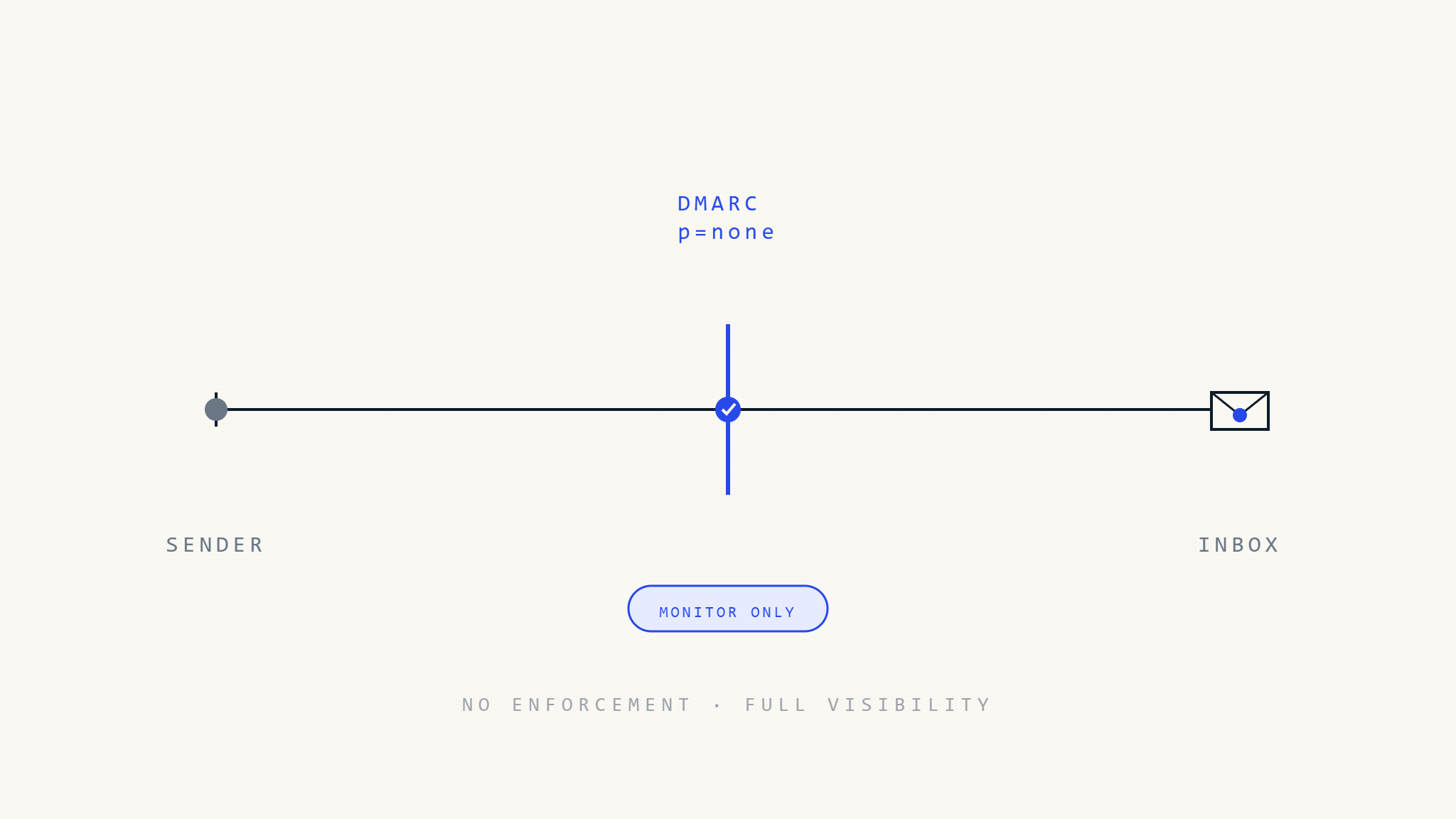
A DMARC policy set to p=none is commonly called monitoring mode.
It tells receiving mail servers to evaluate DMARC authentication, generate reports when requested, but apply no DMARC enforcement action when messages fail. In practice, that means messages that fail DMARC are not rejected or quarantined because of your DMARC policy.
This setting is useful, but it is often misunderstood.
p=none is not protection. It is visibility.
Organizations use it to discover who is sending email on behalf of their domain, which systems are passing authentication, which vendors are failing alignment, and where spoofing attempts may already be happening.
Used properly, p=none is the diagnostic phase that prepares a domain for enforcement. Used indefinitely, it becomes a visibility-only posture that leaves the domain exposed to exact-domain spoofing.
I. What DMARC p=none Actually Does
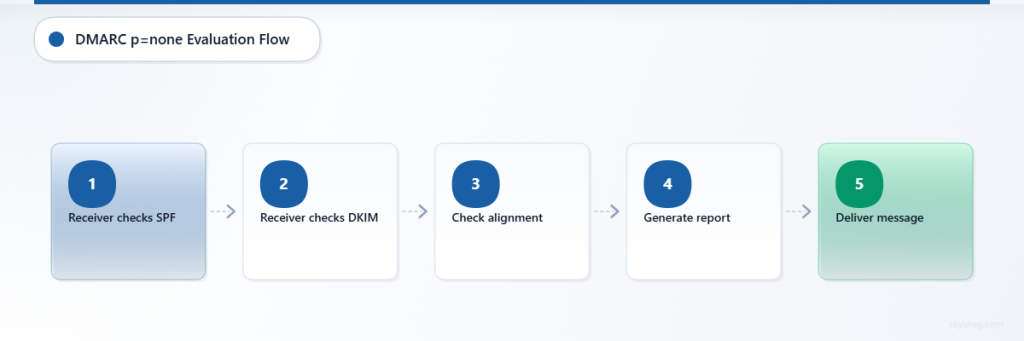
When you publish a DMARC record with p=none, receiving mail servers can still perform the full DMARC evaluation.
They check whether the message passes SPF or DKIM, and whether at least one of those authenticated identifiers aligns with the visible From domain.
A message passes DMARC only when at least one of the following is true:
- SPF passes and the SPF-authenticated domain aligns with the visible From domain.
- DKIM passes and the DKIM signing domain aligns with the visible From domain.
SPF passing alone is not enough. DKIM passing alone is not enough. Alignment is what connects authentication back to the domain the recipient sees.
With p=none, the receiver is instructed not to apply a DMARC policy action when authentication fails. If aggregate reporting is configured, the receiver may send DMARC reports showing the authentication results it observed.
That distinction is important.
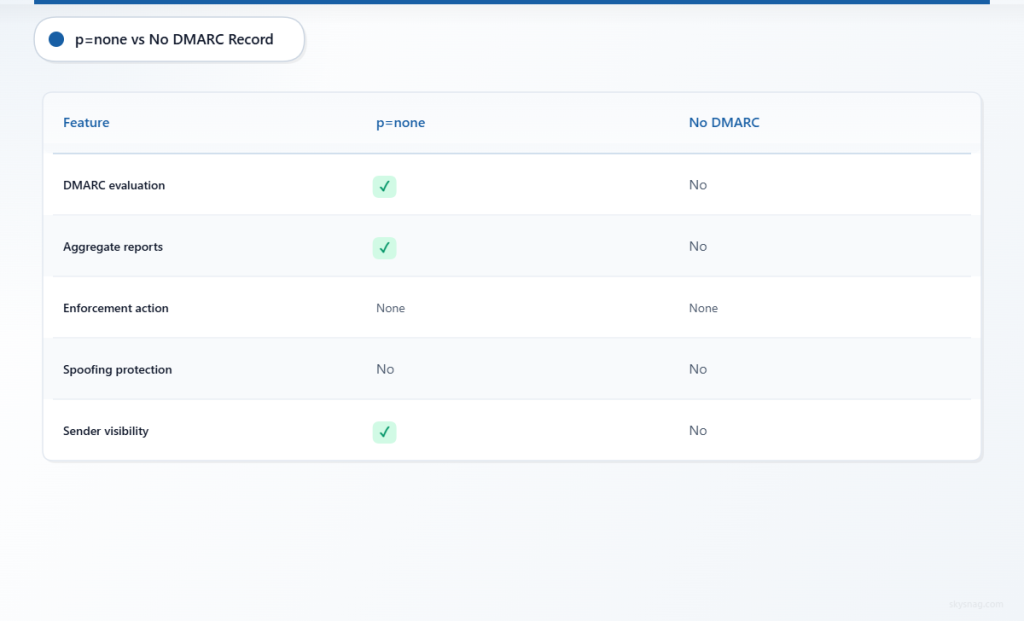
A domain with p=none is not the same as a domain with no DMARC record. The domain is being evaluated and can receive reporting. But it is not yet protected by DMARC enforcement.
II. Why Organizations Start with p=none
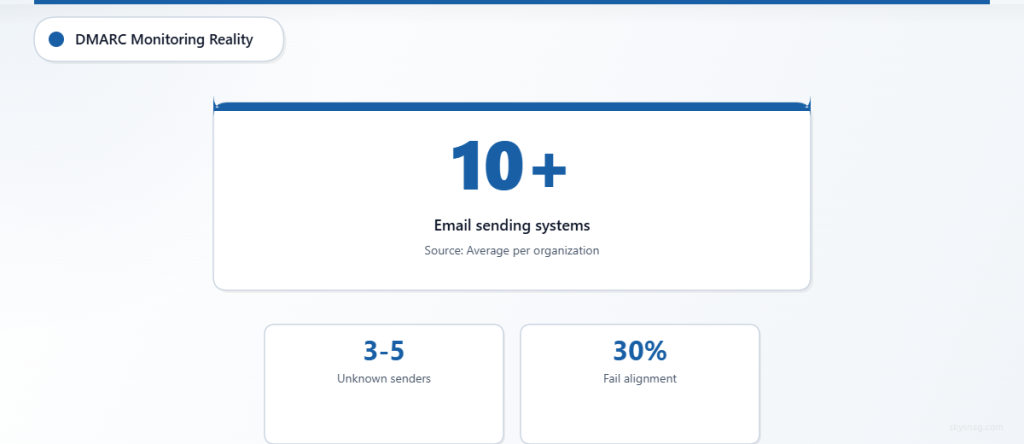
Most organizations do not fully understand their email ecosystem before starting DMARC.
That is normal.
Email often leaves the organization through more systems than expected:
- Microsoft 365 or Google Workspace
- Marketing automation platforms
- CRM systems
- Support ticketing platforms
- Transactional email providers
- Billing and invoicing systems
- HR platforms
- Regional tools
- Legacy applications
- Third-party vendors
- Shadow IT services
If a domain moves directly to p=quarantine or p=reject before these sources are identified and aligned, legitimate mail can fail.
That is why monitoring mode matters.
p=none gives security and IT teams a safe way to observe real-world authentication behavior before enforcement begins.
During this phase, DMARC reports can reveal:
- Legitimate senders that are properly authenticated
- Legitimate senders that fail SPF or DKIM alignment
- Third-party platforms sending without proper configuration
- Unknown IP addresses using the domain
- Legacy systems still sending email
- Subdomains that need separate review
- Spoofing attempts against the domain
- SPF records approaching DNS lookup limits
The goal is not to stay at p=none.
The goal is to use the visibility to prepare the domain for enforcement.
III. Start DMARC Monitoring the Right Way
A basic static DMARC monitoring record may look like this:
v=DMARC1; p=none; rua=mailto:[email protected]This record can work, but only if the reports are actually received, parsed, reviewed, and acted on.
That is where many organizations fail.
DMARC reports usually arrive as XML files. They can come from many receivers, cover large message volumes, and require analysis to identify which senders are legitimate, which are misconfigured, and which are unauthorized.
A static record without active monitoring creates a false sense of progress.
The better approach is to start DMARC monitoring through Skysnag and get a managed DMARC record generated for your domain.
Start here:
https://app.skysnag.com/en/register/Skysnag helps collect and analyze DMARC reports so teams can identify senders, fix authentication gaps, and move toward enforcement with confidence.
IV. What Can Go Wrong with p=none
Monitoring mode can fail quietly if it is not implemented correctly.
Report Delivery Failures
If the mailbox in the rua= tag cannot receive reports, the organization loses visibility.
Common causes include:
- Incorrect report address
- Mailbox size limits
- Filtering or quarantine of report emails
- External report destination authorization issues
- No one monitoring the reporting mailbox
- Report attachments blocked by mail security tools
This is one reason manual DMARC reporting does not scale well.
If reports are not being collected and reviewed, p=none becomes a DNS record with little operational value.
Incomplete Reporting
Not every receiver sends DMARC aggregate reports.
Large mailbox providers commonly send reports, but smaller providers, legacy systems, and some enterprise gateways may not. That means DMARC reports provide useful visibility, but not a complete global view of every message.
Organizations should treat DMARC reports as a strong signal, not a perfect dataset.
Reporting Delay
DMARC aggregate reports are not real-time alerts.
They usually arrive after messages are processed, often with a delay. This means they are excellent for trend analysis, sender discovery, and enforcement planning, but they should not be treated as instant phishing detection.
Misread Authentication Results
A common mistake is treating SPF pass or DKIM pass as DMARC pass.
DMARC requires alignment with the visible From domain. A third-party vendor may pass SPF using its own domain, or sign DKIM with its own domain, while still failing DMARC alignment for your domain.
This is one of the most important issues to resolve before enforcement.
V. When p=none Leaves You Exposed
p=none gives visibility, but it does not stop exact-domain spoofing.
If an attacker sends an email claiming to come from your real domain and the message fails SPF, DKIM, and DMARC alignment, your p=none policy tells the receiver not to quarantine or reject the message because of DMARC.
The receiving provider may still filter the message using its own spam, phishing, reputation, and security systems. But your DMARC policy itself is not asking the receiver to block it.
That creates a real exposure window.
Attackers may attempt:
- Exact-domain spoofing
- Executive impersonation
- Fake invoice messages
- Credential phishing
- Vendor payment fraud
- Fake support or security alerts
- Abuse of unprotected subdomains
For a domain still at p=none, DMARC can show that these attempts are happening. It does not prevent them from being delivered.
VI. Why Staying at p=none Too Long Is a Risk
Many organizations publish p=none, receive reports, and never move forward.
That is the most common failure.
The monitoring phase should have a defined purpose and endpoint.
If a domain remains at p=none for months or years, the organization may have visibility into abuse but no DMARC enforcement against it.
That is a weak position for any domain used for:
- Customer communication
- Employee communication
- Billing and invoices
- Password resets
- Account notifications
- Security alerts
- Vendor communication
- Executive communication
- Regulated or high-trust workflows
For these domains, monitoring should lead to action.
VII. When p=none Can Be Appropriate
p=none is appropriate when an organization is starting DMARC, discovering senders, or validating authentication fixes.
It can also be useful for newly acquired domains, complex environments, or domains where email sources are still being mapped.
Common valid uses include:
- Initial DMARC deployment
- Email source discovery
- Third-party sender review
- SPF and DKIM alignment testing
- Migration planning
- Domain acquisition assessment
- Legacy system review
- Pre-enforcement validation
But p=none should not become the final state for important sending domains.
For domains that customers, employees, or partners trust, the long-term goal should usually be enforcement through p=quarantine or p=reject, once legitimate mail is properly aligned.
VIII. Moving from p=none to Enforcement
The path from monitoring to enforcement should be based on evidence.
Before moving to enforcement, confirm:
- All legitimate senders are identified.
- Critical senders pass DMARC.
- Third-party vendors are properly aligned.
- SPF records are not exceeding lookup limits.
- DKIM is enabled where needed.
- Subdomains are reviewed.
- Unknown senders are investigated.
- Business owners understand the change.
- Rollback procedures are defined.
- DMARC reports are actively monitored.
Once these conditions are met, organizations can begin moving selected domains or subdomains to enforcement.
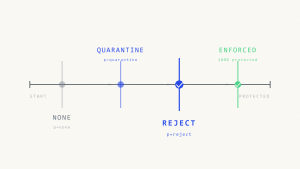
A practical enforcement path looks like this:
- Start with
p=nonefor discovery. - Remediate legitimate sources that fail authentication or alignment.
- Move lower-risk or well-understood subdomains to
p=quarantine. - Monitor the impact and resolve remaining issues.
- Move mature, business-critical domains to
p=quarantine. - Move to
p=rejectwhen confidence is high.
This staged approach is safer than changing every domain at once.
It also avoids relying on percentage-based rollout, which is no longer the preferred model for current DMARC-aware programs.
IX. Common Misunderstandings About p=none
“p=none means we are protected”
False.
p=none means you are monitoring. It does not instruct receivers to quarantine or reject messages that fail DMARC.
“SPF and DKIM are enough”
Not always.
SPF and DKIM only become useful for DMARC when they align with the visible From domain. Without alignment, a message can pass SPF or DKIM and still fail DMARC.
“Reports tell us everything”
No.
DMARC reports are useful, but they are delayed, incomplete, and dependent on receivers sending them.
They do not show every message globally, and aggregate reports do not include message content.
“We can stay at p=none forever”
Technically yes, but security-wise, that means the domain remains in monitoring-only mode.
For important domains, p=none should be a phase, not a permanent strategy.
“Enforcement will break email”
Enforcement can break legitimate email if implemented without discovery.
That is why monitoring exists.
The purpose of p=none is to find and fix issues before enforcement, not to avoid enforcement permanently.
X. What About Forensic Reports?
DMARC supports failure reporting through the ruf= tag, but it should not be enabled casually.
Failure reports can contain sensitive message-level information, depending on receiver implementation. They also have limited adoption across major mailbox providers because of privacy concerns.
For most organizations, aggregate reporting through rua= should be the default starting point.
Use forensic reporting only after legal, privacy, security, and retention review.
XI. Why Tooling Matters
DMARC monitoring is only useful if reports become actionable.
Raw XML reports are difficult to review manually. They must be normalized, grouped by sender, interpreted for SPF and DKIM alignment, and tracked over time.
Skysnag Protect helps automate this process by giving teams visibility into:
- Authorized senders
- Unauthorized sources
- SPF and DKIM alignment
- DMARC pass and fail trends
- Subdomain activity
- Enforcement readiness
- Authentication failures
- Sender changes over time
This helps organizations move from passive monitoring to active protection.
Start DMARC monitoring with Skysnag and get your free DMARC record:
https://app.skysnag.com/en/register/XII. Implementation Checklist
Use this checklist to make p=none effective.
- [ ] Publish a DMARC monitoring record with aggregate reporting.
- [ ] Use a monitored reporting destination, not an unmanaged mailbox.
- [ ] Confirm DMARC reports are being received and parsed.
- [ ] Identify all legitimate sending sources.
- [ ] Classify unknown sources as legitimate, misconfigured, or unauthorized.
- [ ] Validate SPF alignment for each sender.
- [ ] Validate DKIM alignment for each sender.
- [ ] Review SPF DNS lookup limits.
- [ ] Confirm third-party vendors support aligned authentication.
- [ ] Avoid forensic reporting unless privacy and legal teams approve it.
- [ ] Review subdomains separately.
- [ ] Define criteria for moving to quarantine or reject.
- [ ] Establish rollback procedures before enforcement.
- [ ] Monitor reports continuously after policy changes.
XIII. Key Takeaways
DMARC p=none is monitoring mode.
It allows receiving mail servers to evaluate DMARC and send reports, but it does not instruct them to block or quarantine failed messages.
That makes it useful for discovery, but insufficient for long-term protection.
Organizations should use p=none to identify legitimate senders, detect authentication failures, fix third-party alignment, and prepare for enforcement.
The main failure is staying at p=none indefinitely.
For important domains, monitoring should lead to p=quarantine or p=reject once legitimate mail is properly aligned.
DMARC enforcement is what reduces exact-domain spoofing risk. Monitoring is how you get there safely.
Start DMARC monitoring with Skysnag and get your free DMARC record: