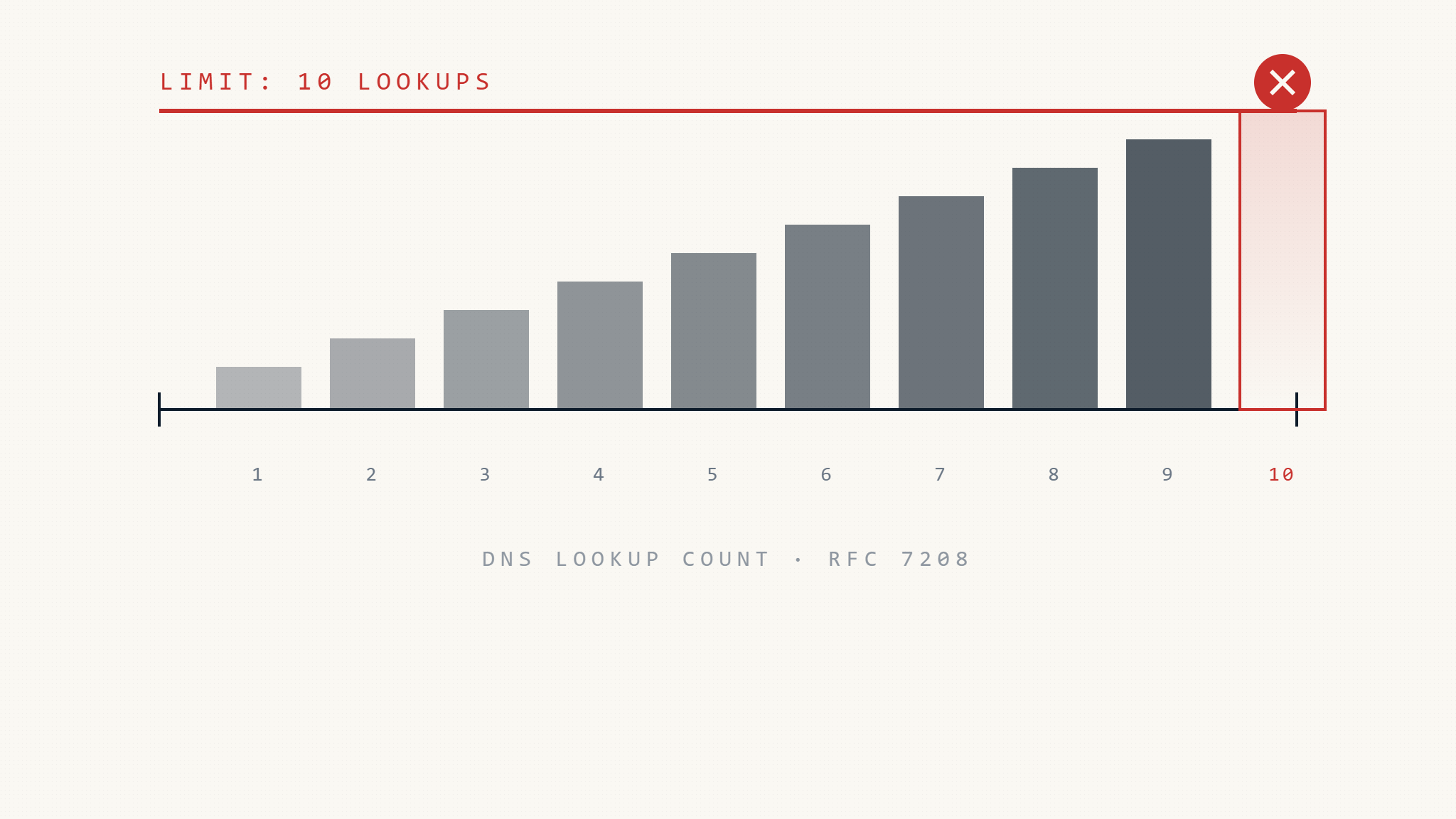
Most organizations discover SPF record limits only after authentication breaks. By then, legitimate email is already bouncing, landing in spam, or failing silently without visible errors. The 10-DNS-lookup limit is not a recommendation it is a hard technical boundary that terminates SPF evaluation and returns a permanent error, typically causing DMARC alignment failure even when other authentication passes.
Sixty-three percent of organizations using three or more third-party email platforms exceed the SPF lookup limit within 18 months of initial deployment, according to recent email authentication benchmark data. The failure is structural: every authorized sender added to SPF through include: mechanisms increases the DNS query count, and most organizations reach the limit long before they realize they are counting queries wrong.
This article explains how SPF lookup limits work, what breaks when you exceed them, how to identify the failure before it impacts delivery, and how to restructure SPF to stay within technical boundaries while maintaining vendor coverage.
I. What Is the SPF Lookup Limit?
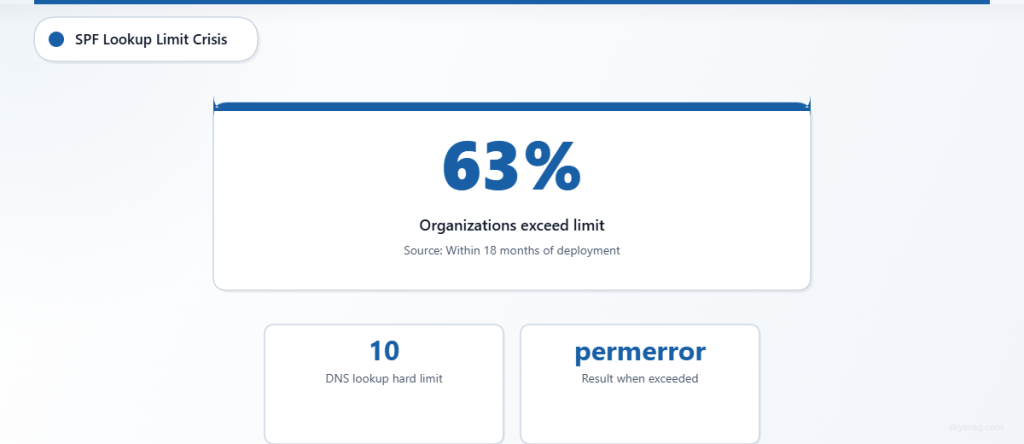
SPF (Sender Policy Framework) validates that the sending mail server is authorized to send email on behalf of a domain. The receiving server performs DNS lookups to resolve the SPF record and evaluate the authorization chain. RFC 7208 sets a hard limit of 10 DNS lookups per SPF evaluation to prevent abuse, infinite recursion, and DNS amplification attacks.
When an SPF evaluation exceeds 10 DNS lookups, the receiving server stops processing and returns permerror. This is a permanent failure, not a temporary condition. The result is treated as an SPF fail in most implementations, which means:
- DMARC alignment fails even if DKIM passes, because SPF did not pass and align.
- Reputation signals degrade because mailbox providers see authentication inconsistency.
- Delivery becomes unpredictable because some receiving servers silently filter, others reject, and many do not surface the failure in bounce messages.
The limit is fixed. It does not scale with domain size, email volume, or business complexity. Adding one more authorized sender when you are already at 10 lookups breaks the entire SPF record.
II. How DNS Lookups Are Counted
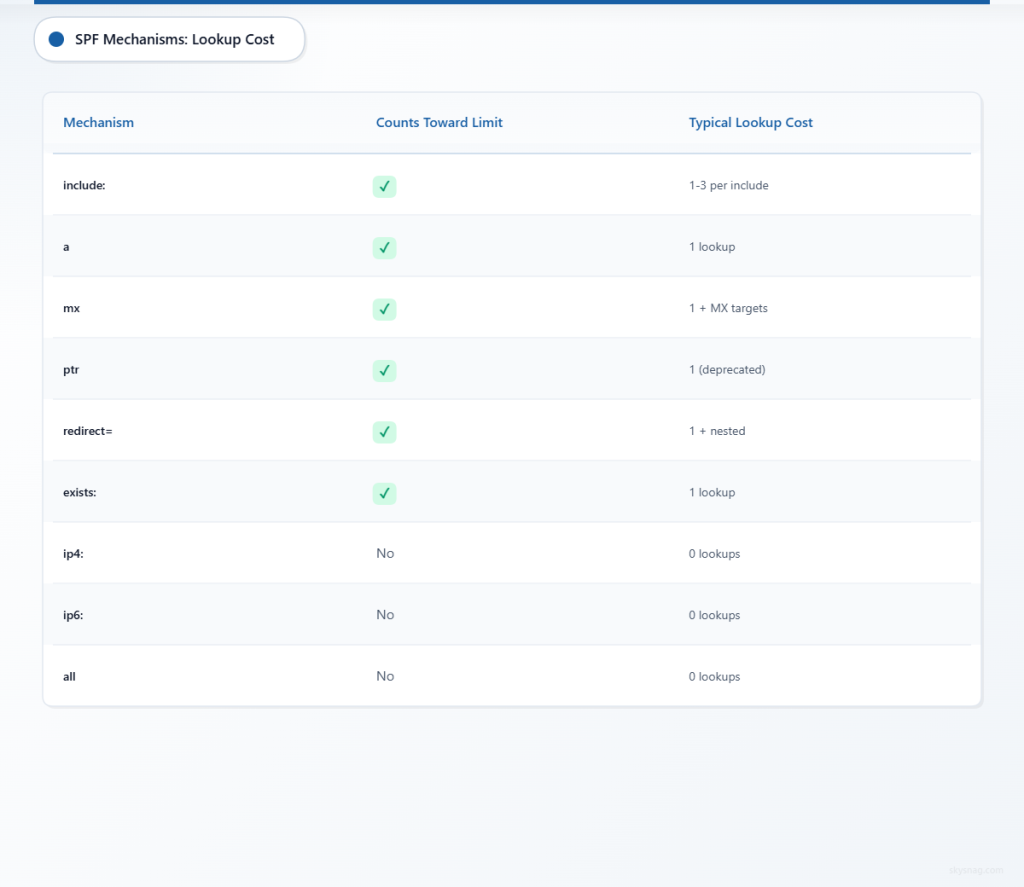
SPF lookup counting is often misunderstood because not every mechanism in an SPF record triggers a DNS lookup. The following mechanisms do count toward the 10-lookup limit:
include:– Eachinclude:mechanism triggers at least one lookup, and if the included record contains additionalinclude:,a,mx, orptrmechanisms, those count recursively.a– Queries the A record for the domain.mx– Queries the MX record for the domain, and each MX target requires an additional A record lookup.ptr– Queries the PTR record (deprecated and should not be used).redirect=– Triggers one lookup, plus any lookups within the redirected record.exists:– Queries the A record for the specified domain.
The following mechanisms do not count:
ip4:– Static IP address, no DNS query required.ip6:– Static IPv6 address, no DNS query required.all– Mechanism that defines default action, no DNS query.
Example: Hidden Lookup Explosion
A seemingly simple SPF record can exceed the limit quickly:
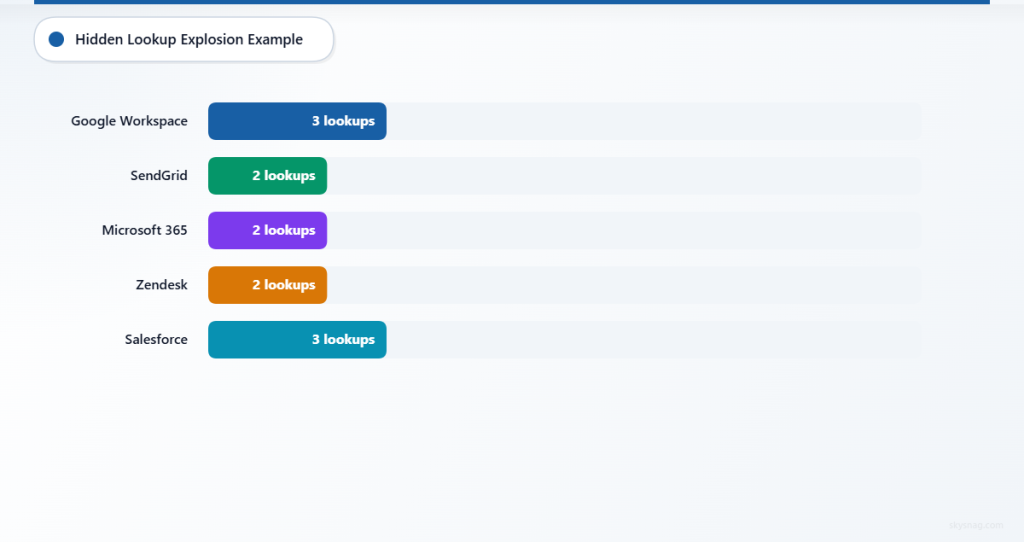
v=spf1 include:_spf.google.com include:sendgrid.net include:spf.protection.outlook.com include:mail.zendesk.com include:_spf.salesforce.com ~allApparent lookup count: 5
Actual lookup count: 12+
Here’s why:
include:_spf.google.com→ 3 lookups (Google uses nested includes)include:sendgrid.net→ 2 lookupsinclude:spf.protection.outlook.com→ 2 lookupsinclude:mail.zendesk.com→ 2 lookupsinclude:_spf.salesforce.com→ 3 lookups
Total: 12 lookups. This record will return permerror and fail SPF authentication.
Organizations often assume that five include: statements equal five lookups. They do not. Each included domain can expand into multiple nested lookups, and those count toward the total.
III. What Breaks When You Exceed the Limit
1. SPF Returns permerror
When the receiving server hits the 10-lookup limit, SPF evaluation stops and returns permerror. This is logged in the Authentication-Results header as:
spf=permerror (too many DNS lookups)The email does not benefit from SPF authentication. If DKIM is not present or does not align, DMARC fails.
2. DMARC Alignment Fails
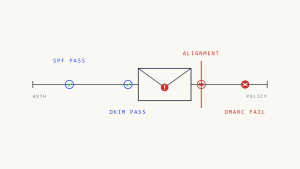
DMARC requires either SPF or DKIM to pass and align with the From: domain. If SPF returns permerror, it cannot align. If DKIM is missing, unsigned, or misaligned, DMARC fails entirely.
At p=quarantine or p=reject, this means the email is filtered or blocked. At p=none, the failure is invisible but still recorded in aggregate reports, degrading reputation over time.
3. Silent Filtering
Not all mailbox providers reject email with SPF permerror. Some silently downgrade delivery:
- The email lands in spam instead of the inbox.
- The email is delayed or throttled.
- The email is delivered but flagged as potentially suspicious in the recipient’s mail client.
Because the failure is silent, organizations often do not realize SPF is broken until complaint rates rise, engagement drops, or a major campaign fails.
4. Vendor-Specific Impact
The impact varies by vendor:
- Gmail: Treats
permerroras a failure signal but may still deliver if DKIM passes and domain reputation is strong. However, inbox placement degrades over time. - Microsoft 365: Treats
permerroras SPF fail. If DKIM does not align, email is filtered or rejected depending on policy and reputation. - Yahoo, AOL: Strict enforcement.
permerroroften results in rejection or spam filtering. - Mailing lists, forwarders: SPF breaks during forwarding because the envelope sender does not align. If the original SPF record is already in
permerror, forwarded email has no authentication coverage.
5. DMARC Reporting Shows the Failure
If your DMARC policy is set to p=none with aggregate reporting enabled, you will see permerror in the spf result field of DMARC aggregate reports. The report shows:
<auth_results>
  <spf>
    <domain>example.com</domain>
    <result>permerror</result>
  </spf>
</auth_results>
The failure is recorded, but if you are not actively reviewing DMARC reports, you will not see it. This is why many organizations exceed the SPF limit without realizing it until delivery issues surface.
IV. How to Identify SPF Lookup Count Before It Breaks
Manual SPF Lookup Counting
You can manually count SPF lookups by recursively expanding each include: mechanism and tallying all include:, a, mx, redirect=, and exists: mechanisms encountered.
Step-by-step process:
- Query your SPF record:
dig TXT example.com- For each
include:mechanism, query the included domain:
   dig TXT _spf.google.com
dig TXT sendgrid.net- Count all mechanisms that trigger DNS lookups in the primary record and all nested records.
This process is time-consuming and error-prone, especially when vendors change their SPF records without notice.
Automated SPF Lookup Validation
Use an SPF record checker that automatically counts DNS lookups and identifies which mechanisms contribute to the total. Tools such as:
- Skysnag Domain Checker – Scans your domain, counts SPF lookups, and flags records that exceed or approach the 10-lookup limit.
dig+ manual recursion (technical but comprehensive).- Third-party SPF validators (vary in accuracy; some do not count nested lookups correctly).
Skysnag Domain Checker shows:
- Current lookup count
- Which
include:mechanisms expand into multiple lookups - Whether the record is already in
permerror - Recommendations for flattening or restructuring
V. How to Fix SPF Lookup Limit Issues
1. Replace include: with ip4: or ip6: Where Possible
If a third-party sender provides a static IP range, replace the include: mechanism with explicit IP addresses:
Before:
v=spf1 include:mail.vendor.com ~allAfter:
v=spf1 ip4:203.0.113.0/24 ip4:198.51.100.5 ~allThis eliminates DNS lookups for that sender. However, this approach only works if the vendor uses static IPs and does not rotate infrastructure frequently. Many SaaS platforms rotate IPs, making static listings impractical.
2. Flatten the SPF Record
SPF flattening resolves all include: mechanisms into their final IP addresses and consolidates them into a single record. This reduces DNS lookups but creates operational risk:
- Vendor IP changes break authentication. If a vendor adds or rotates IP addresses, your flattened SPF record becomes outdated, and legitimate email fails authentication.
- Manual updates required. You must monitor vendor SPF records and update your flattened record whenever changes occur.
- No notification when vendors change. Most vendors do not announce SPF record changes, so you only discover the failure when email starts bouncing.
Flattening works as a short-term fix but requires ongoing maintenance and monitoring.
3. Use Subdomains to Segment Senders
Move specific email streams to dedicated subdomains and create separate SPF records for each:
Example:
example.com→ Authenticated for primary business email (Microsoft 365)marketing.example.com→ Authenticated for marketing platforms (SendGrid, Mailchimp)support.example.com→ Authenticated for support tools (Zendesk, Intercom)
Each subdomain has its own SPF record, and each record stays under the 10-lookup limit. This approach works well for organizations with clear sender segmentation, but it requires:
- Email platform support for subdomain sending (not all platforms support this).
- DNS configuration for each subdomain.
- DMARC policy alignment across subdomains (if not configured, DMARC may fail).
4. Remove Unused or Redundant include: Mechanisms
Many SPF records include senders that are no longer in use:
- Legacy marketing platforms
- Decommissioned support tools
- Duplicate
include:statements (e.g., two entries for the same vendor) - Vendors that were tested but never deployed
Audit your SPF record and remove any include: mechanisms that do not correspond to active senders. Use Skysnag Protect to identify which senders are actively sending email and which include: entries are unused.
5. Consolidate Vendors Where Possible
If you use multiple marketing platforms, support tools, or transactional email providers, consolidate onto fewer vendors. This reduces the number of include: mechanisms and simplifies SPF management.
For example:
- Use one transactional email platform instead of three.
- Consolidate marketing email through a single ESP.
- Route support email through one ticketing system.
This is a business decision, not just a technical fix, but it is the most sustainable way to reduce SPF complexity.
VI. SPF Lookup Limit and DMARC Enforcement
When SPF exceeds the lookup limit and returns permerror, DMARC evaluation depends on whether DKIM passes and aligns.
Scenario 1: SPF permerror + DKIM Pass + DKIM Aligns
DMARC passes because DKIM provides the required authentication and alignment. SPF failure does not block delivery, but it weakens the overall authentication posture.
Scenario 2: SPF permerror + DKIM Fail or Missing
DMARC fails. If your policy is set to p=quarantine or p=reject, the email is filtered or refused during SMTP delivery when the receiving server honors the policy. If your policy is p=none, the failure is logged but does not trigger enforcement.
Scenario 3: SPF permerror + DKIM Pass but Misaligned
DMARC fails. DKIM must align with the From: domain (either strict or relaxed alignment). If DKIM passes but does not align, and SPF is in permerror, DMARC has no valid authentication path.
The most common failure mode is Scenario 2—SPF breaks, DKIM is not configured for the third-party sender, and DMARC fails completely.
VII. How to Monitor SPF Lookup Count Over Time
SPF records change as you add or remove authorized senders. Monitoring lookup count prevents authentication failures before they impact delivery.
Use Skysnag Protect for Continuous SPF Monitoring
Skysnag Protect continuously monitors your SPF record and tracks DNS lookup count. When a vendor updates their SPF record and your total lookup count increases, Skysnag alerts you before the 10-lookup limit is exceeded.
How it works:
- Skysnag scans your SPF record daily.
- Tracks lookup count for all
include:mechanisms. - Alerts you when lookup count approaches or exceeds the limit.
- Provides recommendations for flattening, subdomain segmentation, or IP consolidation.
This prevents the silent failure mode where SPF breaks and you only discover it when delivery degrades.
Start monitoring your SPF record with Skysnag Protect.
VIII. SPF Alternatives: MTA-STS and DKIM-Only Authentication
Some organizations eliminate SPF entirely and rely on DKIM for authentication. This avoids the lookup limit but removes SPF’s role in preventing envelope-level spoofing.
DKIM-Only Authentication
DKIM authenticates the message body and headers using a cryptographic signature. It does not validate the envelope sender (the address used during SMTP), so it does not prevent certain types of spoofing. However, DKIM does not have a lookup limit, does not break during forwarding, and provides stronger cryptographic guarantees than SPF.
If you deploy DKIM-only authentication:
- Ensure DKIM is configured for all authorized senders.
- Use DMARC with
aspf=r(relaxed alignment) to allow subdomain flexibility. - Monitor DMARC aggregate reports to verify DKIM coverage.
MTA-STS for Transport Security
MTA-STS (Mail Transfer Agent Strict Transport Security) enforces encrypted delivery but does not replace SPF or DKIM. It ensures that email is delivered over TLS, preventing man-in-the-middle attacks, but it does not authenticate the sender.
MTA-STS works alongside DMARC, not as a substitute.
IX. Common SPF Lookup Limit Mistakes
1. Assuming Vendor SPF Records Never Change
Vendors update their SPF records to add infrastructure, rotate IPs, or change hosting providers. If you flatten your SPF record and do not monitor vendor changes, authentication silently breaks.
2. Counting include: Statements Instead of DNS Lookups
An SPF record with 5 include: mechanisms may trigger 12+ DNS lookups because each included record can contain additional nested include:, a, or mx mechanisms.
Always count the total recursive DNS lookups, not just the top-level mechanisms.
3. Using ptr Mechanisms
The ptr mechanism is deprecated and inefficient. It triggers reverse DNS lookups and increases query count. Do not use ptr in modern SPF records.
4. Not Testing SPF Changes Before Publishing
Publishing an SPF change without testing can break authentication for all email. Use a test domain or subdomain to validate the record before applying it to production.
5. Ignoring DMARC Aggregate Reports
DMARC reports show SPF permerror failures, but many organizations do not review reports regularly. Set up monitoring through Skysnag to surface SPF issues before they impact delivery.
X. Key Takeaways
SPF lookup limits are not flexible. The 10-DNS-lookup boundary is a fixed technical constraint, and exceeding it returns permerror, which breaks SPF authentication and often causes DMARC failure.
Organizations using multiple third-party email platforms commonly exceed the limit without realizing it because DNS lookups are counted recursively, and vendor SPF records change without notice.
The failure is often silent. Email may still be delivered, but it lands in spam, is throttled, or degrades reputation over time. DMARC aggregate reports show the permerror result, but if reports are not actively monitored, the failure goes unnoticed until deliverability issues surface.
To stay within the SPF lookup limit:
- Replace
include:mechanisms withip4:orip6:where vendors use static IPs. - Segment email streams across subdomains to distribute lookup count.
- Remove unused or legacy
include:entries. - Consolidate vendors to reduce SPF complexity.
- Monitor SPF records continuously to detect vendor changes.
Use Skysnag Protect to monitor DNS lookup count, identify which senders contribute to lookup inflation, and receive alerts before SPF breaks. Skysnag provides visibility into SPF structure, tracks vendor record changes, and helps you restructure records before authentication fails.