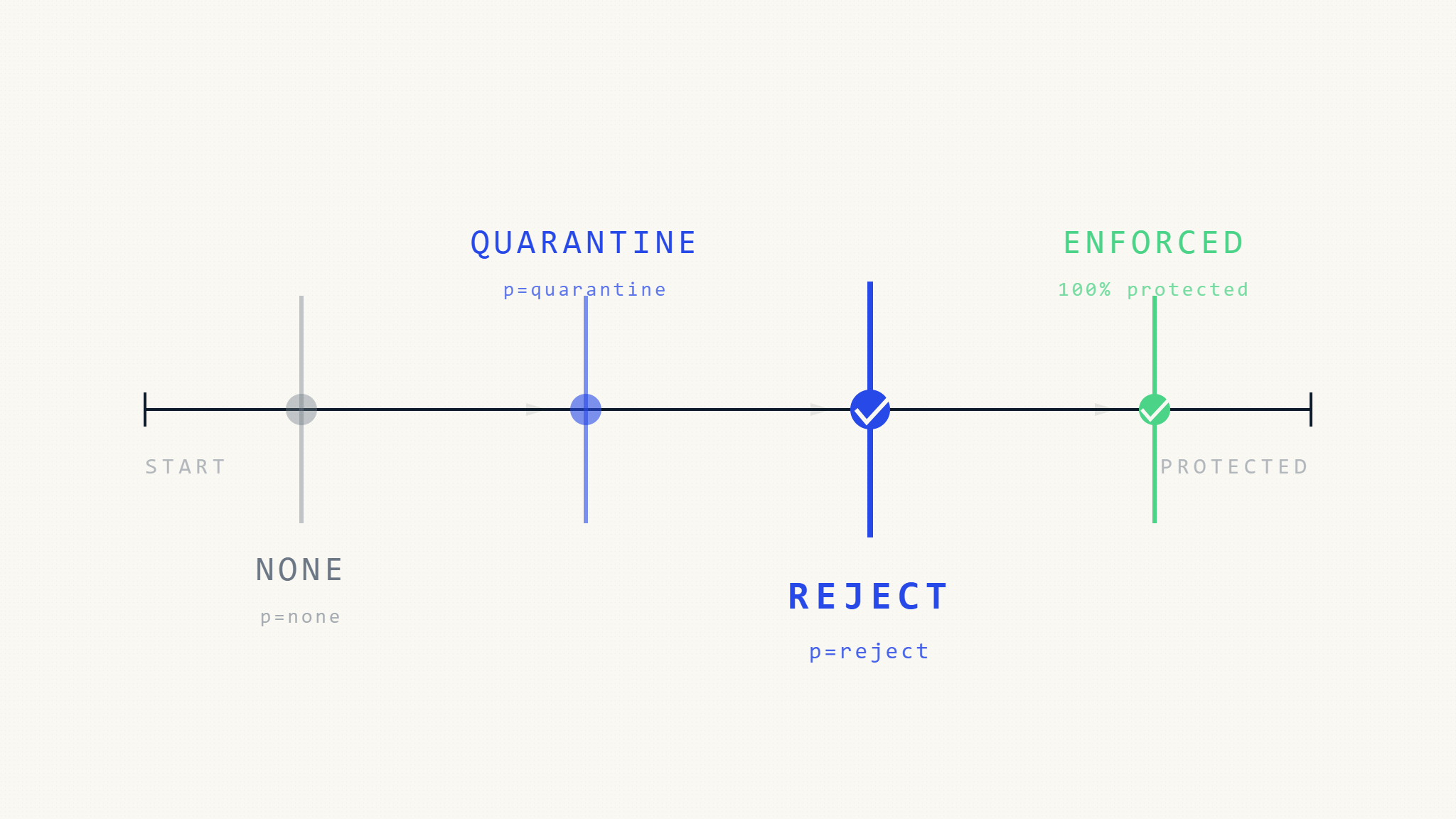
Unauthorized email sent from your domain can bypass SPF and DKIM authentication, reach inboxes appearing legitimate, and damage trust before you detect the problem. DMARC policy enforcement (p=none, p=quarantine, p=reject) controls how receiving servers handle unauthenticated messages claiming to be from your domain.
Most organizations begin DMARC deployment at p=none to collect visibility without enforcement risk. The challenge is knowing when to progress to p=quarantine and p=reject without disrupting legitimate email or exposing gaps in authentication coverage.
This guide explains what each DMARC policy level does, when policy progression can fail, and how to stage enforcement based on sender maturity, business function, and operational readiness.
I. What DMARC Policy Levels Actually Control
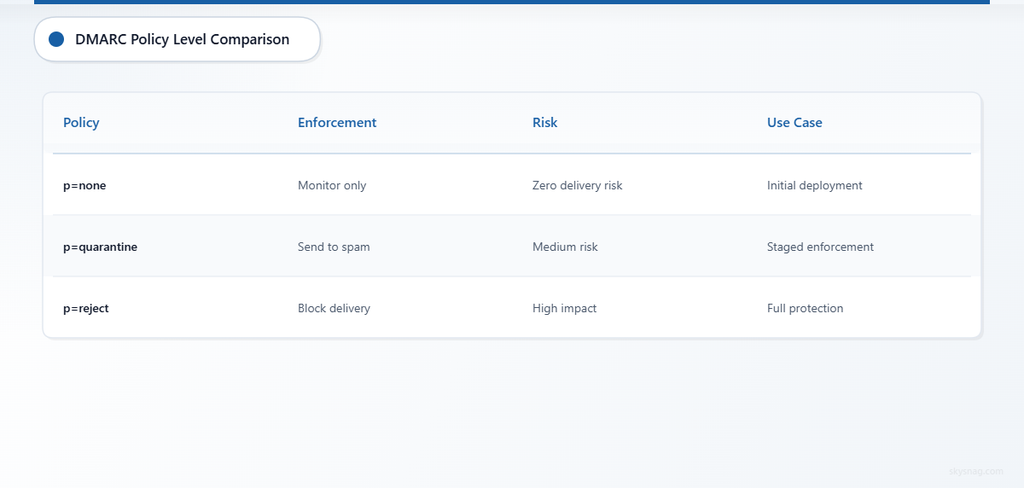
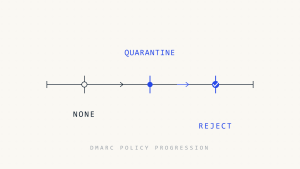
DMARC policy (p=) instructs receiving mail servers how to handle messages that fail DMARC alignment. The three enforcement levels are:
- p=none: Monitor only. Authentication results are reported, but the receiving server applies no DMARC-based enforcement.
- p=quarantine: When honored by the receiving server, unauthenticated messages are typically moved to spam or junk folders.
- p=reject: When honored by the receiving server, unauthenticated messages are refused during SMTP delivery and should not reach the inbox or spam folder.
What Can Go Wrong with DMARC Policy Enforcement
DMARC policy enforcement depends on three conditions that can fail independently:
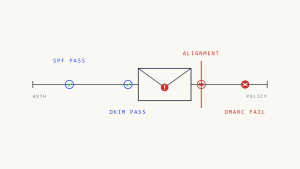
- Alignment failure despite authentication passing: SPF or DKIM can authenticate successfully, but if the domain in the
From:header does not align with the SPF domain or DKIM signing domain, DMARC fails. This commonly happens when third-party senders sign with their own domain or when mail forwarding breaks SPF alignment. - Receiving server does not honor the policy: Some mailing lists, forwarders, and misconfigured mail servers ignore DMARC policy. Even at
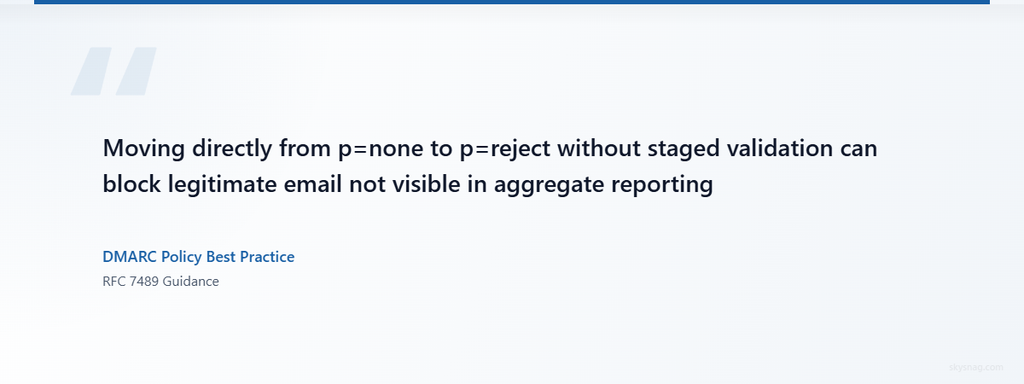
p=reject, a small percentage of mail may still be delivered if the receiving infrastructure does not enforce DMARC. - Silent enforcement gaps: Moving directly from
p=nonetop=rejectwithout staged validation can block legitimate email that was not visible in aggregate reporting, such as low-volume senders, shadow IT tools, or forwarding scenarios.
DMARC passing does not guarantee inbox placement. DMARC failing does not always mean immediate rejection. Mailbox providers evaluate DMARC alongside reputation, content, complaint rates, forwarding context, and internal abuse signals.
II. p=none: Visibility Without Enforcement
At p=none, DMARC is active, but the policy instructs receiving servers to monitor and report authentication results without taking enforcement action.
When p=none Is Appropriate
- Initial DMARC deployment: You need visibility into which senders authenticate successfully and which do not before enforcing policy.
- Complex sending environments: Your domain is used by multiple business units, third-party platforms, support tools, marketing systems, and transactional senders that have not been inventoried.
- Unknown forwarding or mailing list behavior: You expect legitimate mail to flow through forwarding services or mailing lists that may break SPF alignment.
What Can Fail at p=none
Even at p=none, DMARC can produce failure signals:
- SPF passes but alignment fails: A third-party service authenticates with SPF but uses its own domain in the envelope sender (
Return-Path), so the alignment check against theFrom:header domain fails. - DKIM passes but alignment fails: A sender signs email with DKIM, but the signing domain (
d=) does not match the organizational domain in theFrom:header. - Aggregate reports are not collected or analyzed: Publishing a DMARC record with
rua=mailto:[email protected]does not automatically parse, aggregate, or act on the XML reports sent by receiving servers.
Recommended Duration at p=none
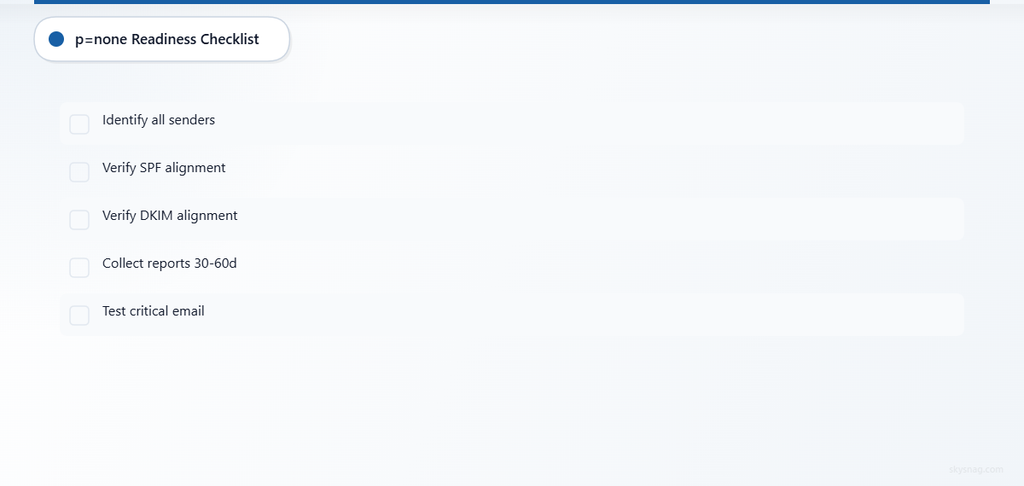
Remain at p=none until:
- You have identified all legitimate sending sources.
- All legitimate senders either pass SPF with alignment or pass DKIM with alignment.
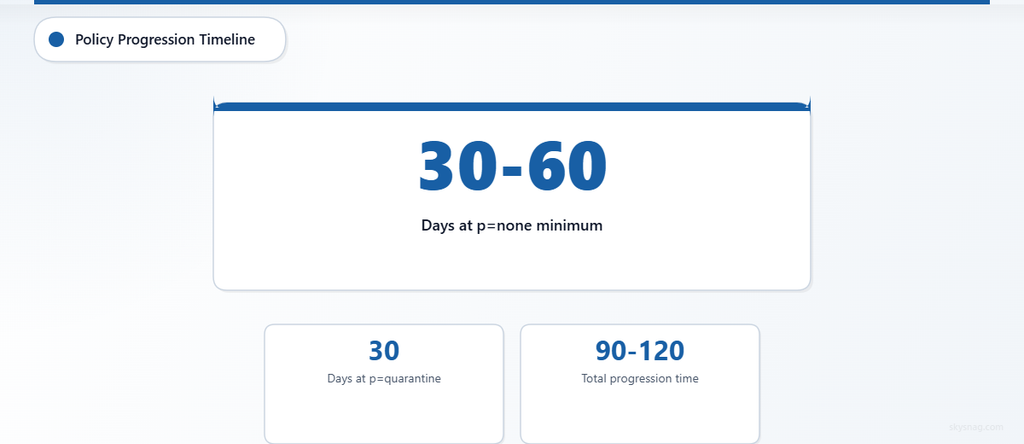
- Aggregate reports show consistent authentication success for at least two full business cycles (commonly 30-60 days for most organizations, longer for seasonal senders).
In a managed Skysnag deployment, use the reporting destination generated by Skysnag. The following is a manual example only:
v=DMARC1; p=none; rua=mailto:[email protected]A traditional static record can work, but only if reports are actively received, parsed, analyzed, and acted on. Skysnag automates this process and surfaces authentication gaps that require correction before policy enforcement.
III. p=quarantine: Staged Enforcement
At p=quarantine, receiving servers that honor DMARC policy typically move unauthenticated messages to spam or junk folders instead of delivering them to the inbox.
When to Move to p=quarantine
Move to p=quarantine when:
- Aggregate reporting shows that legitimate senders consistently pass DMARC alignment.
- Authentication failures in reports correspond to known unauthorized use, misconfigured senders, or spoofing attempts.
- You have validated that critical business email (transactional notifications, support replies, password resets, invoices) passes alignment testing.
What Can Fail at p=quarantine
p=quarantine introduces enforcement risk that does not exist at p=none:
- Legitimate email quarantined due to forwarding: Mail forwarding often breaks SPF alignment. If a legitimate sender relies only on SPF and the message is forwarded, DMARC fails and the message may be quarantined.
- Low-volume senders not visible in reports: A sender that emails your domain once per quarter may not appear in aggregate reports during the monitoring period, but could be blocked when enforcement begins.
- Mailing lists and digest services: Some mailing list software rewrites the
From:header, causing alignment failure even when the original sender authenticated successfully.
Staging p=quarantine by Domain or Subdomain
Instead of applying p=quarantine globally, stage enforcement by isolating different mail streams:
- Transactional subdomains first:
noreply.example.comornotifications.example.comtypically have fewer senders and more predictable authentication patterns. - Marketing or bulk domains next: These domains are common spoofing targets and often have mature SPF and DKIM configurations.
- Primary corporate domain last:
@example.comoften covers the widest range of senders, including employee email, third-party integrations, and legacy systems.
Example DMARC record for a subdomain at p=quarantine:
v=DMARC1; p=quarantine; rua=mailto:[email protected]; pct=100Avoid relying on percentage-based rollout as the primary strategy. Current DMARC-aware programs should stage enforcement by domain, subdomain, sender group, and business function.
In a managed Skysnag deployment, use the reporting destination generated by Skysnag.
IV. p=reject: Full Enforcement
At p=reject, receiving servers that honor DMARC policy refuse unauthenticated messages during SMTP delivery. The message should not reach the inbox or spam folder.
When to Move to p=reject
Move to p=reject when:
- You have operated at
p=quarantinefor at least 30 days without quarantining legitimate email. - Aggregate reports show no unexpected DMARC failures from known senders.
- You have validated mail forwarding scenarios (alumni forwarding, support ticket forwarding, personal forwarding rules) and confirmed that critical senders use DKIM (which survives forwarding) or that forwarding services are excluded from the enforcement domain.
What Can Fail at p=reject
p=reject represents the strongest enforcement posture, but enforcement gaps still exist:
- Forwarding breaks SPF, DKIM not configured: If a sender relies only on SPF and the message is forwarded, SPF alignment fails. If DKIM is not configured, the message fails DMARC and is rejected.
- Mailing lists or shared inboxes: Some mailing list software and shared inbox platforms rewrite message headers in ways that break alignment, even when the original message authenticated successfully.
- Non-compliant receiving servers: Some receiving servers do not honor DMARC policy, especially older mail infrastructure or systems that prioritize historical sender reputation over authentication signals.
Even at p=reject, investigation is harder because monitoring shows authentication results, but the domain is not instructing receivers to block unauthenticated use. Organizations that require attribution of spoofing or phishing incidents commonly operate at p=reject to reduce ambiguity in forensic analysis.
V. Subdomain Policy: Controlling sp= Independently
DMARC allows separate policy enforcement for subdomains using the sp= tag.
Example DMARC record with subdomain policy:
v=DMARC1; p=reject; sp=quarantine; rua=mailto:[email protected]This configuration enforces p=reject on example.com but applies p=quarantine to all subdomains unless a subdomain publishes its own DMARC record.
When to Use sp= for Staged Rollout
Use sp= when:
- Subdomain mail streams are less mature: Marketing, staging, or legacy subdomains may have inconsistent authentication, so applying
sp=quarantineprovides enforcement without the risk of rejecting legitimate mail. - Subdomain authentication is managed separately: Different business units manage subdomain email independently, and you want to enforce policy on the primary domain while subdomain owners validate their senders.
What Can Fail with sp=
- Subdomain DMARC records override sp=: If a subdomain publishes its own DMARC record, the
sp=value in the organizational domain record is ignored. This can create policy gaps if subdomain owners publishp=nonewhile the organizational domain operates atp=reject.
VI. How to Stage DMARC Policy Progression in 2026
Staging DMARC policy enforcement by sender group, business function, and mail stream maturity reduces enforcement risk and improves authentication coverage.
Step 1: Deploy p=none and Collect Reporting
Start DMARC monitoring through Skysnag and get a managed DMARC record generated for your domain. This provides automated report parsing and sender identification.
Step 2: Identify Legitimate Senders
Review aggregate reports to identify:
- Which senders pass SPF alignment
- Which senders pass DKIM alignment
- Which senders fail both (commonly unauthorized or spoofed mail)
For senders that fail alignment:
- Configure DKIM signing if the sender supports it (DKIM survives forwarding)
- Add the sender’s SPF include mechanism if the sender uses your domain in the envelope sender
- Migrate to a subdomain if the sender cannot authenticate with your primary domain
Step 3: Validate Critical Business Email
Before moving to enforcement, validate that critical email passes DMARC:
- Transactional email (password resets, account notifications, order confirmations)
- Support ticket systems (Zendesk, Freshdesk, Intercom, help desk platforms)
- Marketing platforms (Mailchimp, SendGrid, HubSpot, Marketo)
- Internal applications (HR systems, expense platforms, CRM, ERP)
- Third-party SaaS tools (Slack notifications, GitHub alerts, monitoring tools)
If any critical sender fails DMARC, resolve the authentication gap before enforcement.
Step 4: Move to p=quarantine on Isolated Subdomains
Apply p=quarantine to subdomains with predictable sending patterns first:
noreply.example.comnotifications.example.commarketing.example.com
Monitor for quarantined legitimate email. If none appears after 30 days, proceed.
Step 5: Move to p=reject on Validated Subdomains
Apply p=reject to subdomains where authentication is mature and no legitimate email was quarantined.
Step 6: Move Primary Domain to p=quarantine
After subdomain enforcement is stable, move the primary organizational domain (example.com) to p=quarantine.
Step 7: Move Primary Domain to p=reject
After operating at p=quarantine without issues for at least 30 days, move the primary domain to p=reject.
VII. Common Policy Progression Failures and How to Avoid Them
1. Legitimate Email Rejected Due to Forwarding
Failure condition: A user forwards email from [email protected] to a personal Gmail account. The forwarded message fails SPF alignment because the envelope sender still shows example.com, but the sending IP is now the forwarding server. If DKIM is not configured, the message fails DMARC and is rejected.
How to avoid: Configure DKIM on all legitimate senders. DKIM signatures survive forwarding because they travel with the message body, unlike SPF which depends on the sending IP.
2. Mailing List or Shared Inbox Breaks Alignment
Failure condition: A mailing list or shared inbox platform rewrites the From: header to comply with the platform’s sending policy. The rewritten header no longer aligns with the original sender’s domain, causing DMARC failure.
How to avoid: Identify mailing list and shared inbox behavior during the p=none phase. If the platform cannot preserve alignment, consider using a subdomain with relaxed policy or migrating to a platform that supports DMARC-compliant sending.
3. Shadow IT Senders Discovered After Enforcement
Failure condition: A business unit uses an unauthorized third-party tool to send email from @example.com. The tool does not appear in aggregate reports because it sends infrequently. When p=reject is applied, the tool’s email is blocked, disrupting a business process.
How to avoid: Conduct sender discovery across business units before enforcement. Use Skysnag Protect to identify unauthorized sending sources and validate authentication coverage.
VIII. DMARC Policy Rollback: When to Step Down Enforcement
If enforcement causes legitimate email to be blocked, step down the policy temporarily:
- Move from
p=rejectback top=quarantine - Identify the sender causing the failure in aggregate reports
- Resolve the authentication gap (add SPF include, configure DKIM, migrate to subdomain)
- Validate the fix in reports
- Return to
p=reject
Stepping down enforcement temporarily is safer than leaving legitimate email blocked while troubleshooting.
IX. How Skysnag Supports Policy Progression
Moving from p=none to p=quarantine to p=reject requires continuous visibility, sender validation, and enforcement evidence.
Skysnag Protect provides:
- Automated DMARC report parsing and sender identification
- Authentication gap detection for legitimate senders
- Enforcement readiness scoring before policy changes
- Subdomain policy management and validation
Use Skysnag Protect to identify legitimate senders, detect unauthorized sources, and move toward enforcement without disrupting business email.
X. Key Takeaways
- DMARC policy enforcement depends on alignment, not just authentication passing
- Forwarding breaks SPF alignment but DKIM signatures survive, making DKIM essential for enforcement readiness
- Staged enforcement by subdomain and sender group reduces risk compared to percentage-based rollout
p=quarantineexposes enforcement gaps without full rejection riskp=rejectprovides the strongest protection but requires validation of forwarding scenarios and low-volume senders- Enforcement depends on receiving servers honoring the policy, which is not universal
Start DMARC monitoring through Skysnag and get your free DMARC record.