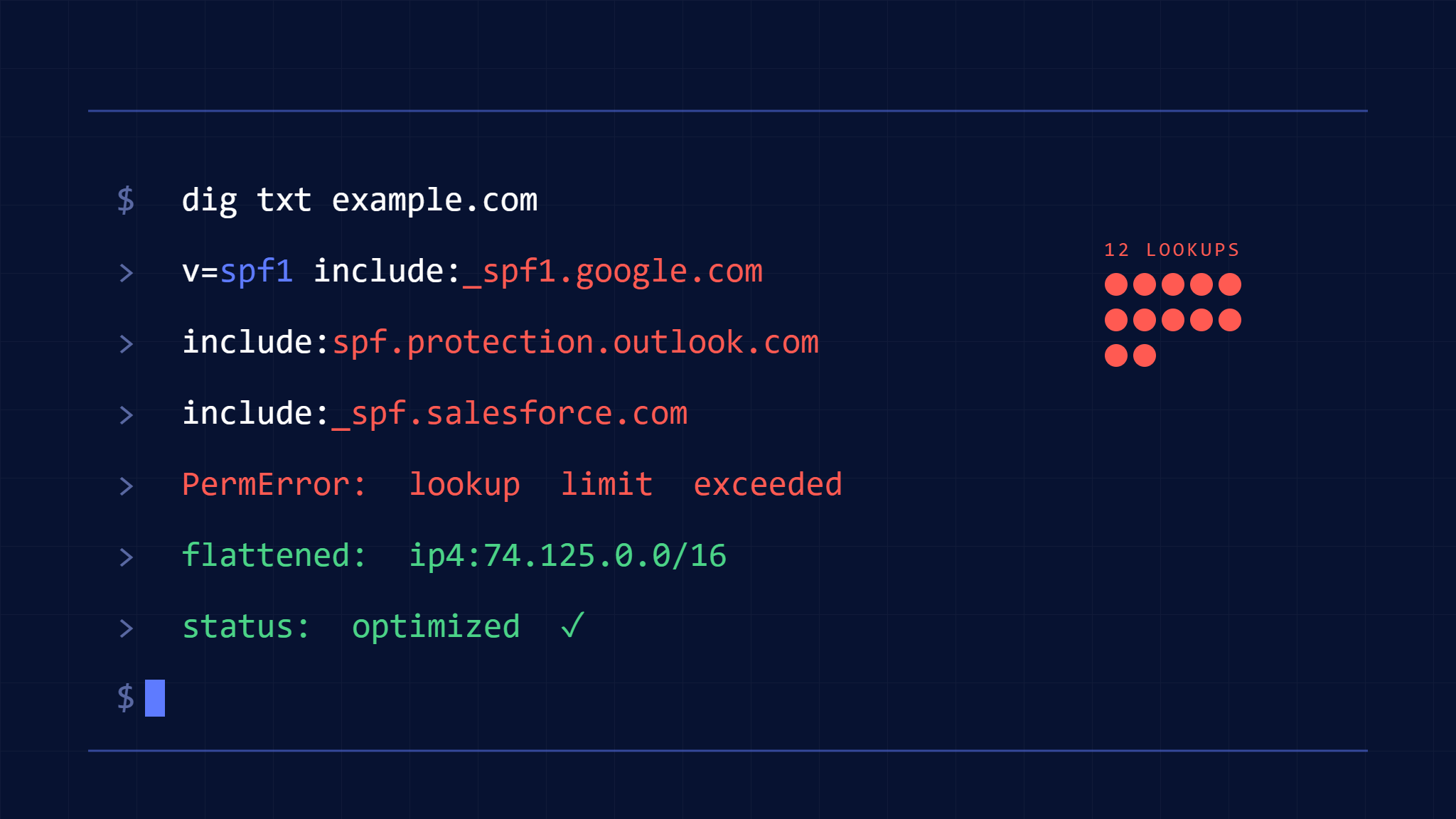
The dreaded “SPF PermError: too many DNS lookups” message has become the bane of email administrators worldwide. When your SPF record triggers more than 10 DNS lookups, legitimate emails fail authentication, potentially damaging your domain reputation and blocking critical business communications.
This comprehensive guide walks you through understanding the SPF lookup limit, diagnosing lookup count issues, and implementing proven optimization strategies including SPF flattening to keep your email authentication working reliably.
I. Understanding the SPF 10 DNS Lookup Limit
What Counts as a DNS Lookup
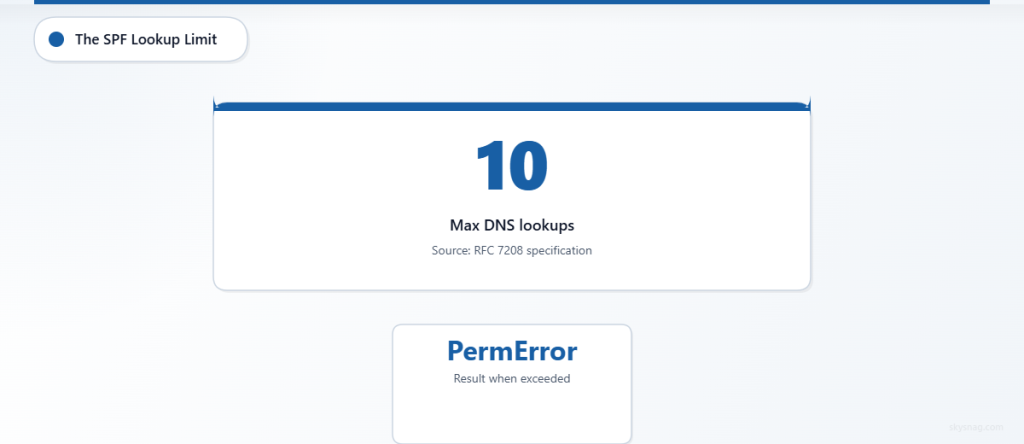
The SPF specification (RFC 7208) imposes a hard limit of 10 DNS lookups during SPF record evaluation. Each mechanism in your SPF record that requires DNS resolution counts toward this limit:
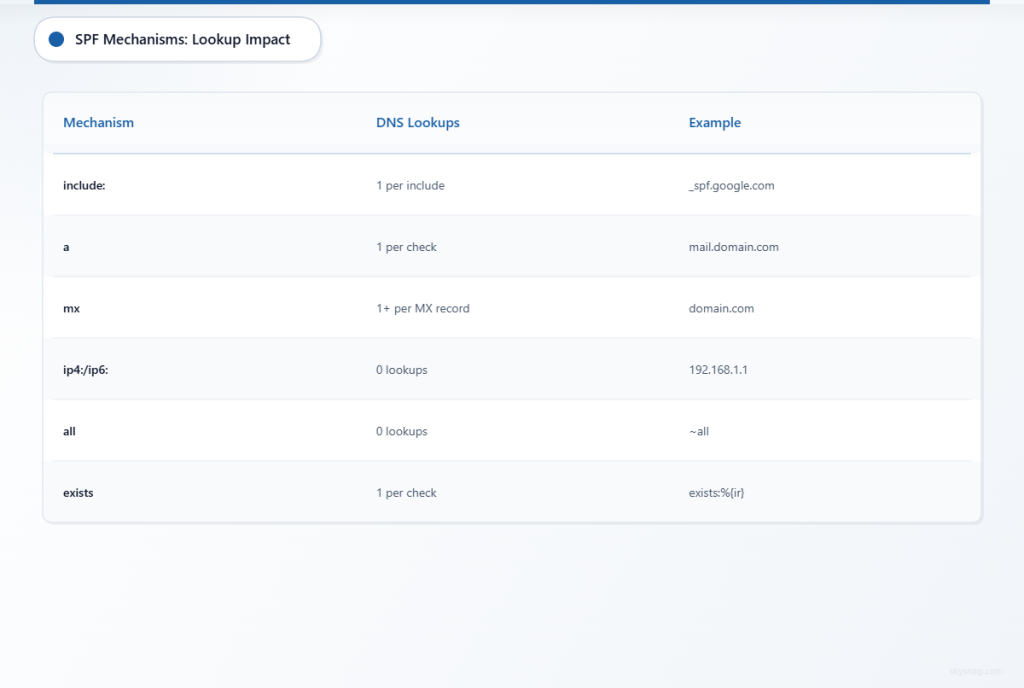
Mechanisms that consume lookups:
include:statements (each counts as 1)amechanisms (1 lookup per A record check)mxmechanisms (1 lookup plus additional for each MX record)existsmechanisms (1 lookup each)redirect=modifiers (1 lookup)
Mechanisms that don’t consume lookups:
ip4:andip6:(static IP addresses)allqualifierptrmechanisms (though these are deprecated)
Why the Limit Exists
The 10-lookup limit prevents infinite recursion loops and reduces DNS server load. When an SPF record exceeds this threshold, receiving mail servers return a “PermError” result, typically causing the email to fail SPF authentication entirely.
II. Diagnosing SPF Lookup Count Issues
Method 1: Manual SPF Record Analysis
Start by examining your current SPF record to identify all lookup-consuming mechanisms:
v=spf1 include:_spf.google.com include:spf.protection.outlook.com include:mailgun.org include:_spf.salesforce.com include:servers.mcsv.net include:_spf.createsend.com include:mail.zendesk.com include:spf.mandrillapp.com ~allIn this example, there are 8 include: statements, each requiring one DNS lookup. However, each included domain may have its own includes, creating nested lookups that contribute to the total count.
Method 2: SPF Testing Tools
Several online tools can calculate your total lookup count:
- Skysnag SPF Record Checker: Provides comprehensive SPF analysis including lookup counting
- MXToolbox SPF Lookup Tool: Shows the complete SPF resolution chain
- DMARCian SPF Survey: Maps out all nested includes
Method 3: Command-Line Testing
Use dig or nslookup to manually trace SPF lookups:
dig TXT yourdomain.com
dig TXT _spf.google.com
dig TXT spf.protection.outlook.com
III. SPF Record Optimization Strategies
Strategy 1: IP Address Consolidation
Replace include: mechanisms with direct ip4: and ip6: addresses wherever possible:
Before:
v=spf1 include:mailgun.org include:_spf.createsend.com ~allAfter:
v=spf1 ip4:209.61.151.0/24 ip4:198.61.254.0/24 ip4:103.253.157.0/24 ~allThis approach eliminates DNS lookups entirely for these services but requires manual maintenance when providers change their IP ranges.
Strategy 2: Service Provider Consolidation
Audit your email services and eliminate redundant or unused providers:
- Identify active services: Review which email platforms actively send mail
- Consolidate similar services: Use one marketing platform instead of multiple
- Remove legacy entries: Delete SPF includes for discontinued services
Strategy 3: Subdomain Delegation
Move some sending services to subdomains with their own SPF records:
Main domain SPF:
v=spf1 include:_spf.google.com include:marketing.yourdomain.com ~allMarketing subdomain SPF:
v=spf1 include:mailchimp.com include:constantcontact.com ~allThis approach distributes the lookup load but requires careful management of subdomain reputation.
IV. SPF Flattening Implementation
What is SPF Flattening
SPF flattening replaces include: mechanisms with the actual IP addresses from the included domains, reducing DNS lookup requirements. This process must be automated since third-party IP ranges change frequently.
Manual SPF Flattening Process
Step 1: Resolve All Includes
For each include: in your record, resolve the IP addresses:
dig TXT _spf.google.com
# Returns: v=spf1 include:_netblocks.google.com include:_netblocks2.google.com include:_netblocks3.google.com ~all

dig TXT _netblocks.google.com
# Returns: v=spf1 ip4:35.190.247.0/24 ip4:64.233.160.0/19 ... ~all
Step 2: Extract IP Ranges
Compile all IP addresses and ranges into a consolidated list:
35.190.247.0/24
64.233.160.0/19
66.102.0.0/20
66.249.80.0/20
72.14.192.0/18
Step 3: Create Flattened Record
Build your new SPF record using only IP addresses:
v=spf1 ip4:35.190.247.0/24 ip4:64.233.160.0/19 ip4:66.102.0.0/20 ip4:66.249.80.0/20 ip4:72.14.192.0/18 ~allAutomated SPF Flattening Solutions
Manual flattening becomes unmanageable when providers frequently update their IP ranges. Several solutions provide automated SPF flattening:
Commercial SPF Flattening Services:
- Monitor provider IP changes automatically
- Update SPF records via DNS API integration
- Provide lookup count monitoring and alerts
- Offer rollback capabilities for failed updates
Skysnag Protect Integration:
Skysnag Protect includes automated SPF management capabilities that can help maintain optimized SPF records while monitoring for lookup limit violations. The platform provides real-time SPF validation and can alert you when records approach the 10-lookup threshold.
V. Advanced Optimization Techniques
Multi-Domain SPF Architecture
For organizations managing multiple domains, implement a hierarchical SPF structure:
Parent company domain:
v=spf1 include:_spf-shared.company.com include:_spf-corporate.company.com ~allShared services record:
v=spf1 ip4:203.0.113.0/24 ip4:198.51.100.0/24 ~allDivision-specific records:
v=spf1 include:_spf-shared.company.com include:division-specific-provider.com ~allSPF Record Splitting
When flattening isn’t sufficient, split your SPF record across multiple domains:
Primary domain:
v=spf1 include:_spf1.yourdomain.com include:_spf2.yourdomain.com ~allSplit records:
_spf1: v=spf1 ip4:192.0.2.0/24 ip4:203.0.113.0/24 ~all
_spf2: v=spf1 ip4:198.51.100.0/24 ip4:10.0.0.0/8 ~all
This approach requires careful planning to ensure comprehensive coverage without conflicts.
VI. Implementation Best Practices
Testing and Validation
Before implementing optimized SPF records:
- Test in staging environment: Use a test domain to validate changes
- Monitor email delivery: Track delivery rates during transitions
- Implement gradually: Roll out changes to subsets of domains first
- Maintain fallback records: Keep original records available for quick rollback
Ongoing Maintenance
SPF optimization requires continuous attention:
- Regular audits: Monthly reviews of service provider changes
- Automated monitoring: Set up alerts for SPF failures and lookup count increases
- Documentation: Maintain records of which services use which IP ranges
- Incident response: Prepare procedures for handling SPF-related delivery issues
Common Pitfalls to Avoid
Over-flattening: Including unnecessary IP ranges increases record size and management complexity.
Stale IP addresses: Failing to update flattened records when providers change IPs.
Missing qualifiers: Ensure your optimized record maintains appropriate ~all or -all qualifiers.
Inconsistent subdomains: Mismatched SPF policies between parent domains and subdomains.
VII. Monitoring and Troubleshooting
SPF Failure Detection
Implement monitoring to detect SPF-related issues:
- DMARC reports: Analyze aggregate reports for SPF failures
- Email delivery metrics: Track changes in delivery rates
- DNS query monitoring: Monitor SPF record resolution times
- Provider notifications: Subscribe to IP change announcements from email services
Troubleshooting Lookup Limit Issues
When emails fail SPF authentication:
- Verify current lookup count: Use testing tools to confirm record complexity
- Check recent changes: Review any modifications to SPF records or email services
- Validate DNS propagation: Ensure optimized records have propagated globally
- Test from multiple locations: Confirm consistent behavior across different DNS resolvers
VIII. Key Takeaways
The SPF 10 DNS lookup limit represents a critical constraint for organizations using multiple email services. Successfully managing this limitation requires a combination of strategic planning, technical implementation, and ongoing maintenance.
Key strategies include consolidating IP addresses, eliminating unused services, implementing SPF flattening (either manually or through automated solutions), and establishing robust monitoring procedures. Organizations should also consider advanced techniques like subdomain delegation and multi-domain architectures for complex email infrastructures.
Regular auditing and proactive management prevent SPF failures that could impact email deliverability and domain reputation. By implementing these optimization strategies, organizations can maintain reliable email authentication while supporting their diverse sending requirements.
Skysnag Protect provides comprehensive email authentication management, including SPF optimization tools and automated monitoring to help organizations maintain compliant and efficient SPF records.