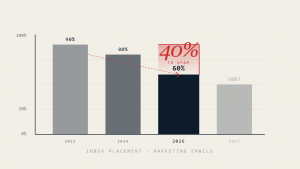
When legitimate emails land in spam folders, it creates a communication breakdown that impacts business relationships, marketing campaigns, and operational efficiency. Understanding why emails go to spam and implementing targeted fixes is crucial for maintaining reliable email deliverability in today’s increasingly sophisticated filtering environment.
Email service providers use complex algorithms that evaluate hundreds of factors to determine whether an email belongs in the inbox or spam folder. These systems have become more aggressive in response to evolving cyber threats, making it essential for businesses to understand and address the root causes of deliverability issues.
I. Understanding Email Spam Filtering
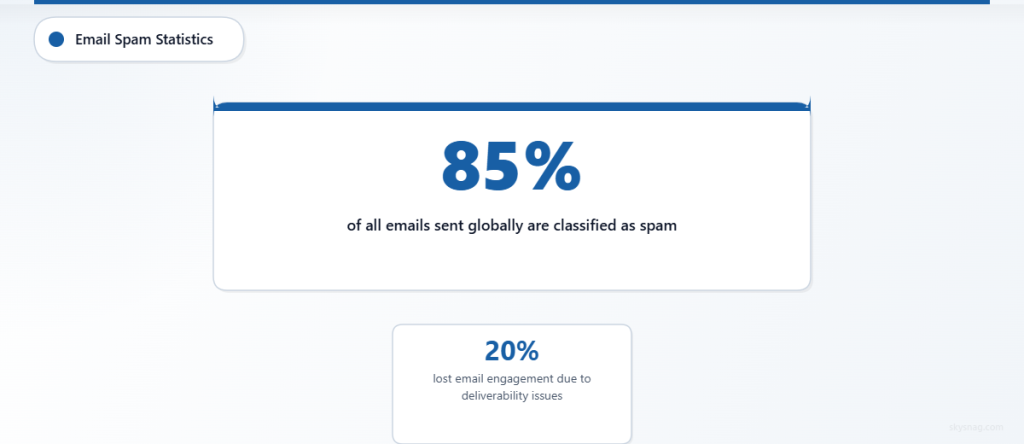
Modern spam filters operate on multiple levels, analyzing sender reputation, content quality, authentication protocols, and recipient engagement patterns. According to industry data, approximately 85% of all emails sent globally are classified as spam, making robust filtering mechanisms necessary but sometimes overzealous in their protection.
The consequences of emails going to spam extend beyond missed communications. Businesses report losing up to 20% of their expected email engagement due to deliverability issues, directly impacting revenue and customer relationships.
II. 15 Critical Reasons Why Emails Go to Spam
1. Missing or Misconfigured Email Authentication
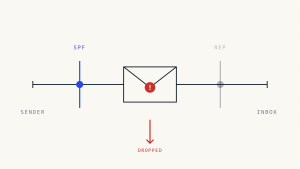
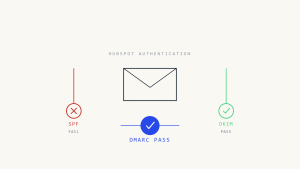
The Problem: Emails without proper SPF, DKIM, and DMARC authentication records appear untrustworthy to email providers. These protocols verify that emails are legitimately sent from your domain.
The Fix:
- Implement SPF records to specify authorized sending servers
- Configure DKIM signing to add cryptographic signatures
- Set up DMARC policies to instruct receivers how to handle unauthenticated emails
- Use Skysnag Protect to monitor and optimize your email authentication configuration
2. Poor Sender Reputation
The Problem: Your domain or IP address has developed a negative reputation due to high bounce rates, spam complaints, or association with suspicious activity.
The Fix:
- Monitor sender reputation using reputation monitoring tools
- Gradually warm up new IP addresses with small email volumes
- Maintain consistent sending patterns and volumes
- Remove hard bounces and unengaged recipients regularly
3. High Bounce Rates
The Problem: Sending emails to invalid or non-existent addresses signals poor list hygiene and damages sender reputation.
The Fix:
- Implement real-time email validation during signup processes
- Use double opt-in confirmation for new subscribers
- Regularly clean email lists to remove invalid addresses
- Monitor bounce rates and investigate spikes immediately
4. Spam Trigger Words and Phrases
The Problem: Subject lines and content containing words like “free,” “urgent,” “limited time,” or excessive capitalization trigger spam filters.
The Fix:
- Audit email content for common spam trigger words
- Use natural, conversational language instead of sales-heavy terminology
- Test subject lines with spam checking tools before sending
- Avoid excessive punctuation marks and all-caps text
5. Poor HTML and Email Design
The Problem: Broken HTML, missing alt text, image-heavy content, or poor formatting can trigger spam filters and reduce deliverability.
The Fix:
- Use clean, well-structured HTML code
- Include alt text for all images
- Maintain appropriate text-to-image ratios
- Test emails across multiple clients and devices
6. Inconsistent From Address
The Problem: Frequently changing sender names or email addresses confuses recipients and spam filters, reducing trust and recognition.
The Fix:
- Use consistent sender names and email addresses
- Authenticate all sending domains properly
- Create recognizable “From” names that recipients will remember
- Avoid using no-reply addresses when possible
7. Lack of Unsubscribe Options
The Problem: Emails without clear unsubscribe mechanisms violate CAN-SPAM regulations and increase spam complaints when recipients can’t easily opt out.
The Fix:
- Include prominent unsubscribe links in all emails
- Process unsubscribe requests within 10 business days
- Make the unsubscribe process simple and immediate
- Honor all unsubscribe requests without additional marketing messages
8. Low Recipient Engagement
The Problem: Poor open rates, click-through rates, and high deletion rates signal to email providers that your content isn’t valuable to recipients.
The Fix:
- Segment email lists based on recipient preferences and behavior
- Personalize content to increase relevance
- A/B test subject lines and content to improve engagement
- Remove consistently unengaged subscribers from active lists
9. Blacklist Inclusion
The Problem: Your domain or IP address appears on spam blacklists maintained by various organizations, automatically blocking or filtering your emails.
The Fix:
- Regularly check major blacklists for your domain and IP addresses
- Follow delisting procedures for any blacklists where you appear
- Address root causes that led to blacklisting
- Monitor for future blacklist appearances
10. Sudden Volume Spikes
The Problem: Dramatically increasing email volumes without proper preparation appears suspicious to email service providers and can trigger filtering.
The Fix:
- Gradually increase sending volumes over several weeks
- Maintain consistent sending schedules
- Avoid sending large campaigns after periods of inactivity
- Use dedicated IP addresses for high-volume sending
11. Generic or Suspicious Content
The Problem: Emails with generic templates, suspicious attachments, or content that appears automated rather than personalized often get filtered as spam.
The Fix:
- Personalize emails beyond just inserting recipient names
- Avoid suspicious file attachments in email campaigns
- Use conversational, human-like language in your content
- Include relevant, valuable information for recipients
12. Inadequate List Building Practices
The Problem: Purchasing email lists, using outdated contact information, or adding recipients without explicit consent leads to high complaint rates and poor deliverability.
The Fix:
- Build email lists organically through opt-in processes
- Use double opt-in confirmation for new subscribers
- Regularly update and clean your email database
- Document consent for all email recipients
13. Technical Infrastructure Issues
The Problem: Server misconfigurations, DNS issues, or hosting problems can affect email deliverability and trigger spam filtering.
The Fix:
- Ensure proper DNS configuration for all email-related records
- Use reputable email service providers or properly configured mail servers
- Monitor server reputation and performance metrics
- Implement proper security measures to prevent compromise
14. Time and Frequency Problems
The Problem: Sending emails at inappropriate times or too frequently can irritate recipients and trigger spam filters designed to detect excessive sending patterns.
The Fix:
- Research optimal sending times for your target audience
- Implement frequency capping based on recipient preferences
- Allow subscribers to choose their preferred email frequency
- Monitor engagement metrics to optimize sending schedules
15. Insufficient Content Variety
The Problem: Repetitive content, identical messaging across campaigns, or lack of content diversity can trigger automated spam detection systems.
The Fix:
- Vary email templates and content structure regularly
- Create diverse content that provides genuine value
- Use different subject line styles and formats
- Incorporate user-generated content when appropriate
III. Implementing Systematic Solutions
Establish Comprehensive Monitoring
Deploy email deliverability monitoring tools that track authentication status, sender reputation, and delivery rates across major email providers. Skysnag Protect provides comprehensive visibility into your email authentication posture and helps identify deliverability issues before they impact your campaigns.
Create Authentication Protocols
Implement robust email authentication using SPF, DKIM, and DMARC protocols. These technical standards verify your identity as a legitimate sender and prevent domain spoofing that could damage your reputation.
Develop List Hygiene Practices
Establish regular list cleaning procedures that remove invalid addresses, monitor engagement metrics, and maintain healthy subscriber relationships. Quality email lists consistently outperform larger, poorly maintained databases.
IV. Advanced Troubleshooting Techniques
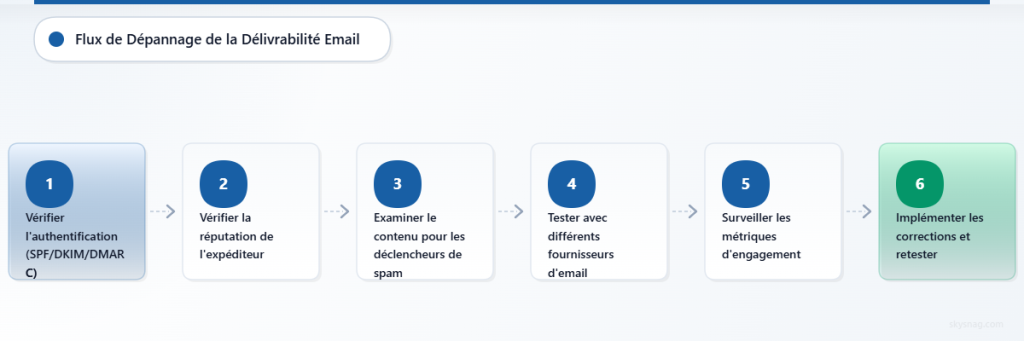
Seed List Testing
Use seed list testing to monitor how your emails are delivered across different email providers. This proactive approach helps identify deliverability issues before they affect your entire subscriber base.
Reputation Monitoring
Implement continuous monitoring of your sender reputation across multiple reputation services. Early detection of reputation issues allows for faster remediation and prevents extended deliverability problems.
Content Analysis
Regularly analyze your email content using spam detection tools to identify potential triggers before sending campaigns. This preventive approach reduces the likelihood of emails going to spam folders.
V. Key Takeaways
Email deliverability requires a comprehensive approach addressing technical configuration, content quality, and sender practices. The 15 critical factors identified here represent the most common causes of emails going to spam, each requiring specific remediation strategies.
Success in email deliverability comes from consistent monitoring, proper authentication implementation, and maintaining high-quality subscriber relationships. Organizations that address these fundamental issues proactively maintain better inbox placement rates and stronger email program performance.
Regular audits of your email practices, combined with proper authentication protocols and engagement monitoring, provide the foundation for reliable email delivery. Tools like Skysnag Protect can help automate much of this monitoring and provide actionable insights for improving your email deliverability.