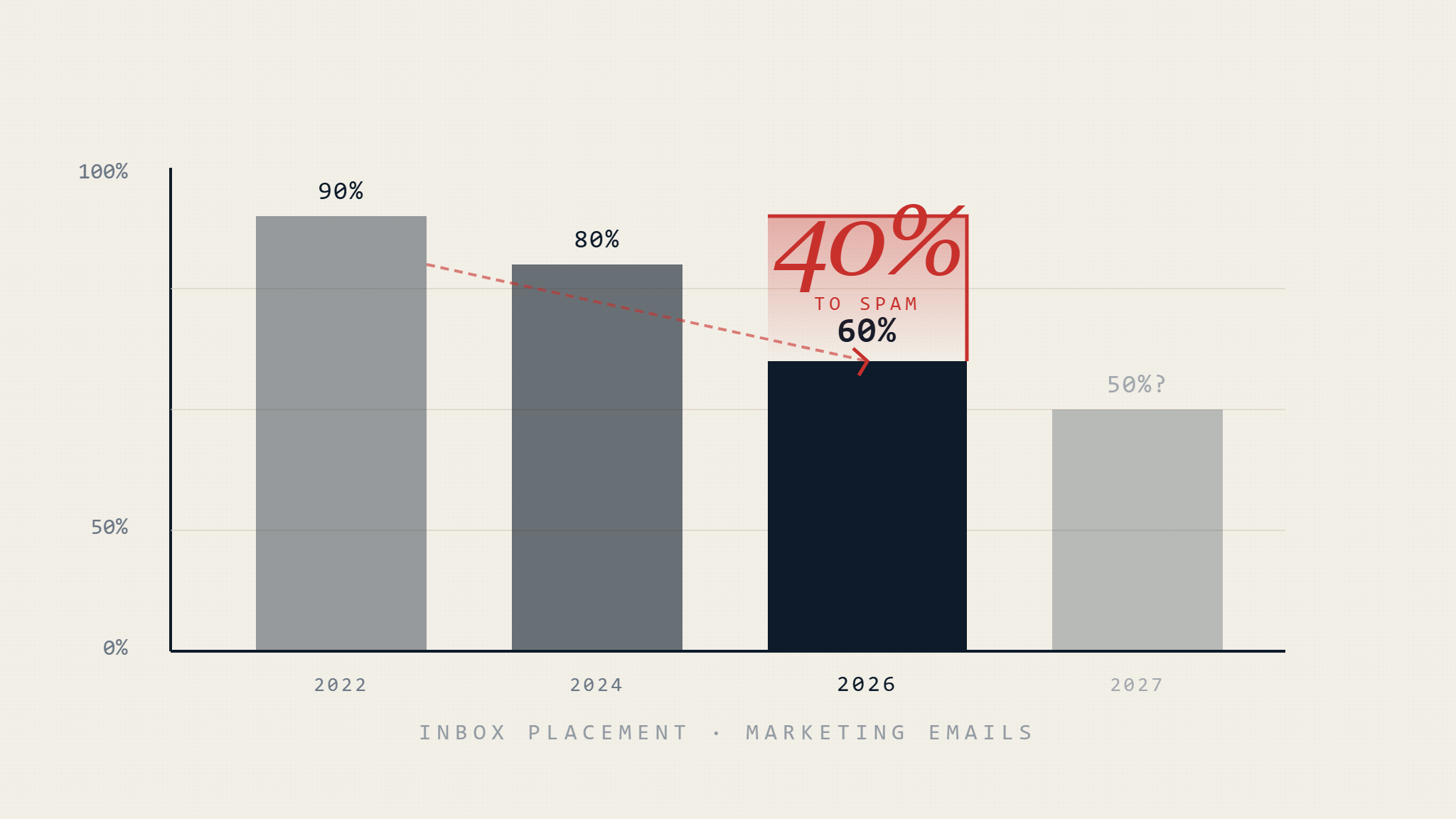
Marketing teams now face a harsh reality: four out of ten legitimately-sent emails never reach the inbox. The problem isn’t misconfigured SPF records or missing DKIM signatures—those are table stakes. The real shift happened when mailbox providers deployed AI spam filters trained on billions of user interactions, fundamentally changing what “legitimate email” means.
This article explains what changed, where traditional email marketing strategies now fail, and how organizations can adapt without abandoning marketing email entirely.
I. The 40% Problem: What the Numbers Actually Mean
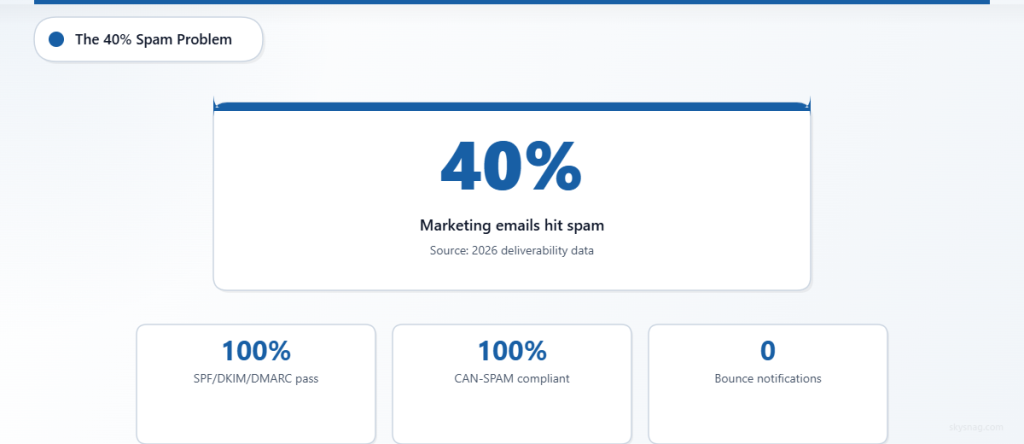
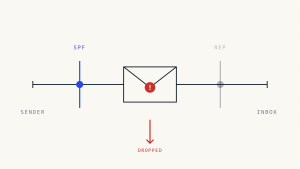
Recent studies from email deliverability monitoring platforms show that 40% of permission-based marketing emails land in spam folders or get silently filtered before users ever see them. This doesn’t mean authentication failed. It means AI-driven reputation systems flagged the message as unwanted based on behavioral signals, not technical validation.
What makes this percentage alarming:
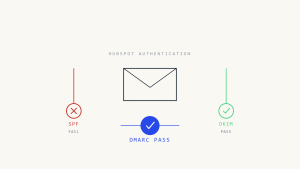
- It includes authenticated emails: SPF pass, DKIM pass, DMARC alignment verified
- It includes opted-in recipients: Users who filled out a form or clicked “subscribe”
- It includes compliant senders: Unsubscribe links present, CAN-SPAM compliant, proper List-Unsubscribe headers
- It happens silently: No bounce, no notification, no insight into why
Traditional deliverability wisdom taught that good authentication plus subscriber consent equals inbox delivery. That assumption no longer holds.
II. What Changed: AI Spam Filters vs. Rule-Based Filtering
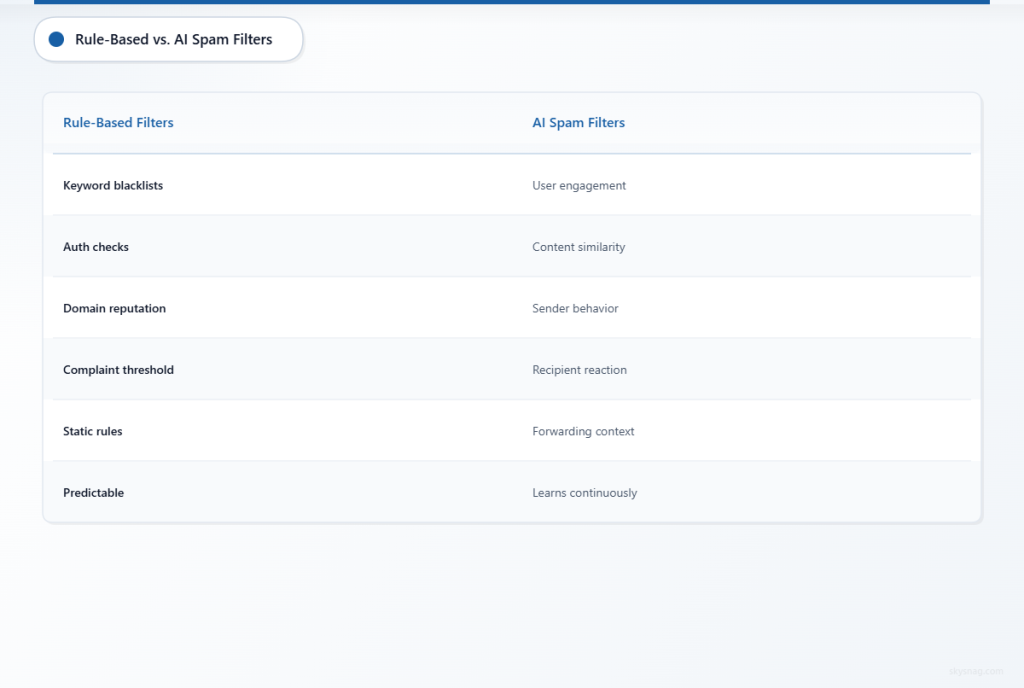
Until recently, spam filters operated primarily on rules: keyword blacklists, authentication checks, domain reputation scores, and complaint thresholds. Organizations could pass these tests by following documented best practices.
AI spam filters work differently. They analyze:
- User engagement patterns: Opens, clicks, deletes, time-to-read, folder moves
- Content similarity: How closely the email matches previously-reported spam
- Sender behavior: Sending frequency, volume spikes, recipient targeting consistency
- Recipient reaction: Whether other users who received this email ignored, deleted, or complained
- Forwarding and sharing context: How the email behaves when forwarded or shared
These systems learn continuously. A campaign that worked last quarter can fail this quarter because user behavior shifted, or because the model was retrained with new spam examples.
Where This Fails (Silently)
AI spam filters commonly produce false positives when:
- Cold outreach mimics spam structure: Subject lines, opening sentences, and calls-to-action that resemble mass-blast patterns trigger flags, even if the sender authenticated properly and the recipient technically opted in
- Engagement drops below threshold: If a domain’s previous campaigns produced low engagement, newer emails from that domain inherit the poor reputation, even if the list was cleaned or the content improved
- Recipient context differs: An email sent to a cleaned list may still land in spam if the recipient’s mailbox shows no prior interaction with the sender domain, making it appear unsolicited to the AI model
- Content category matches spam training data: Financial offers, “limited time” urgency language, PDF attachments, and form-fill requests all appear in spam training datasets, so legitimate emails using these elements risk misclassification
- Volume inconsistency: Sending 10,000 emails one month and 1,000 the next signals instability, prompting AI models to apply stricter filtering until patterns normalize
III. The Authentication Paradox: Why Passing SPF, DKIM, and DMARC Isn’t Enough
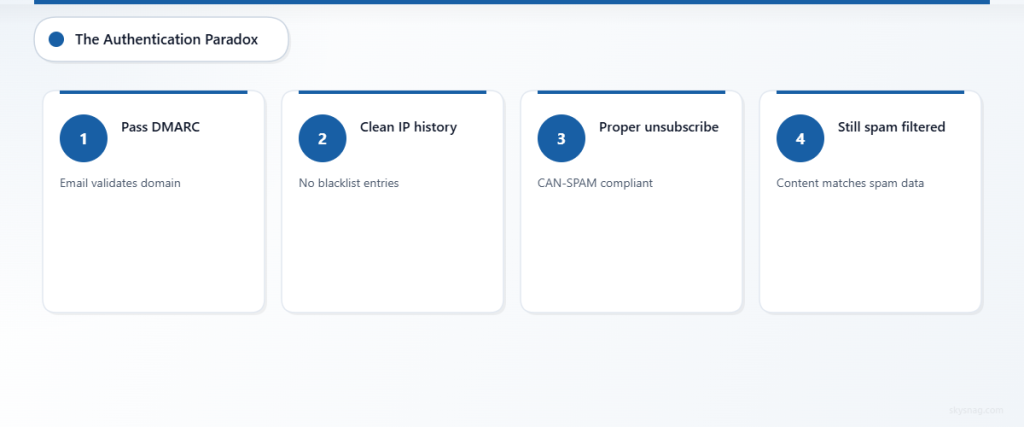
DMARC passing does not guarantee inbox placement. DMARC validates that the email came from the claimed domain. It does not evaluate whether the recipient wants the email.
AI spam filters evaluate DMARC as one signal among hundreds. An email can:
- Pass DMARC alignment checks
- Have a clean sending IP with no blacklist history
- Include proper unsubscribe links
- Still land in spam because the content or behavior pattern matches spam training data
This creates a paradox for marketers: you can do everything “right” technically and still fail commercially.
Where Authentication Still Matters
Authentication prevents one specific failure: domain spoofing. If your domain lacks DMARC enforcement:
- Attackers can send phishing emails pretending to be you
- Recipients may report those emails as spam
- Your domain reputation degrades even though you didn’t send the attack emails
DMARC at p=reject stops unauthorized use, which protects your reputation. But it doesn’t improve the filtering outcome for emails you actually send. That requires different controls.
IV. Cold Email Patterns That Now Trigger Spam Filters
AI models trained on user-reported spam have learned to recognize cold outreach structures:
Pattern 1: Personalization tokens that don’t match context
- “Hi {{FirstName}}, I noticed your company {{CompanyName}} recently posted about {{Topic}}”
- Filters detect when merge tags populate correctly but the surrounding message doesn’t align with actual recipient behavior or prior engagement
Pattern 2: Manufactured urgency
- “Only 3 spots left”
- “Offer expires tonight”
- “Limited availability”
- These phrases appear frequently in spam training data, so legitimate urgency claims get grouped with fraudulent ones
Pattern 3: Multi-paragraph opener that delays the ask
- Long context-setting introduction
- Then pivot to a request for time, demo booking, or call scheduling
- AI models recognize this structure from millions of spam samples
Pattern 4: Links to generic landing pages or calendar booking tools
- Calendly, meetings.hubspot.com, Zoom scheduler links
- Not inherently spam, but these domains appear in both legitimate outreach and spam campaigns, so filters apply stricter content analysis when they’re present
Pattern 5: Follow-up sequences that ignore engagement signals
- Sending three follow-ups when the first email was never opened
- Filters interpret this as volume-based outreach that disregards recipient interest
V. Where Legitimate Marketing Fails
Organizations see spam folder placement even when:
Scenario 1: Subscriber opt-in is documented, but engagement history is empty
- User filled out a form six months ago
- Never opened an email since
- Filters treat this as a dormant or disinterested contact, applying stricter rules
Scenario 2: Content matches category trained as spam
- Financial services, insurance quotes, real estate offers, SaaS trials
- These verticals have high spam volume, so legitimate emails in the same category inherit suspicion
Scenario 3: Shared IP reputation degrades
- Email service provider uses shared sending IPs
- Another customer on the same IP sends spam or sees high complaint rates
- Your emails inherit the IP’s poor reputation, even if your domain authentication and content are clean
Scenario 4: Volume inconsistency signals instability
- Campaign sends 50,000 emails one week, 2,000 the next
- Filters interpret this as sender behavior inconsistency, which matches spam bot patterns
Scenario 5: Domain age and sending history are insufficient
- New domain or domain with little prior sending history
- Filters apply stricter rules until the domain builds engagement data
VI. How Mailbox Providers Actually Apply Filtering
Gmail, Microsoft 365, Yahoo, and Apple Mail each use proprietary AI-driven filtering, but they share common principles:
- Authentication is a prerequisite, not a pass: SPF, DKIM, and DMARC passing means “this email came from who it claims to be.” It does not mean “this email is wanted by the recipient.”
- Engagement signals override authentication: If users consistently delete emails from a sender without opening, future emails from that sender land in spam, even if authentication passes.
- Reputation is domain-specific and recipient-specific: A sender can have good reputation with one mailbox provider and poor reputation with another. A sender can have good reputation with engaged recipients and poor reputation with dormant ones.
- Complaint rates matter more than open rates: One spam complaint can outweigh ten opens. Mailbox providers prioritize user-reported spam over engagement metrics.
- Content analysis happens at scale: AI models compare email content to billions of spam samples, not just keyword blacklists. Legitimate emails that structurally resemble spam templates trigger flags.
When Filtering Fails (Silently)
Mailbox providers do not always notify senders when filtering happens. Common failure modes include:
- Soft filtering: Email arrives but is automatically moved to a “Promotions” or “Updates” tab instead of primary inbox (Gmail-specific behavior)
- Gray mail treatment: Email is delivered but deprioritized in the inbox, appearing below more recent messages
- Silent discard: Email is accepted during SMTP delivery but never appears in any folder, with no bounce notification sent to the sender
- Recipient-specific filtering: Email reaches some recipients’ inboxes but lands in spam for others, with no consistent pattern visible to the sender
VII. What Organizations Should Do: Practical Adaptation Strategies
Strategy 1: Separate Transactional and Marketing Sending Domains
Do not send marketing emails from the same domain used for transactional messages (password resets, order confirmations, account notifications).
Implementation:
- Transactional emails:
[email protected]or[email protected] - Marketing emails:
marketing.example.comornews.example.com - Ensure both domains have proper SPF, DKIM, and DMARC configuration
- Apply DMARC
p=rejectto the transactional domain immediately - Apply DMARC
p=noneto the marketing domain during initial testing, then move top=quarantineorp=rejectafter validating all authorized senders
Why this works: If marketing campaigns trigger spam complaints, the reputation damage stays isolated to the marketing domain. Transactional emails continue delivering reliably.
Strategy 2: Monitor Engagement and Prune Dormant Contacts
Filters penalize senders who repeatedly email unengaged recipients. Remove contacts who haven’t opened or clicked in 90 days.
Implementation:
- Export engagement data monthly
- Identify contacts with zero opens or clicks in the last 90 days
- Move them to a re-engagement campaign with three emails over two weeks
- If still no engagement, remove from active sending list
Why this works: Sending to engaged recipients improves domain reputation. Filters observe that most recipients open, click, or at least don’t delete immediately, which signals wanted email.
Strategy 3: Implement Feedback Loops and Monitor Complaint Rates
Mailbox providers offer feedback loops that send notifications when recipients mark emails as spam.
Implementation:
- Register for Gmail Postmaster Tools, Microsoft SNDS (Smart Network Data Services), and Yahoo Complaint Feedback Loop
- Monitor complaint rates weekly
- Investigate spikes above 0.1% (one complaint per 1,000 emails)
- Adjust content, subject lines, or list targeting when complaint rates increase
Why this works: Complaint rates directly affect filtering decisions. Keeping complaints below 0.1% maintains good sender reputation.
Strategy 4: Use Authenticated Subdomains for Different Campaigns
Instead of sending all marketing emails from one domain, create subdomains for different campaign types and authenticate each separately.
Example structure:
newsletter.example.comfor weekly contentoffers.example.comfor promotional campaignsevents.example.comfor webinar and event invitations
Each subdomain gets:
- Its own SPF record
- Its own DKIM signing key
- Its own DMARC policy and reporting destination
Why this works: If one campaign type triggers spam complaints, the reputation damage stays isolated to that subdomain. Other campaigns continue delivering normally.
Strategy 5: Validate Sending Infrastructure Against DMARC Reports
DMARC aggregate reports show which servers send email on your behalf and whether they pass authentication.
Implementation:
- Collect DMARC reports daily
- Identify third-party senders (marketing automation platforms, CRMs, support tools)
- Verify each sender is authorized in SPF or DKIM-signing
- Remove unauthorized senders or disable their email-sending capability
Why this works: Unauthorized senders can damage your domain reputation even if you never see the emails they send. DMARC reports surface this activity.
VIII. Where Skysnag Fits: Monitoring, Validation, and Evidence

Skysnag provides continuous DMARC monitoring and validation, helping organizations:
Identify all senders using your domain: DMARC aggregate reports show every IP address and sending source that attempted to send email on your behalf. Skysnag parses these reports and flags unauthorized senders.
Track authentication compliance: See which emails pass or fail SPF, DKIM, and DMARC alignment. Filter by sender, date range, or authentication result.
Monitor third-party marketing platforms: When marketing automation tools, CRM systems, or support platforms send emails from your domain, Skysnag shows whether they authenticate properly.
Evidence enforcement for compliance programs: If your organization is subject to PCI DSS, SOC 2, ISO 27001, or internal security policies, Skysnag provides logs and reports demonstrating email authentication controls.
Move to DMARC enforcement safely: Skysnag helps identify all legitimate senders before applying p=quarantine or p=reject, reducing the risk of blocking your own emails.
Start DMARC monitoring with Skysnag and get your free DMARC record:
Use Skysnag Protect to identify legitimate senders, detect unauthorized sources, and move toward enforcement:
IX. What Can Fail (Even After Following Best Practices)
Authentication, segmentation, engagement monitoring, and complaint management all reduce spam folder risk. They do not eliminate it. Common failure modes include:
Reputation lag: Even after fixing authentication and pruning dormant contacts, domain reputation takes weeks to recover. Filters use historical data, not just recent behavior.
Shared IP contamination: If your email service provider uses shared IPs, another sender’s spam can affect your deliverability. Monitor IP reputation separately from domain reputation.
Content false positives: AI models sometimes misclassify legitimate emails when content structure matches spam training data. Testing subject lines, preview text, and body structure helps reduce this risk.
Recipient mailbox rules: Some users create rules that automatically filter emails from specific domains or senders to spam, regardless of authentication or content. This behavior doesn’t show in aggregate metrics.
Provider-specific filtering inconsistency: An email may land in the inbox at Gmail but hit spam at Microsoft 365. Test delivery across multiple providers during campaign development.
X. Key Takeaways
- 40% spam folder placement is now normal for marketing emails, even when authentication passes. AI spam filters evaluate behavior, not just technical validation.
- DMARC passing prevents spoofing but does not guarantee inbox placement. Reputation, engagement, content structure, and recipient behavior all affect filtering.
- Cold email patterns trained as spam now trigger filters, including personalization tokens, manufactured urgency, multi-paragraph openers, and booking tool links.
- Separate transactional and marketing sending domains to isolate reputation damage. Apply DMARC
p=rejectto transactional domains immediately. - Monitor engagement and prune dormant contacts. Filters penalize senders who repeatedly email unengaged recipients.
- Complaint rates above 0.1% signal filtering risk. Use feedback loops and adjust campaigns when complaints increase.
- Skysnag provides DMARC monitoring, sender validation, and enforcement evidence. Start monitoring or implement full protection with Skysnag Protect
AI spam filters changed the rules. Organizations that adapt by monitoring authentication, segmenting campaigns, pruning unengaged contacts, and tracking reputation signals maintain better inbox placement rates than those relying on authentication alone.