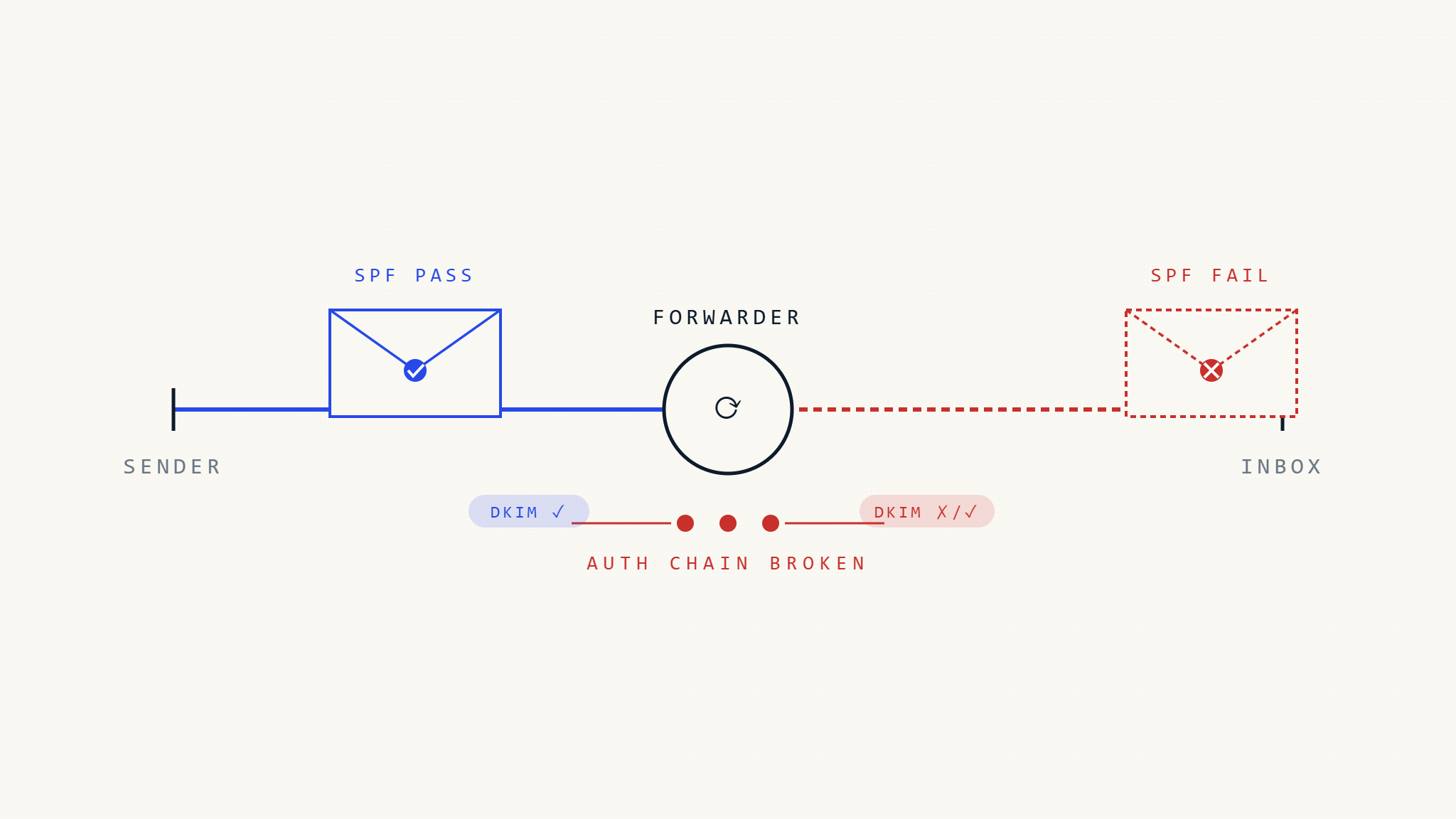
Email forwarding is one of the most common legitimate activities that causes DMARC authentication failures. When a mailbox automatically forwards an incoming message to another destination—such as a personal Gmail address forwarding to a work account, or an office administrator forwarding messages to department members—the forwarded message can fail DMARC checks even when the original sender configured everything correctly.
This authentication breakdown happens because DMARC expects the sending infrastructure, message headers, and domain alignment to remain unchanged during delivery. Forwarding breaks that assumption. The result: legitimate messages from authenticated domains can be rejected, quarantined, or flagged when a forwarding server relays them to the final recipient.
Understanding why forwarding breaks DMARC, what fails during the forwarding process, and how to implement forwarding-safe policies helps organizations enforce anti-spoofing protections without blocking legitimate business communications.
I. Why Email Forwarding Causes DMARC Failures
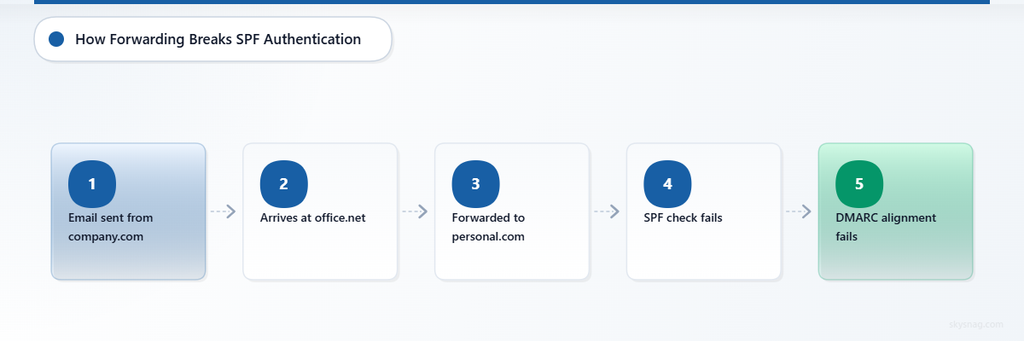
DMARC alignment requires that either SPF or DKIM pass authentication and align with the domain in the From: header. When forwarding occurs, both alignment mechanisms can fail.
SPF Fails During Forwarding
SPF authenticates the sending server against the domain listed in the envelope MAIL FROM address. When a message is forwarded, the forwarding server becomes the new sending server. The original SPF record does not authorize the forwarding server’s IP address, so SPF authentication fails at the final destination.
Example flow:
[email protected]sends email to[email protected][email protected]forwards the message to[email protected]- The forwarding server (
office.net) delivers the message topersonal.com personal.comchecks SPF forcompany.comagainst the forwarding server’s IP- The forwarding server is not in
company.com‘s SPF record - SPF fails
The envelope MAIL FROM still references company.com, but the sending IP now belongs to office.net. The SPF lookup returns fail or softfail.
DKIM Can Fail When Content Changes
DKIM signs the message headers and body using a cryptographic signature. If the forwarding server modifies the message—such as adding a footer, changing the subject line, or altering MIME structure—the DKIM signature verification fails.
Common forwarding modifications that break DKIM:
- Appending a forwarding notice or disclaimer to the message body
- Adding
[Fwd:]or[External]to the subject line - Converting HTML to plain text or altering MIME boundaries
- Stripping attachments or changing encoding
Even small changes invalidate the signature. When DKIM fails, the forwarded message loses its authentication proof.
DMARC Alignment Fails Even When DKIM Passes
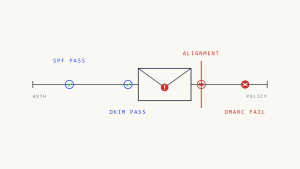
Even when the forwarding server does not modify the message and DKIM verification succeeds, DMARC can still fail due to alignment requirements.
DMARC requires that the domain in the From: header matches the domain in the SPF envelope sender (relaxed or strict alignment) or the domain in the DKIM signature (relaxed or strict alignment). If SPF fails and DKIM passes but uses a different domain (such as the forwarding server signing with its own domain), DMARC alignment fails.
This commonly occurs when:
- The original DKIM signature remains valid but the
From:domain differs from the DKIM signing domain - The forwarding server adds its own DKIM signature, which does not align with the original
From:domain - SPF fails and no aligned DKIM signature exists
II. What Fails, When, and How Visibly
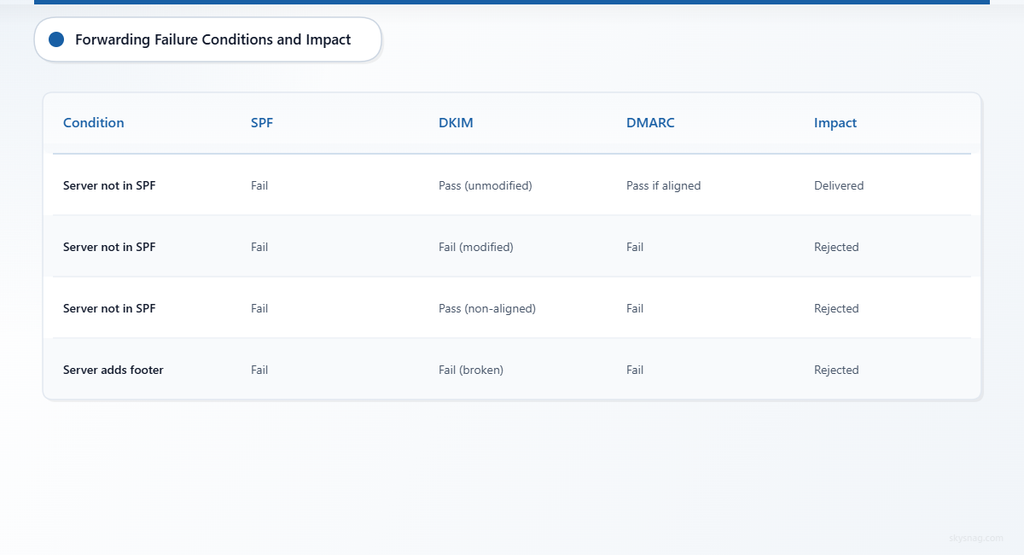
Forwarding failures are often silent to the original sender and the forwarding user. The message may be rejected or quarantined without clear feedback.
Failure Conditions
| Condition | SPF Result | DKIM Result | DMARC Result | Impact |
|---|---|---|---|---|
| Forwarding server not in SPF | Fail | Pass (unmodified) | Pass if DKIM aligns | Delivered |
| Forwarding server not in SPF | Fail | Fail (modified) | Fail | Rejected or quarantined |
| Forwarding server not in SPF | Fail | Pass (non-aligned) | Fail | Rejected or quarantined |
| Forwarding server adds footer | Fail | Fail (signature broken) | Fail | Rejected or quarantined |
When Failure Is Silent
- The forwarding user does not receive a bounce or failure notification
- The original sender does not see delivery failure because the message successfully reached the forwarding mailbox
- The final destination rejects the message without notifying the forwarding user
- DMARC aggregate reports show authentication failure, but the original sender may not correlate the failure with forwarding
When Failure Is Visible
- The forwarding user notices messages from certain senders stop arriving at the final destination
- The final mailbox provider sends a rejection notice to the forwarding mailbox
- The original sender receives a bounce if the final destination generates a failure notification (rare)
III. How Organizations Discover Forwarding Breaks DMARC
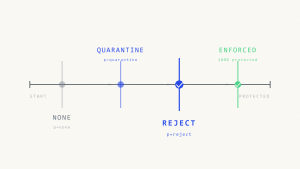
Most organizations discover forwarding issues after moving from p=none to p=quarantine or p=reject. Messages that previously delivered without issue suddenly stop reaching forwarded destinations.
Common discovery paths:
- Employees report that forwarded messages from customers, vendors, or partners no longer arrive
- Sales teams notice that automated forwards to CRM systems fail
- Helpdesk forwards from ticketing systems to personal email stop working
- Executives using email forwarding from corporate accounts to personal devices lose messages
DMARC aggregate reports show authentication failures from forwarding server IP addresses, but the reports do not explicitly identify forwarding as the cause. Analyzing the reports requires correlating failure sources with known forwarding configurations.
IV. How to Implement Forwarding-Safe DMARC Policies
Organizations cannot control how third-party forwarding servers handle messages. However, they can adjust DMARC policies, monitor failure patterns, and educate users on forwarding alternatives.
Stage Enforcement by Mail Stream, Not by Percentage
Instead of using pct= to gradually enforce DMARC, stage enforcement by domain, subdomain, sender group, and mail stream maturity. Apply p=reject to high-value domains used for financial transactions, account notifications, and executive communications. Apply p=quarantine or p=none to domains with known forwarding patterns until alternative solutions are implemented.
Avoid relying on percentage-based rollout as the primary strategy. Current DMARC-aware programs should stage enforcement by domain, subdomain, sender group, and business function.
Use Subdomains for Forwarding-Heavy Mail Streams
If a specific mail stream is frequently forwarded—such as newsletters, automated reports, or internal notifications—send from a subdomain with a less restrictive DMARC policy. This isolates forwarding failures from high-value transactional mail.
Example:
company.com→p=reject(transactional, account security)reports.company.com→p=none(automated reports, newsletters)
This approach preserves anti-spoofing protection on the primary domain while allowing forwarded mail streams to pass through.
Educate Users on Forwarding Alternatives
Forwarding is often used for convenience, but alternatives reduce DMARC alignment failures:
- Use native IMAP or POP access instead of forwarding. Most email clients support multiple account management.
- Use email delegation (such as Gmail’s “Grant access to your account” or Microsoft 365’s “Send on behalf of”) to manage multiple mailboxes without forwarding.
- Use email aliases within the same domain instead of forwarding to external addresses.
- Use distribution lists or shared mailboxes for team-based mail routing instead of individual forwarding rules.
Monitor Aggregate Reports for Forwarding Patterns
DMARC aggregate reports include the source IP address, authentication results, and message count. Forwarding failures typically show:
- SPF fail from IP addresses that belong to known forwarding providers (Google Workspace, Microsoft 365, email hosting providers)
- DKIM pass or fail depending on whether the message was modified
- Alignment failure if DKIM passes but does not align
Reviewing these patterns helps identify which forwarding destinations cause failures and whether the volume justifies policy adjustments.
In a managed Skysnag deployment, use the reporting destination generated by Skysnag. The following is a manual example only:
v=DMARC1; p=quarantine; rua=mailto:[email protected]; pct=100; fo=1A traditional static record can work, but only if reports are actively received, parsed, analyzed, and acted on. Skysnag Protect automatically aggregates and analyzes DMARC reports to surface forwarding patterns and identify affected senders.
Consider ARC (Authenticated Received Chain) Support
ARC is a protocol designed to preserve authentication results across intermediary servers, including forwarding systems. When a message passes through a forwarding server that supports ARC, the server adds an ARC header set that records the original authentication results. The final destination can evaluate the ARC chain to determine whether the message was authenticated before forwarding.
ARC does not solve forwarding failures on its own. The final receiving server must honor ARC headers, and the forwarding server must implement ARC correctly. As of 2026, ARC support is growing among major mailbox providers, but it is not universally deployed.
Organizations cannot control whether forwarding servers or final destinations support ARC. However, monitoring ARC-related headers in DMARC forensic reports can help identify whether forwarding systems are attempting to preserve authentication.
V. What Can Go Wrong After Policy Adjustment
Adjusting DMARC policies to accommodate forwarding introduces new risks.
Weakening Policy on the Primary Domain
Lowering DMARC enforcement on the primary domain to prevent forwarding failures reduces anti-spoofing protection. Attackers can exploit the weakened policy to send unauthenticated email from the domain.
Example failure:
company.comchanges fromp=rejecttop=quarantineto allow forwarded messages- An attacker spoofs
[email protected]to send phishing email - The spoofed message fails DMARC but is quarantined instead of rejected
- Some recipients retrieve the message from quarantine and fall victim to the phishing attack
Subdomain Policy Misalignment
Using subdomains for forwarding-heavy mail streams works only if the subdomain DMARC policy is explicitly set. If the subdomain inherits the parent domain’s p=reject policy through the sp= tag, forwarding failures persist.
Example failure:
company.com→p=reject; sp=rejectreports.company.comis created for forwarded mailreports.company.cominheritsp=rejectfrom the parent domain- Forwarded messages still fail DMARC and are rejected
Always publish a separate DMARC record for subdomains with different enforcement needs.
User Education Gaps
Recommending forwarding alternatives does not guarantee user adoption. Employees may continue using forwarding rules if alternatives are not clearly communicated, documented, or supported by IT.
Example failure:
- IT announces that email forwarding causes DMARC failures and recommends IMAP access
- Employees do not understand how to configure IMAP or lack mobile device management policies
- Employees continue forwarding email and report that messages from vendors and customers are missing
- IT manually troubleshoots individual cases without addressing the root behavior
Forwarding alternatives require user training, clear documentation, and IT support to succeed.
VI. How Skysnag Protect Helps Identify and Address Forwarding Failures

Skysnag Protect aggregates DMARC reports, identifies forwarding-related authentication failures, and surfaces patterns that indicate legitimate mail streams are affected by forwarding.
Skysnag Protect:
- Identifies source IP addresses that belong to known forwarding services and highlights DMARC failures originating from those addresses
- Shows whether SPF, DKIM, or both failed during forwarding
- Tracks message volume from forwarding sources to help prioritize policy adjustments
- Provides visibility into which senders and mail streams are most affected by forwarding
- Generates reports that help IT teams educate users on forwarding alternatives and monitor adoption
Use Skysnag Protect to identify legitimate senders, detect unauthorized sources, and move toward enforcement without blocking business-critical forwarded messages. Start DMARC monitoring at.
VII. Key Takeaways
- Email forwarding breaks DMARC because SPF fails when the forwarding server is not authorized by the original sender’s SPF record.
- DKIM can fail if the forwarding server modifies the message body, subject line, or MIME structure.
- Even when DKIM passes, DMARC alignment can fail if the
From:domain does not match the SPF or DKIM signing domain. - Forwarding failures are often silent to the original sender and the forwarding user. The final destination rejects or quarantines the message without clear feedback.
- Organizations should stage DMARC enforcement by domain and mail stream, not by percentage. Use subdomains for forwarding-heavy mail streams.
- Educate users on forwarding alternatives: IMAP access, email delegation, aliases, and shared mailboxes.
- Monitor DMARC aggregate reports to identify forwarding patterns and quantify the impact.
- Skysnag Protect surfaces forwarding-related failures, tracks affected mail streams, and helps prioritize policy adjustments without weakening anti-spoofing protection.