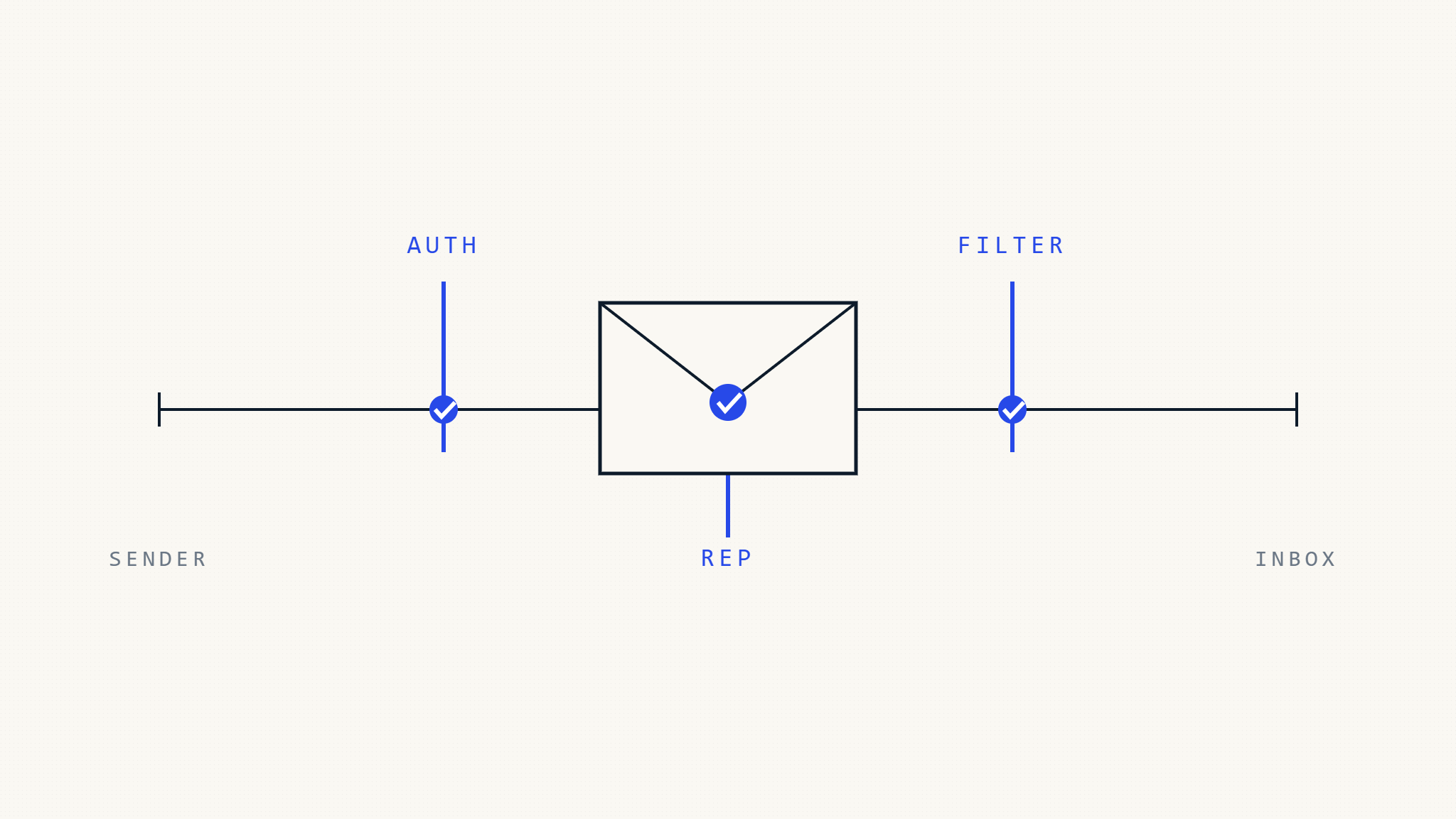
Passing DMARC does not guarantee inbox placement.
That is one of the most important realities in modern email delivery.
DMARC tells a receiving mail server whether a message aligns with the sender’s published authentication policy. It helps receivers identify whether a message claiming to come from a domain is properly authenticated through SPF or DKIM.
But Gmail and Microsoft do not make delivery decisions from DMARC alone.
They also evaluate sender reputation, recipient behavior, complaint rates, content signals, phishing indicators, forwarding context, tenant-level rules, and internal anti-abuse systems.
That means two messages can both pass DMARC and still be handled differently by Gmail and Outlook. One may land in the inbox. Another may be filtered, rate-limited, placed in spam, or rejected based on other signals.
For organizations sending to both Google and Microsoft ecosystems, the lesson is clear:
DMARC is necessary, but it is not the whole deliverability story.
I. Why Gmail and Outlook Handle Authentication Differently
Gmail and Microsoft both support SPF, DKIM, and DMARC.
Both expect serious senders to authenticate their mail.
Both use authentication as part of broader abuse prevention.
But their ecosystems, tools, policies, and filtering layers are not identical.
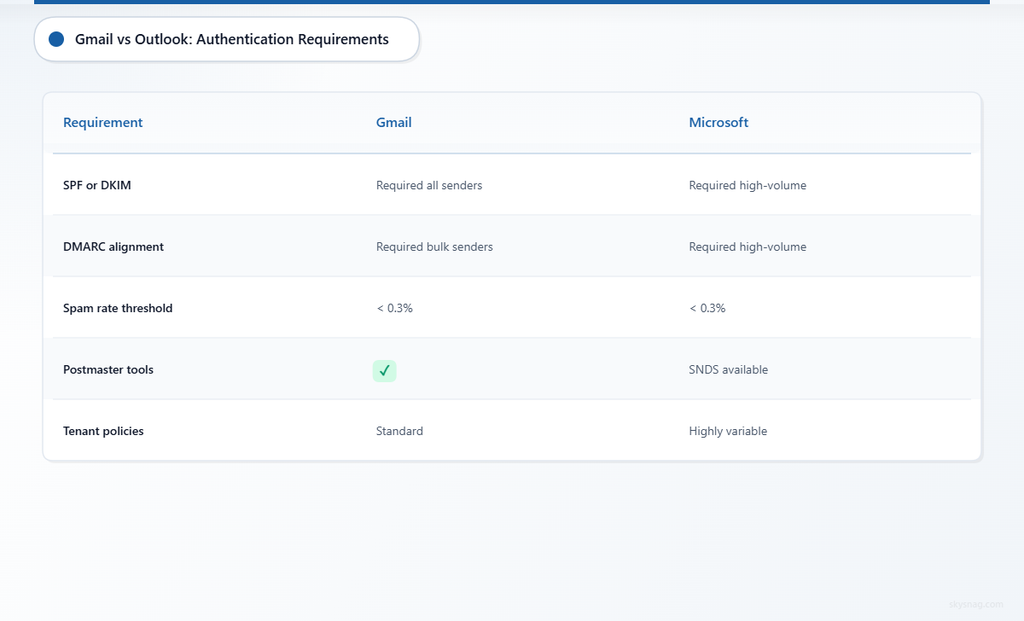
Google’s public sender requirements are more prescriptive for bulk senders. Google requires all senders to authenticate mail with SPF or DKIM, and bulk senders must use SPF, DKIM, and DMARC. Google also states that DMARC passes when SPF or DKIM authenticates and aligns with the visible From domain.
Microsoft has also moved toward stricter sender requirements. In 2025, Microsoft announced new requirements for high-volume senders to Outlook.com, Hotmail, and Live.com addresses, including SPF, DKIM, and DMARC. Microsoft 365 also uses what it calls implicit email authentication, where traditional SPF, DKIM, and DMARC are combined with signals such as sender reputation, sender history, recipient history, behavioral analysis, and other techniques.
The practical difference is not that one provider “cares” about DMARC and the other does not.
The difference is operational.
Gmail’s public guidance gives senders a clearer baseline for bulk-mail compliance. Microsoft’s filtering environment often includes more tenant-specific variation because Exchange Online Protection, Defender for Office 365, mailbox policies, allow/block rules, and enterprise configurations can influence how a message is handled.
For senders, this creates a simple reality:
You need authentication that satisfies both providers, and reputation strong enough to survive filtering beyond authentication.
II. DMARC Refresher: What Actually Has to Pass
DMARC is often misunderstood.
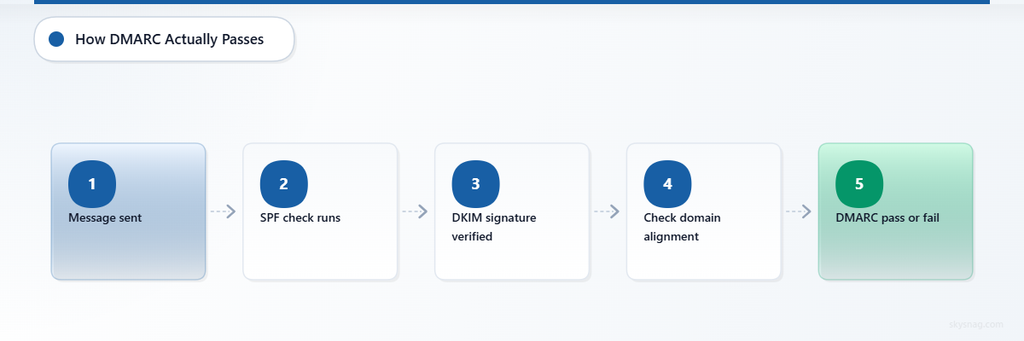
A message does not pass DMARC just because SPF passes.
A message does not pass DMARC just because DKIM passes.
A message passes DMARC only when at least one authenticated identifier aligns with the visible From domain.
That means:
- SPF must pass and the SPF-authenticated domain must align with the visible From domain.
- Or DKIM must pass and the DKIM signing domain must align with the visible From domain.
This is especially important for third-party platforms.
A marketing tool, support platform, CRM, billing system, or transactional email service may pass SPF or DKIM using its own domain. That is useful for the vendor, but it may not help your DMARC result unless the authenticated domain aligns with your visible From domain.
The user sees your domain.
DMARC checks whether the authentication result connects back to that domain.
III. What Gmail Requires Senders to Get Right
Google’s sender guidelines make authentication a baseline requirement.
For senders, this means Gmail expects:
- SPF or DKIM for all senders.
- SPF, DKIM, and DMARC for bulk senders.
- DMARC alignment with the visible From domain.
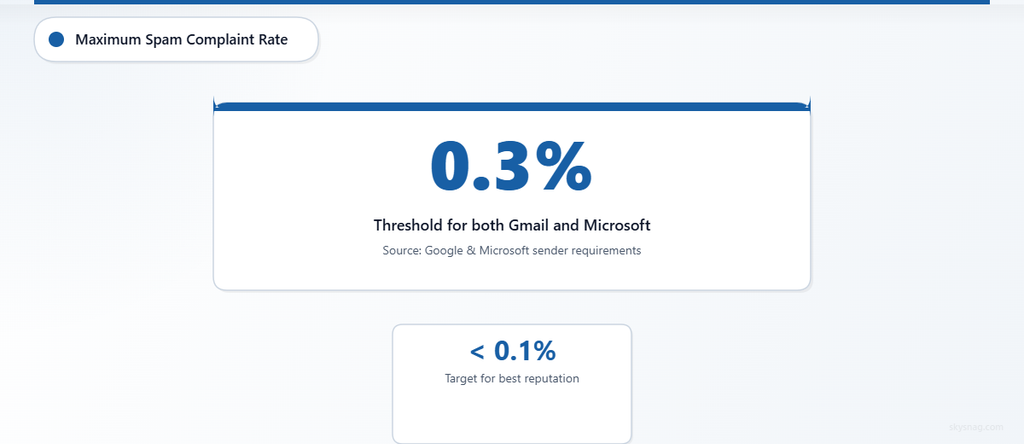
- Low spam complaint rates.
- Proper handling of subscriptions and unsubscribe requirements for marketing mail.
Google also provides visibility through Postmaster Tools. Its Authentication dashboard shows the percentage of mail that passes SPF, DKIM, and DMARC for messages using the sender’s From domain. Google notes that senders typically achieve high DKIM and DMARC success rates when these methods are configured correctly, while SPF success can be lower when third-party senders are involved.
This matters because Gmail gives senders a clearer way to observe authentication health.
However, Gmail Postmaster Tools does not explain every individual filtering decision. A message can pass authentication and still be filtered if other signals indicate risk.
Common Gmail delivery issues include:
- Poor domain or IP reputation.
- High spam complaint rates.
- Sudden sending volume spikes.
- Suspicious content or phishing-like patterns.
- Misconfigured third-party senders.
- DKIM failures after key changes.
- SPF alignment failures caused by third-party Return-Path domains.
For Gmail, authentication is the baseline. It gets you into the trust conversation. It does not guarantee inbox placement.
IV. What Microsoft Requires Senders to Get Right
Microsoft’s ecosystem includes Outlook.com, Hotmail, Live.com, Microsoft 365, Exchange Online Protection, and Microsoft Defender for Office 365.
That creates more variation in how messages are evaluated.
Microsoft publicly announced high-volume sender requirements for Outlook.com, Hotmail, and Live.com addresses that include SPF, DKIM, and DMARC. For Microsoft 365, inbound authentication is evaluated through SPF, DKIM, DMARC, and additional implicit authentication signals such as sender reputation, sender history, recipient history, behavioral analysis, and other advanced techniques.
This means authentication matters, but it is part of a wider decision system.
A message sent to a Microsoft environment may be affected by:
- SPF, DKIM, and DMARC results.
- Sender reputation.
- Recipient or tenant history.
- Defender for Office 365 policies.
- Exchange transport rules.
- Tenant-specific allow or block lists.
- Spoof intelligence.
- User reports.
- Content and attachment analysis.
- URL and phishing detection.
This is why senders sometimes see differences between Microsoft tenants.
A message may be accepted by one organization and filtered by another because the receiving tenant has different policies, security settings, allowlists, or historical relationship with the sender.
That does not mean Microsoft ignores DMARC.
It means Microsoft’s filtering environment has more layers than DMARC alone.
V. Gmail vs Outlook: Practical Differences for Senders
The safest comparison is not “which provider enforces DMARC more.”
The better comparison is how senders experience the two ecosystems.
| Area | Gmail | Outlook and Microsoft 365 |
|---|---|---|
| Public sender requirements | Clear bulk sender requirements for SPF, DKIM, DMARC, spam rate, and unsubscribe practices | High-volume sender requirements for Outlook.com, Hotmail, and Live.com; Microsoft 365 also evaluates authentication through broader filtering layers |
| Authentication visibility | Google Postmaster Tools provides authentication, spam rate, reputation, and delivery-related dashboards | Microsoft provides admin/security visibility inside Microsoft 365 environments, but senders often see less centralized external visibility |
| Filtering model | Authentication plus reputation, engagement, content, complaints, and abuse signals | Authentication plus reputation, tenant configuration, recipient history, Defender/EOP policies, spoof intelligence, and user-level signals |
| Third-party sender risk | SPF or DKIM must align with the visible From domain for DMARC to pass | Same DMARC alignment requirement, but tenant rules and implicit authentication signals may affect final handling |
| Delivery variability | Often easier to track at domain level through Postmaster Tools | Can vary more by tenant policy, enterprise configuration, and internal Microsoft security controls |
| What DMARC reports show | Authentication outcomes, not full placement reason | Authentication outcomes, not full placement reason |
The operational conclusion is straightforward:
If your mail authenticates cleanly, aligns properly, maintains low complaints, and uses stable sending patterns, you are better positioned across both Gmail and Microsoft.
If your mail fails alignment, uses poorly configured third-party senders, or has weak reputation, authentication problems may appear differently across the two ecosystems.
VI. Third-Party Senders Are the Common Failure Point
Most organizations do not send all mail from one system.
They use:
- Marketing automation platforms.
- CRM systems.
- Helpdesk tools.
- Ticketing platforms.
- Transactional email services.
- Billing systems.
- Event platforms.
- HR tools.
- Regional or business-unit platforms.
Each sender must be authenticated and aligned.
This is where DMARC programs often break.
A third-party platform may be included in SPF, but SPF may not align because the Return-Path domain belongs to the vendor.
Another platform may DKIM-sign the message, but the DKIM d= domain may belong to the vendor instead of your domain.
In both cases, the message may have authentication, but still fail DMARC alignment.
This can affect Gmail and Microsoft differently because each provider combines authentication with other filtering signals. But the fix is the same:
Configure each third-party sender to pass aligned SPF or aligned DKIM.
In many cases, aligned DKIM is the more reliable path because SPF can break in forwarding scenarios and shared sending infrastructure.
VII. When DMARC Passes but Delivery Still Fails
DMARC passing is not the same as inbox placement.
A message can pass DMARC and still be filtered because of:
- High complaint rates.
- Poor engagement.
- Low domain reputation.
- Low IP reputation.
- Suspicious content.
- Phishing indicators.
- Unsafe URLs.
- Sudden volume spikes.
- Poor list hygiene.
- Recipient-level filtering.
- Tenant-level rules.
This is true for Gmail and Microsoft.
Authentication proves that the message is authorized to use the domain.
It does not prove that the message is wanted, safe, or high quality.
That distinction matters.
A sender can have perfect SPF, DKIM, and DMARC and still perform poorly if recipients mark messages as spam, ignore the mail, or if content triggers filtering systems.
VIII. When DMARC Fails but Mail Still Appears to Deliver
The reverse can also happen.
A message can fail DMARC and still appear to deliver.
Possible reasons include:
- The receiving provider applies additional context.
- The message is forwarded and evaluated with additional authentication signals.
- The recipient or tenant has allowlisted the sender.
- The message is placed in spam rather than rejected.
- The receiver treats the domain’s published policy differently in specific scenarios.
- The message is judged low risk by other filtering systems.
This does not mean DMARC is irrelevant.
It means DMARC is one signal in a larger receiving-side decision.
Senders should not use occasional delivery of failing mail as proof that authentication is healthy.
If DMARC reports show failures, those failures should be investigated even when users are not reporting delivery problems.
IX. Silent Failure Modes to Watch
The most dangerous problems are the ones that do not create immediate support tickets.
1. Authentication Drift
A vendor changes infrastructure. A DKIM selector is rotated incorrectly. SPF includes change. A business team adds a new sending tool.
Mail may continue to deliver for a while, but DMARC reports begin showing failures.
Without monitoring, the issue remains hidden until deliverability drops or spoofing risk increases.
2. Reputation Masking
A sender with strong reputation may not see immediate delivery impact from some authentication issues.
That can create false confidence.
The authentication gap still exists, and it may become visible later when reputation changes, volume spikes, or provider filtering thresholds shift.
3. Tenant-Specific Delivery Differences
Microsoft environments can vary by tenant configuration.
One customer may receive the message. Another may quarantine it. Another may block it because of local rules or Defender policy.
This makes troubleshooting harder because authentication results alone do not explain every delivery outcome.
4. Forwarding and Mailing Lists
Forwarding can break SPF because the forwarding server is not authorized in the original sender’s SPF record.
DKIM may survive forwarding if the message is not modified. If DKIM also fails, DMARC can fail.
ARC can help receivers evaluate forwarded mail context, but senders should still aim for strong DKIM alignment to reduce dependency on forwarding behavior.
X. Implementation Guidance for Both Gmail and Microsoft
A strong authentication program should not be designed for one provider only.
It should work across both ecosystems.
1. Publish DMARC and Monitor Reports
Start with monitoring to identify legitimate senders and failures.
A basic static record may look like:
v=DMARC1; p=none; rua=mailto:[email protected]A better approach is to use a managed DMARC monitoring record through Skysnag so reports are collected, parsed, and turned into actionable sender intelligence.
Start DMARC monitoring with Skysnag and get your free DMARC record.
2. Authenticate Every Legitimate Sender
For every sender, confirm:
- SPF is authorized where needed.
- DKIM is enabled.
- At least one method aligns with the visible From domain.
- The sender is documented.
- The business owner is known.
- Authentication is monitored over time.
3. Prefer Aligned DKIM for Third-Party Platforms
Where possible, configure third-party platforms to DKIM-sign using your domain.
This reduces reliance on SPF alignment, which can be fragile when mail passes through shared infrastructure or forwarding paths.
4. Separate Mail Streams
Use appropriate domains or subdomains for different mail categories.
For example:
- Transactional mail.
- Marketing mail.
- Support mail.
- Security notifications.
- Internal systems.
This makes authentication easier to manage and reputation easier to protect.
5. Move Toward Enforcement Carefully
Do not stay at p=none forever.
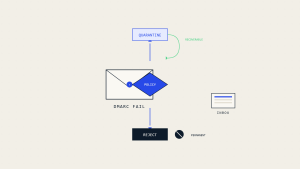
After discovery and remediation, move mature domains toward quarantine and then reject.
A staged approach should be based on:
- Domain readiness.
- Subdomain maturity.
- Sender group stability.
- Business criticality.
- Authentication pass rates.
- Remediation status.
Avoid percentage-based rollout as the primary strategy. Current DMARC-aware programs should stage enforcement by domain, subdomain, sender group, and business unit rather than relying on pct.
6. Monitor Reputation Separately from Authentication
DMARC reports show authentication outcomes.
They do not fully explain inbox placement.
Use provider tools and operational metrics where available, including:
- Google Postmaster Tools.
- Microsoft 365 message trace and security reports where applicable.
- Bounce data.
- Complaint trends.
- Engagement metrics.
- Blocklist and reputation monitoring.
- Delivery testing across mailbox providers.
Authentication and reputation must be monitored together.
XI. Compliance Implications
Email authentication supports many compliance and governance programs, but it should be described accurately.
DMARC can support anti-phishing, domain protection, vendor oversight, and communication integrity objectives. It can also provide evidence that the organization monitors unauthorized sending and authentication failures.
However, DMARC does not automatically satisfy GDPR, PCI DSS, HIPAA, SOC 2, NIS2, or any other framework by itself.
Better framing:
- DMARC supports anti-phishing and communication integrity controls.
- SPF and DKIM support sender authentication.
- DMARC reports support monitoring and evidence collection.
- Enforcement supports protection against exact-domain spoofing.
- MTA-STS and TLS-RPT support secure mail transport visibility.
Skysnag Comply helps organizations maintain visibility, reporting, and evidence around email authentication posture across sending sources and domains.
XII. Practical Operating Model
For organizations sending to Gmail and Microsoft, the operating model should be simple:
- Know every sender.
- Authenticate every sender.
- Align at least one authentication method with the visible From domain.
- Monitor DMARC reports continuously.
- Track provider reputation and complaint signals.
- Separate mail streams by function and risk.
- Move from monitoring to enforcement when ready.
- Treat delivery issues as both authentication and reputation problems.
- Review third-party senders regularly.
- Maintain documentation for audit and governance.
This model works because it does not depend on guessing exactly how Gmail or Microsoft weighs every signal internally.
It focuses on the controls senders can actually manage.
XIII. Key Takeaways
Gmail and Microsoft both require strong email authentication for serious senders, especially high-volume senders.
Gmail’s public sender requirements are more prescriptive for bulk senders, while Microsoft combines traditional authentication with implicit authentication signals such as reputation, sender history, recipient history, behavioral analysis, and tenant-specific controls.
DMARC passing does not guarantee inbox placement.
DMARC failing does not always mean immediate rejection.
Authentication must be managed alongside reputation, complaint rates, content quality, sending patterns, and provider-specific visibility.
The biggest operational risk is third-party sender misalignment. Every platform sending on behalf of the domain must be configured to pass aligned SPF or aligned DKIM.
The safest strategy is not to optimize for Gmail or Microsoft separately. It is to build a disciplined authentication program that works across both.
Start DMARC monitoring with Skysnag and get your free DMARC record.