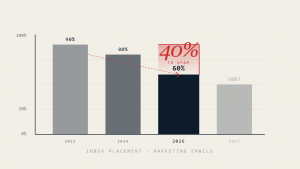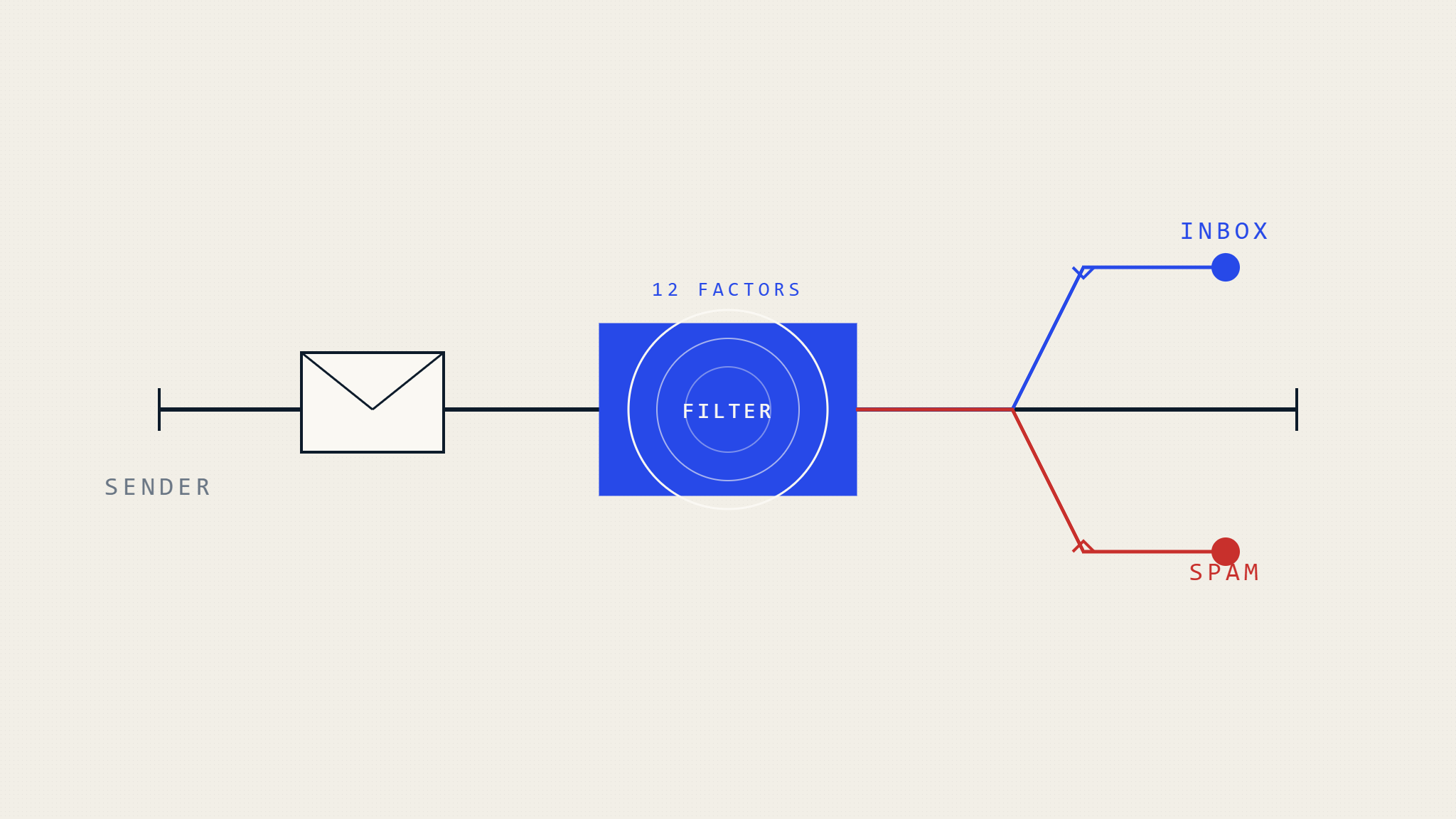
Email deliverability remains one of the most challenging aspects of digital communication, with legitimate business emails frequently landing in spam folders instead of reaching their intended recipients. Understanding why emails go to spam and how modern filtering systems operate is essential for maintaining effective communication channels and protecting your organization’s reputation.
Modern email providers process over 300 billion emails daily, with sophisticated algorithms determining which messages reach the inbox and which get relegated to spam folders. These filtering systems have evolved far beyond simple keyword detection, now incorporating machine learning, sender reputation analysis, and complex authentication protocols to protect users from unwanted messages.
I. How Email Filtering Systems Actually Work
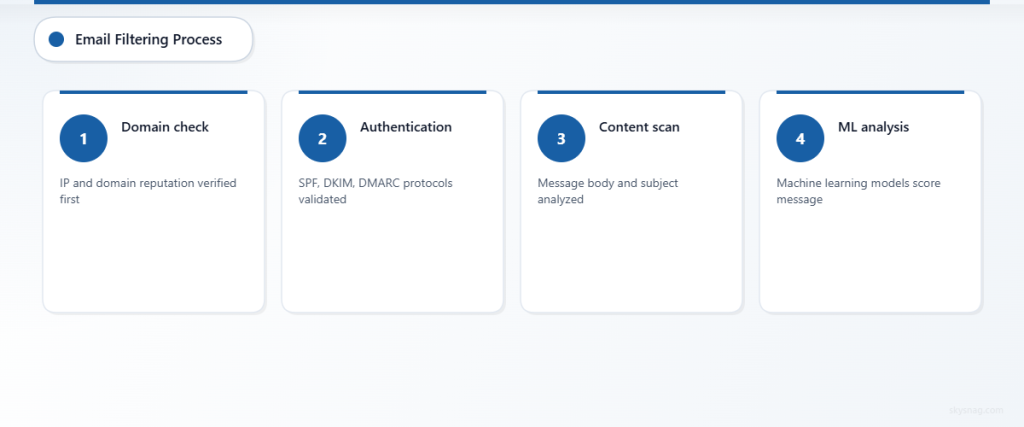
Email filtering operates through multiple layers of protection, each examining different aspects of incoming messages. Internet Service Providers (ISPs) like Gmail, Outlook, and Yahoo employ proprietary algorithms that analyze hundreds of factors within milliseconds of receiving an email.
The filtering process begins before your email even reaches the recipient’s server. Domain reputation, IP reputation, and authentication protocols are evaluated first. If your email passes these initial checks, content filters examine the message body, subject line, and attachments for spam indicators.
Machine learning models trained on millions of emails continuously adapt to new spam techniques, making the filtering process increasingly sophisticated. These systems learn from user behavior, noting which emails recipients mark as spam, delete without reading, or engage with positively.
II. The 12 Critical Factors That Send Emails to Spam
1. Sender Reputation and Domain Authority
Your sending domain’s reputation significantly impacts deliverability. ISPs maintain reputation scores based on historical sending patterns, complaint rates, and bounce rates. New domains or those with poor sending histories face immediate scrutiny.
Consistent sending patterns help establish credibility. Sudden spikes in email volume or irregular sending schedules trigger suspicion. Organizations should maintain steady sending volumes and avoid dramatic changes in email frequency without proper warming procedures.
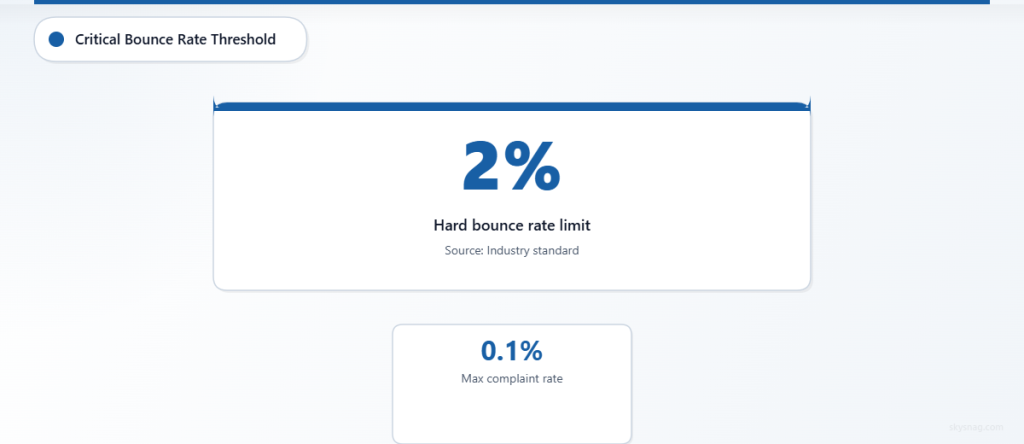
Domain age and authentication setup contribute to reputation scores. Newer domains require careful reputation building through gradual volume increases and maintaining low complaint rates below 0.1%.
2. Email Authentication Failures
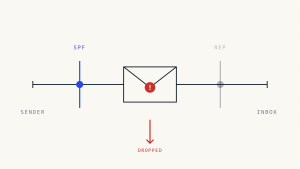
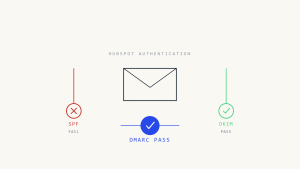
Missing or misconfigured email authentication protocols represent a major spam trigger. SPF (Sender Policy Framework), DKIM (DomainKeys Identified Mail), and DMARC (Domain-based Message Authentication, Reporting, and Conformance) records must be properly configured to verify sender legitimacy.
SPF records specify which IP addresses are authorized to send emails on behalf of your domain. Failure to include all sending sources results in authentication failures and spam folder placement.
DKIM provides cryptographic signatures that verify email integrity during transmission. Messages lacking valid DKIM signatures appear suspicious to filtering algorithms.
DMARC policies instruct receiving servers how to handle emails that fail SPF or DKIM checks. Without DMARC implementation, your domain remains vulnerable to spoofing attacks that damage sender reputation.
3. Poor List Hygiene and High Bounce Rates
Maintaining clean email lists directly impacts deliverability performance. Hard bounce rates exceeding 2% signal poor list management and trigger spam filtering mechanisms.
Invalid email addresses accumulate naturally as people change jobs or abandon old accounts. Regular list cleaning removes these addresses before they impact your sender reputation.
Spam traps, email addresses specifically created to catch unsolicited messages, pose significant threats to deliverability. Purchasing email lists or scraping contact information often introduces spam traps that immediately damage sender reputation.
Role-based addresses like info@, sales@, or support@ generate higher complaint rates and should be segmented or removed from marketing campaigns.
4. Spam-Triggering Content and Language
Content analysis remains a crucial component of spam filtering, though modern systems focus more on context than individual keywords. However, certain phrases and formatting patterns consistently trigger filters.
Excessive use of promotional language, ALL CAPS text, or multiple exclamation points raises suspicion. Words like “FREE,” “URGENT,” or “LIMITED TIME” require careful usage within broader message context.
HTML-to-text ratio imbalances flag messages as potentially suspicious. Emails with excessive HTML code relative to actual content appear spammy to filtering algorithms.
Personalization tokens that fail to populate correctly, displaying [FIRST_NAME] or similar placeholders, immediately identify bulk email campaigns and increase spam likelihood.
5. Subject Line Red Flags
Subject lines serve as the first filter checkpoint and significantly influence spam folder placement. Misleading subject lines that don’t match message content trigger immediate filtering.
Length matters: subject lines exceeding 50 characters often get truncated and perform poorly across email clients. Optimal length ranges between 30-40 characters for maximum deliverability and engagement.
Excessive punctuation, especially multiple question marks or exclamation points, signals spam behavior. Similarly, subject lines written entirely in capital letters trigger aggressive filtering.
Generic subject lines like “Important Information” or “Update” lack specificity and context that modern filters expect from legitimate business communication.
6. Image-Heavy Emails and Attachment Issues
Emails consisting primarily of images without sufficient text content face delivery challenges. Spam filters cannot analyze image content effectively, leading to higher spam folder placement rates.
The image-to-text ratio should maintain balance, with substantial text content accompanying any visual elements. Best practice suggests limiting images to 40% of total email content.
Certain attachment types, particularly executable files, compressed archives, or documents from unfamiliar senders, trigger automatic filtering. PDF attachments from unknown senders face particular scrutiny.
Large file sizes slow email processing and consumption, leading to delivery delays or filtering. Keeping total email size under 100KB improves deliverability across all major ISPs.
7. Suspicious Link Practices
Link structure and destination analysis plays a crucial role in spam detection. Shortened URLs from unfamiliar services raise immediate red flags with filtering systems.
Too many links within a single email suggests promotional intent and increases spam likelihood. Optimal link quantity remains under five per message, with each serving a clear purpose.
Links pointing to recently registered domains or those with poor reputations trigger immediate filtering. ISPs maintain databases of suspicious domains and block emails containing links to these destinations.
Mismatched display text and actual URLs, a common phishing technique, result in automatic spam folder placement or message blocking.
8. Technical Infrastructure Problems
Server configuration issues frequently cause legitimate emails to appear suspicious to filtering systems. Proper MX record setup, reverse DNS configuration, and SSL certificates are essential for deliverability.
Shared IP addresses with poor reputations affect all users on that infrastructure. Organizations sending significant email volumes should consider dedicated IP addresses to maintain control over their reputation.
Blacklist appearances from major reputation monitoring services like Spamhaus or Barracuda immediately impact deliverability across multiple ISPs. Regular monitoring and prompt removal requests are essential.
Missing or incorrect reverse DNS (PTR) records signal potential spam sources to receiving servers. PTR records should match your sending domain for optimal deliverability.
9. Recipient Engagement Patterns
Modern filtering systems analyze recipient behavior to determine message relevance and legitimacy. Low engagement rates signal potential spam content to machine learning algorithms.
Open rates below industry averages (typically 15-25% depending on sector) trigger algorithmic adjustments that reduce future deliverability for that sender.
High unsubscribe rates, particularly above 0.5%, indicate message quality issues and negatively impact sender reputation scores across all major ISPs.
Emails that recipients consistently delete without opening train filters to automatically route future messages from that sender to spam folders.
10. Timing and Sending Patterns
Unusual sending times or patterns trigger automated suspicion from filtering systems. Sending large volumes during typical spam hours (late night or early morning) increases filtering likelihood.
Consistent sending schedules help establish sender legitimacy. Random or erratic timing patterns suggest automated spam systems rather than legitimate business communication.
Geographic sending patterns matter: emails originating from locations inconsistent with sender domain registration or target audience raise filtering concerns.
Volume spikes without proper IP warming procedures immediately trigger rate limiting and spam filtering across major ISPs.
11. List Building and Permission Issues
The method used to acquire email addresses significantly impacts deliverability performance. Recipients who didn’t explicitly opt-in to receive emails generate higher complaint rates.
Purchased email lists consistently produce poor deliverability results and damage sender reputation through high bounce and complaint rates.
Single opt-in processes, while simpler, result in more unengaged recipients compared to confirmed double opt-in methods that ensure genuine interest.
Lack of clear unsubscribe mechanisms violates regulations and increases complaint rates, directly impacting spam folder placement for future campaigns.
12. Email Client and ISP Variations
Different email providers apply varying filtering criteria and strictness levels. Gmail’s filtering differs significantly from Outlook or Yahoo, requiring tailored approaches for optimal deliverability.
Corporate email systems often implement additional filtering layers beyond standard ISP protections, including keyword filtering, attachment blocking, and external sender restrictions.
Mobile email clients display content differently and may trigger different filtering mechanisms compared to desktop versions of the same email provider.
Understanding these variations allows for testing and optimization across multiple platforms to ensure consistent inbox placement regardless of recipient email provider.
III. Solutions for Improving Email Deliverability
Authentication and Technical Setup
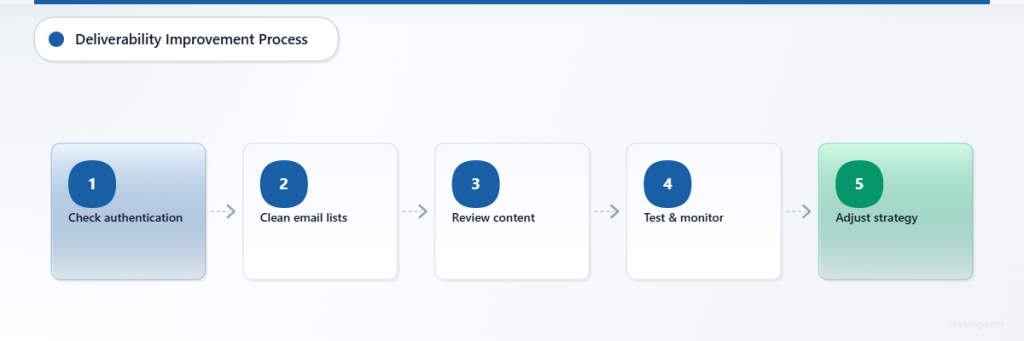
Implement comprehensive email authentication protocols including SPF, DKIM, and DMARC records. Work with DNS administrators to ensure proper configuration and regular monitoring of authentication status.
Skysnag Protect provides automated monitoring and management of email authentication protocols, helping organizations maintain optimal deliverability while protecting against spoofing attacks.
Establish dedicated IP addresses for high-volume sending and implement proper IP warming procedures when introducing new sending infrastructure.
Content Optimization Strategies
Focus on valuable, relevant content that recipients actually want to receive. Avoid promotional language overuse and maintain natural, conversational tone throughout your messages.
Optimize HTML structure and maintain proper text-to-image ratios. Ensure all content displays correctly across different email clients and devices.
Personalize messages beyond simple name insertion. Use behavioral data and preferences to create genuinely relevant content that encourages engagement.
List Management Best Practices
Implement double opt-in procedures for new subscribers and regularly clean your email lists to remove inactive or invalid addresses.
Segment your audience based on engagement levels and sending preferences. Tailor content and frequency to match recipient expectations and behavior patterns.
Monitor engagement metrics closely and remove consistently unengaged subscribers to maintain high-quality lists that improve overall deliverability.
Ongoing Monitoring and Maintenance
Regularly check your domain and IP reputation across major monitoring services. Address any blacklist appearances immediately through proper removal procedures.
Monitor complaint rates, bounce rates, and engagement metrics across different ISPs to identify and address platform-specific deliverability issues.
Test your emails before sending using spam testing tools and preview across multiple email clients to ensure consistent presentation and filtering avoidance.
IV. Key Takeaways
Understanding why emails go to spam requires recognizing that modern filtering systems evaluate multiple factors simultaneously. Success depends on maintaining strong sender reputation through proper authentication, engaging content, and clean list management practices.
Technical infrastructure, content quality, and recipient engagement all contribute equally to deliverability success. Organizations must address all factors comprehensively rather than focusing on individual elements.
Regular monitoring and proactive maintenance of email practices prevent deliverability issues before they impact business communication. Investment in proper email authentication and reputation management pays dividends through improved message delivery and recipient engagement.
Ready to protect your email deliverability and ensure your messages reach their intended recipients? Explore Skysnag Protect to implement comprehensive email authentication and monitoring solutions that keep your emails out of spam folders.