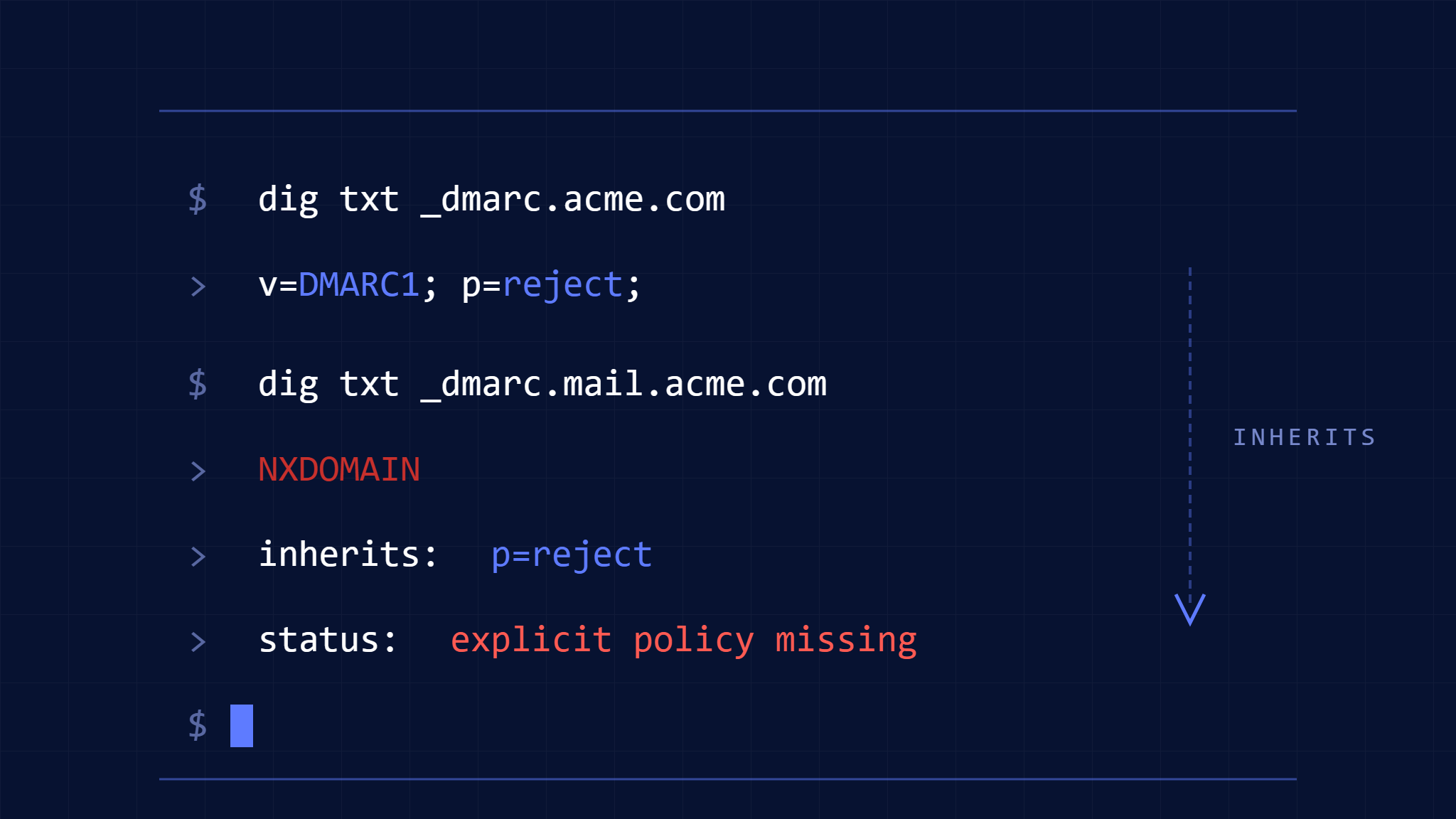
Subdomain takeover attempts now commonly bypass email authentication because organizations assume DMARC policy inheritance works automatically. It does not. When a subdomain lacks an explicit DMARC record, the subdomain inherits the organizational domain policy—but only if the organizational domain policy exists and is configured correctly. If inheritance fails, attackers can send unauthenticated mail from marketing.example.com, support.example.com, or any unclaimed subdomain, even when example.com enforces DMARC at p=reject.
Subdomain DMARC inheritance creates three failure conditions that security teams commonly miss: (1) the organizational domain policy exists but is misconfigured, so subdomains inherit a weaker policy than intended, (2) the subdomain sends mail through a third-party service that does not align with the organizational domain authentication, so inherited policy fails alignment checks, or (3) the subdomain is registered in DNS but not actively managed, creating an exploitable gap where attackers can claim the subdomain through hosting provider or DNS provider vulnerabilities and send mail before detection.
AI-powered phishing campaigns now scan for these gaps using automated DNS enumeration and policy validation. If a subdomain returns NXDOMAIN or a null DMARC record, the attacker tests whether spoofed mail from that subdomain passes DMARC. If it does, the subdomain becomes a persistent phishing vector.
This guide explains how subdomain DMARC inheritance actually works, where inheritance fails silently, and how to configure enforcement that closes exploitable gaps before attackers find them.
I. How DMARC Policy Inheritance Works (and Where It Breaks)
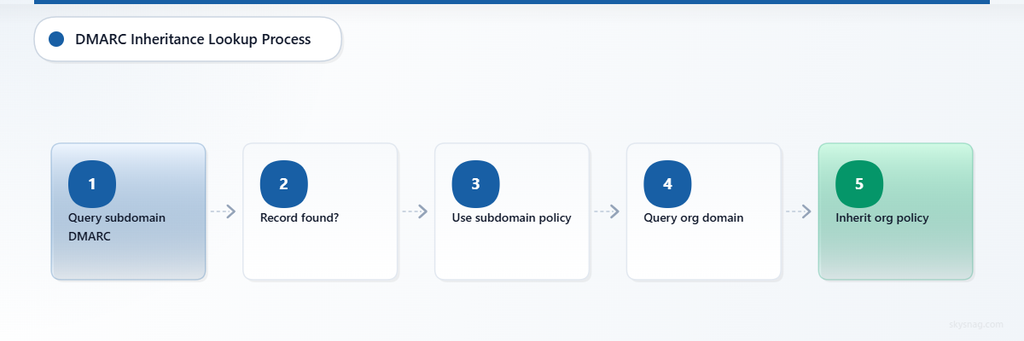
When a receiving mail server evaluates DMARC for [email protected], it queries DNS for a DMARC record at _dmarc.marketing.example.com. If no record exists, the server queries _dmarc.example.com. If a record exists at the organizational domain, the subdomain inherits the policy defined in that record.
This inheritance mechanism works correctly when:
- The organizational domain (
example.com) publishes a DMARC record - The subdomain (
marketing.example.com) does not publish a DMARC record - The subdomain sends mail that aligns with the organizational domain SPF or DKIM configuration
Inheritance fails when:
- The organizational domain DMARC record contains syntax errors, so the record is ignored and the subdomain effectively inherits no policy
- The subdomain sends mail through a third-party service that uses its own envelope sender domain, breaking SPF alignment
- The third-party service does not sign with a DKIM selector under the organizational domain, breaking DKIM alignment
- The subdomain is registered in DNS but not actively managed, so attackers can claim it through hosting provider account recovery, DNS provider vulnerabilities, or expired domain registration
When inheritance fails, the subdomain mail either fails DMARC silently (if the organizational policy is p=none or p=quarantine) or fails DMARC visibly but still reaches the inbox (if the receiving server does not honor enforcement or applies reputation overrides).
II. Common Subdomain DMARC Failure Scenarios
Scenario 1: Organizational Domain Policy Exists but Subdomain Authentication Misaligns
Setup:
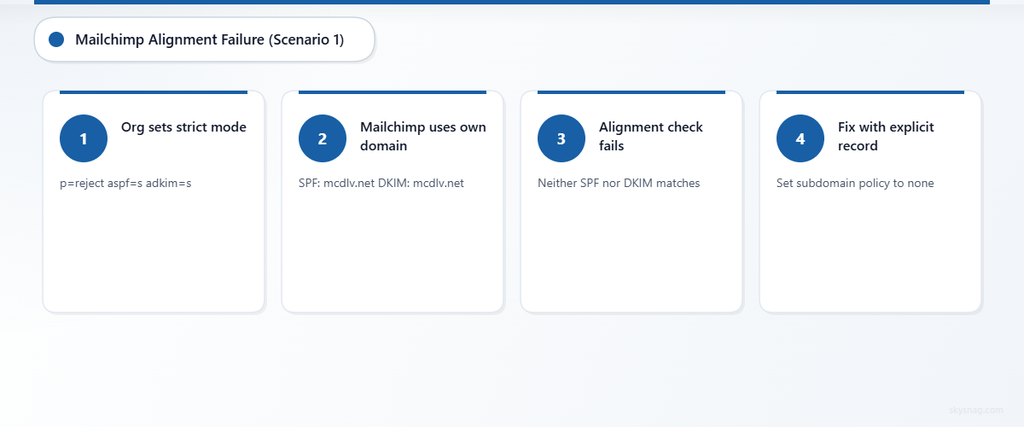
example.compublishesv=DMARC1; p=reject; aspf=s; adkim=smarketing.example.comsends mail through Mailchimp- Mailchimp envelope sender:
[email protected] - Mailchimp DKIM signature:
d=mcdlv.net
What happens:
- DMARC queries
_dmarc.marketing.example.com→ no record - DMARC queries
_dmarc.example.com→ findsp=reject; aspf=s; adkim=s - SPF evaluates
[email protected]→ passes SPF formcdlv.net, notmarketing.example.com - DKIM evaluates signature with
d=mcdlv.net→ passes DKIM formcdlv.net, notmarketing.example.com - DMARC alignment check fails because neither SPF nor DKIM aligns with
marketing.example.comin strict mode - Result: The inherited policy instructs receivers to reject the message, but because the policy was inherited and not explicitly set for the subdomain, some receivers may apply looser enforcement
Fix:
Publish an explicit DMARC record at _dmarc.marketing.example.com:
v=DMARC1; p=none; rua=mailto:[email protected]; sp=rejectThen configure Mailchimp to DKIM-sign with d=marketing.example.com or d=example.com, so DKIM alignment passes under relaxed mode.
Alternatively, use aspf=r; adkim=r at the organizational domain to allow relaxed alignment for subdomains.
Scenario 2: Subdomain Registered in DNS but Not Actively Managed
Setup:
example.compublishesv=DMARC1; p=rejectdev.example.comexists in DNS but no longer sends mail and no longer hosts services- Attacker discovers
dev.example.comthrough DNS enumeration - Attacker claims
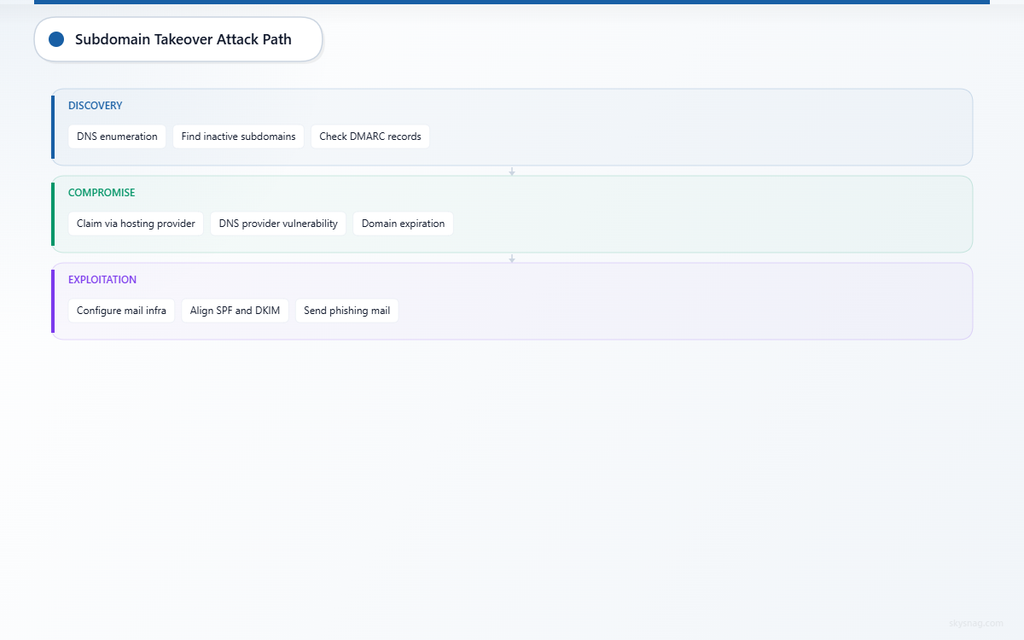
dev.example.comthrough hosting provider account recovery, DNS provider vulnerability, or domain expiration
What happens:
- Attacker configures mail infrastructure at
dev.example.com - Attacker sends phishing mail from
[email protected] - DMARC queries
_dmarc.dev.example.com→ no record - DMARC queries
_dmarc.example.com→ findsp=reject - Attacker-controlled mail infrastructure uses attacker-controlled SPF and DKIM, both of which align with
dev.example.comunder relaxed alignment mode - DMARC passes because attacker controls the subdomain and can configure compliant authentication
- Mail reaches inbox despite organizational domain enforcement
Fix:
Explicitly publish p=reject at _dmarc.dev.example.com:
v=DMARC1; p=reject; rua=mailto:[email protected]Remove DNS records for inactive subdomains. If the subdomain must remain registered, publish a null MX record to signal that the subdomain does not send or receive mail:
dev.example.com. IN MX 0 .Monitor DMARC reports for unexpected authentication from subdomains.
Scenario 3: Organizational Domain Policy Syntax Error Breaks Inheritance
Setup:
example.compublishes:
v=DMARC1; p=reject; rua=mailto:[email protected]; pct=50newsletter.example.comsends mail- No explicit DMARC record exists for
newsletter.example.com
What happens:
- DMARC queries
_dmarc.newsletter.example.com→ no record - DMARC queries
_dmarc.example.com→ finds record withpct=50 - Many modern DMARC implementations ignore
pct=or treat percentage-based enforcement inconsistently - Subdomain inherits a policy that may not be enforced predictably
- Attackers send spoofed mail from
newsletter.example.comand observe whether enforcement applies
Fix:
Remove pct= from the organizational domain policy:
v=DMARC1; p=reject; rua=mailto:[email protected]Stage enforcement by subdomain or sender group, not by percentage.
III. Explicit Subdomain Policy Configuration Patterns
Pattern 1: Inherit Organizational Domain Policy (Default Behavior)
Organizational domain record:
_dmarc.example.com. IN TXT "v=DMARC1; p=reject; rua=mailto:[email protected]"Subdomain behavior:
marketing.example.cominheritsp=rejectsupport.example.cominheritsp=reject- All subdomains inherit
p=rejectunless an explicit record exists
When to use:
- You control all subdomains
- All subdomains send mail through infrastructure that aligns with organizational domain SPF or DKIM
Pattern 2: Override Inherited Policy for Specific Subdomains
Organizational domain record:
_dmarc.example.com. IN TXT "v=DMARC1; p=reject; rua=mailto:[email protected]"Subdomain override:
_dmarc.marketing.example.com. IN TXT "v=DMARC1; p=none; rua=mailto:[email protected]"Result:
marketing.example.comusesp=none- All other subdomains inherit
p=reject
When to use:
- A specific subdomain sends mail through third-party services that cannot yet align with organizational domain authentication
- You need visibility into authentication results before enforcing policy on the subdomain
Pattern 3: Set Subdomain Policy at Organizational Domain Level
Organizational domain record:
_dmarc.example.com. IN TXT "v=DMARC1; p=reject; sp=quarantine; rua=mailto:[email protected]"Result:
example.comusesp=reject- All subdomains inherit
p=quarantine(defined bysp=)
When to use:
- You want different enforcement for organizational domain vs. subdomains
- Subdomains send lower-volume or lower-risk mail
Pattern 4: Explicit Enforcement for Every Subdomain
Organizational domain record:
_dmarc.example.com. IN TXT "v=DMARC1; p=reject; rua=mailto:[email protected]"Explicit subdomain records:
_dmarc.marketing.example.com. IN TXT "v=DMARC1; p=reject; rua=mailto:[email protected]"
_dmarc.support.example.com. IN TXT "v=DMARC1; p=reject; rua=mailto:[email protected]"
_dmarc.newsletter.example.com. IN TXT "v=DMARC1; p=reject; rua=mailto:[email protected]"
When to use:
- You want maximum visibility and control
- You want to eliminate ambiguity about which policy applies
- You want to detect subdomain takeover attempts through reporting anomalies
IV. Alignment Mode and Subdomain Inheritance Interaction
DMARC alignment mode (aspf= for SPF, adkim= for DKIM) controls whether alignment requires an exact domain match (strict mode) or allows organizational domain match (relaxed mode).
Relaxed mode (aspf=r; adkim=r):
- SPF passes if envelope sender domain is
mail.example.comand header From is[email protected] - DKIM passes if DKIM signature domain is
mail.example.comand header From is[email protected]
Strict mode (aspf=s; adkim=s):
- SPF passes only if envelope sender domain matches header From domain exactly
- DKIM passes only if DKIM signature domain matches header From domain exactly
Subdomain inheritance interaction:
When a subdomain inherits a policy with strict alignment mode, mail from that subdomain must align exactly. If the subdomain sends through a third-party service that uses its own domain for SPF or DKIM, strict alignment fails.
Example:
- Organizational domain:
v=DMARC1; p=reject; aspf=s; adkim=s - Subdomain:
marketing.example.comsends through Mailchimp - Mailchimp uses
[email protected]for envelope sender - Mailchimp DKIM-signs with
d=mcdlv.net - DMARC evaluates strict alignment: both SPF and DKIM fail alignment
- Result: DMARC fails, policy instructs reject
Fix options:
- Change organizational domain policy to relaxed mode:
aspf=r; adkim=r - Publish explicit subdomain policy with relaxed mode:
v=DMARC1; p=reject; aspf=r; adkim=r - Configure Mailchimp to DKIM-sign with organizational domain or subdomain selector
V. Subdomain Takeover Attack Patterns and DMARC Gaps
Subdomain takeover occurs when an attacker claims control of a subdomain that an organization registered but no longer actively manages. Common attack vectors include:
- Expired DNS hosting: Subdomain CNAME points to a hosting provider account that expired. Attacker registers new account with same provider and claims the subdomain.
- Dangling CNAME: Subdomain CNAME points to a service (GitHub Pages, AWS S3, Heroku, etc.) that no longer exists. Attacker registers the service name and serves content from the subdomain.
- DNS provider account compromise: Attacker gains access to DNS provider account through credential reuse, phishing, or provider vulnerability. Attacker modifies subdomain records to point to attacker-controlled infrastructure.
DMARC inheritance does not prevent subdomain takeover. If an attacker controls the subdomain infrastructure, the attacker can configure SPF and DKIM to align with the subdomain, passing DMARC even when the organizational domain enforces p=reject.
Detection and prevention:
- Explicit subdomain policies: Publish DMARC records at every subdomain to gain visibility into authentication activity.
- DNS monitoring: Monitor DNS records for unexpected changes to subdomain A, AAAA, CNAME, MX, or TXT records.
- DMARC reporting analysis: Review DMARC reports for authentication from subdomains that should not send mail.
- Null MX records: Publish null MX for subdomains that do not send or receive mail:
inactive.example.com. IN MX 0 .- Remove unused DNS records: Delete A, AAAA, and CNAME records for subdomains that no longer serve content or send mail.
VI. Debugging Inherited DMARC Policy Failures
When a subdomain inherits a DMARC policy but mail fails enforcement unexpectedly, follow this diagnostic process:
Step 1: Verify Organizational Domain Policy Syntax
Query the organizational domain DMARC record:
dig TXT _dmarc.example.com +shortExpected output:
"v=DMARC1; p=reject; rua=mailto:[email protected]"Common syntax errors that break inheritance:
- Missing
v=DMARC1 - Invalid
p=value (must benone,quarantine, orreject) - Malformed
rua=address - Inclusion of deprecated
pct=tag
If syntax errors exist, the record may be ignored, causing subdomains to inherit no policy.
Step 2: Verify Subdomain Record Absence or Presence
Query the subdomain DMARC record:
dig TXT _dmarc.marketing.example.com +shortExpected output (if inheriting):
(no output)Expected output (if explicit override):
"v=DMARC1; p=none; rua=mailto:[email protected]"If a record exists at the subdomain, inheritance does not occur. The subdomain uses its own policy.
Step 3: Verify SPF Alignment
Check the SPF result and alignment in DMARC reports or mail headers.
Common SPF alignment failure:
- Envelope sender domain:
[email protected] - Header From domain:
[email protected] - SPF passes for
mail.thirdpartyservice.com - SPF alignment fails because envelope sender domain does not match header From domain
Fix:
- Configure third-party service to use organizational domain or subdomain as envelope sender
- Use relaxed alignment mode at organizational domain or subdomain level
Step 4: Verify DKIM Alignment
Check the DKIM signature domain in mail headers:
DKIM-Signature: v=1; a=rsa-sha256; d=thirdpartyservice.com; s=selector; ...If d=thirdpartyservice.com and header From is [email protected], DKIM alignment fails in strict mode.
Fix:
- Configure third-party service to DKIM-sign with
d=marketing.example.comord=example.com - Use relaxed alignment mode at organizational domain or subdomain level
Step 5: Review DMARC Reports for Subdomain Activity
DMARC aggregate reports include subdomain authentication results. Look for:
- Subdomains you do not recognize
- High failure rates from known subdomains
- Authentication from IP addresses you do not control
If a subdomain appears in reports but you do not control the subdomain infrastructure, investigate for subdomain takeover.
In a managed Skysnag deployment, use the reporting destination generated by Skysnag. The following is a manual example only:
v=DMARC1; p=none; rua=mailto:[email protected]A traditional static record can work, but only if reports are actively received, parsed, analyzed, and acted on.
VII. Recommended Subdomain DMARC Configuration Strategy
- Publish organizational domain policy:
v=DMARC1; p=reject; rua=mailto:[email protected]; sp=quarantineThis enforces p=reject for the organizational domain and p=quarantine for all subdomains by default.
- Publish explicit policies for active subdomains:
_dmarc.marketing.example.com. IN TXT "v=DMARC1; p=none; rua=mailto:[email protected]"
_dmarc.support.example.com. IN TXT "v=DMARC1; p=reject; rua=mailto:[email protected]"
This provides visibility into authentication activity and allows staged enforcement per subdomain.
- Remove DNS records for inactive subdomains.
- Publish null MX for subdomains that do not send or receive mail:
inactive.example.com. IN MX 0 .- Monitor DMARC reports for unexpected subdomain activity.

Use Skysnag Protect to identify legitimate senders, detect unauthorized sources, and move toward enforcement:
VIII. Key Takeaways
Subdomain DMARC inheritance works only when the organizational domain publishes a valid DMARC record and the subdomain does not publish its own record. Inheritance fails when the organizational domain policy contains syntax errors, the subdomain sends mail through third-party services that do not align, or the subdomain is registered but not actively managed, creating subdomain takeover opportunities.
Publish explicit DMARC policies for all active subdomains to gain visibility and control. Remove DNS records for inactive subdomains. Use null MX records for subdomains that do not send or receive mail. Monitor DMARC reports for unexpected subdomain authentication activity.
Start DMARC monitoring with Skysnag and get your free DMARC record: