E-commerce businesses depend on trusted email.
Customers receive order confirmations, password reset links, shipping updates, refund notices, account alerts, payment notifications, support messages, and marketing campaigns. If attackers can spoof those messages, impersonate the store, or abuse weak email authentication, they can damage customer trust and create avoidable security risk.
For Shopify and WooCommerce merchants, email security is not only a deliverability issue.
It is part of protecting the customer journey around payment, account access, and post-purchase communication.
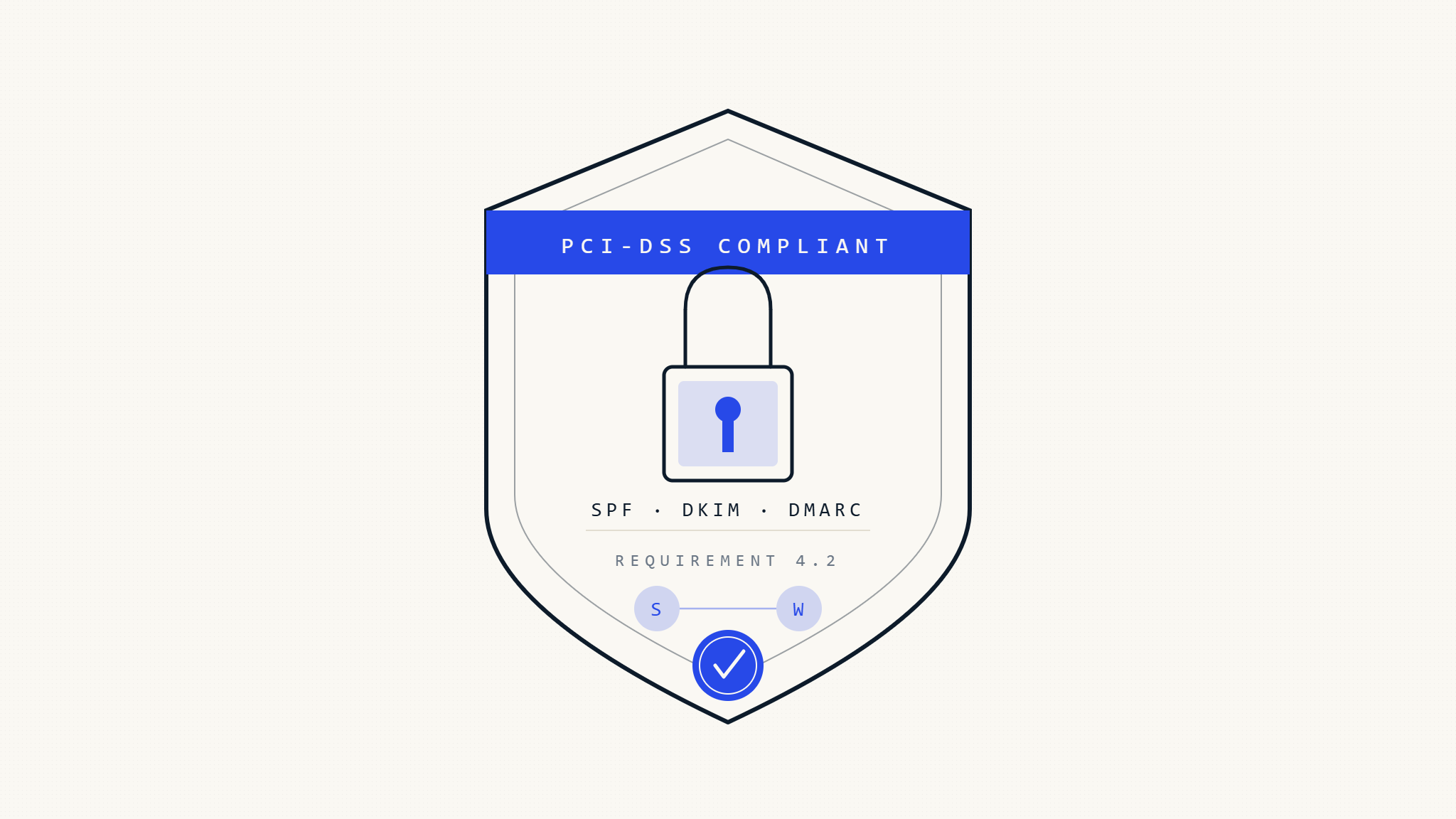
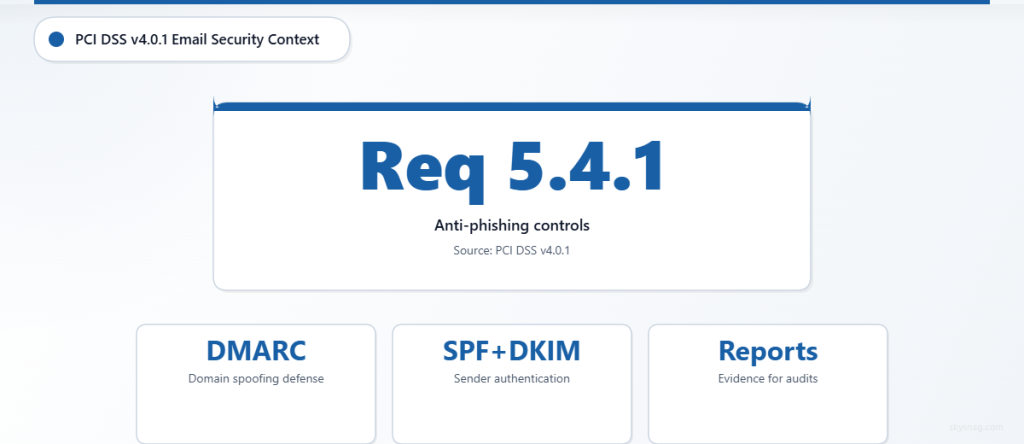
PCI DSS does not name DMARC, SPF, or DKIM as standalone mandatory protocols. However, PCI DSS v4.0.1 Requirement 5.4.1 requires processes and automated mechanisms to detect and protect personnel against phishing attacks. Email authentication can support that anti-phishing objective as part of a broader security and compliance program.
The right framing is simple:
DMARC does not make an e-commerce business PCI DSS compliant by itself. But DMARC, SPF, DKIM, MTA-STS, and TLS-RPT can help reduce domain spoofing, improve sender visibility, and provide evidence that email authentication is being monitored and maintained.
For e-commerce merchants, that matters.
A fake order notification, refund request, invoice update, or password reset email can become the start of a broader attack against customers, staff, or payment workflows.
I. Why Email Authentication Matters for E-commerce
E-commerce email carries trust.
A customer expects messages from your store to be legitimate. A support agent expects internal alerts to be reliable. A finance team expects billing emails to come from known systems. A store owner expects third-party apps to send messages safely.
Attackers exploit that trust.
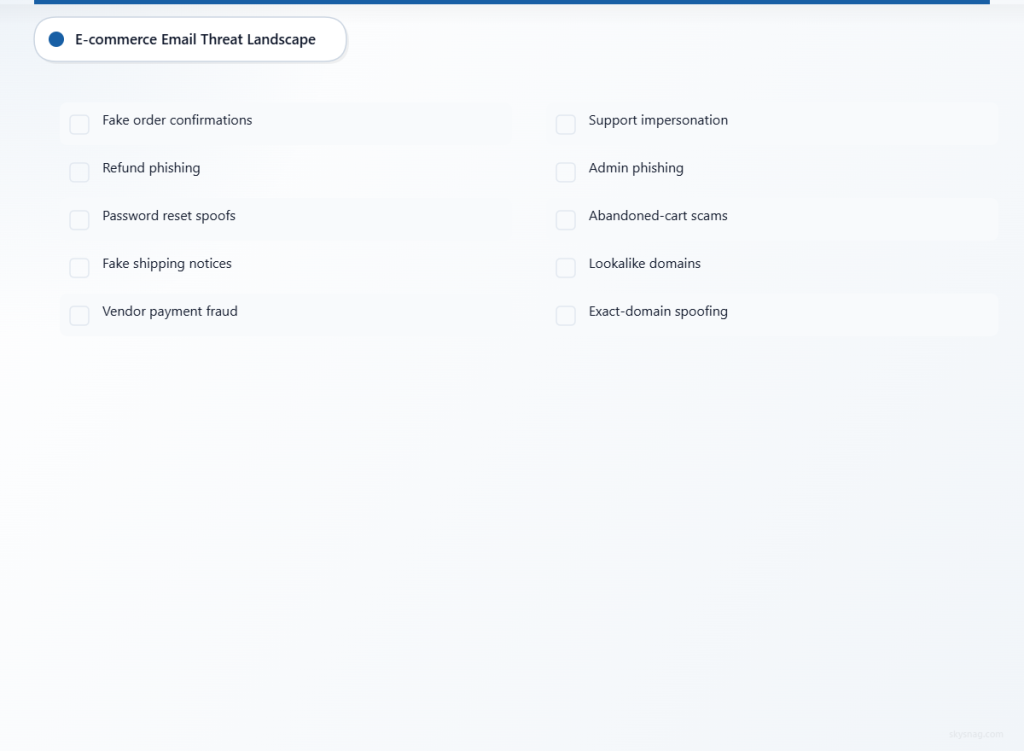
Common e-commerce email threats include:
- Fake order confirmation emails
- Refund and chargeback phishing
- Password reset impersonation
- Fake shipping notifications
- Vendor payment fraud
- Customer support impersonation
- Store administrator phishing
- Abandoned-cart phishing
- Lookalike domain abuse
- Exact-domain spoofing
DMARC helps address one specific but important risk: attackers sending email that appears to come from your real domain.
When properly implemented, DMARC allows receiving mail servers to evaluate whether a message claiming to come from your domain is authenticated and aligned.
This helps protect the visible domain customers see in the From address.
II. PCI DSS Context: What Email Authentication Supports
PCI DSS focuses on protecting cardholder data and maintaining secure payment environments.
Email authentication does not directly protect stored cardholder data. It does not replace payment gateway controls, secure checkout configuration, access controls, vulnerability management, or anti-malware protections.
But it can support PCI DSS security objectives in several practical ways.
Anti-Phishing Controls
PCI DSS v4.0.1 Requirement 5.4.1 focuses on processes and automated mechanisms to detect and protect personnel against phishing attacks.
DMARC, SPF, and DKIM can support this by reducing the ability of attackers to impersonate trusted store domains in email.
Access Protection
Password reset emails, administrator alerts, and account verification messages are often part of the access workflow for e-commerce platforms.
If these emails can be spoofed, attackers may trick staff or customers into entering credentials on fake pages.
Vendor and Third-Party Risk
Shopify apps, WooCommerce plugins, CRMs, support tools, review platforms, email marketing services, and transactional email providers may all send email on behalf of a store.
DMARC reporting helps identify which services are sending, which are properly aligned, and which require remediation.
Monitoring and Evidence
DMARC reports can provide evidence that the organization is monitoring email authentication, identifying unauthorized sources, and moving toward enforcement.
That evidence can support security reviews, internal audits, vendor assessments, and compliance documentation.
III. Shopify vs WooCommerce: Different Responsibilities
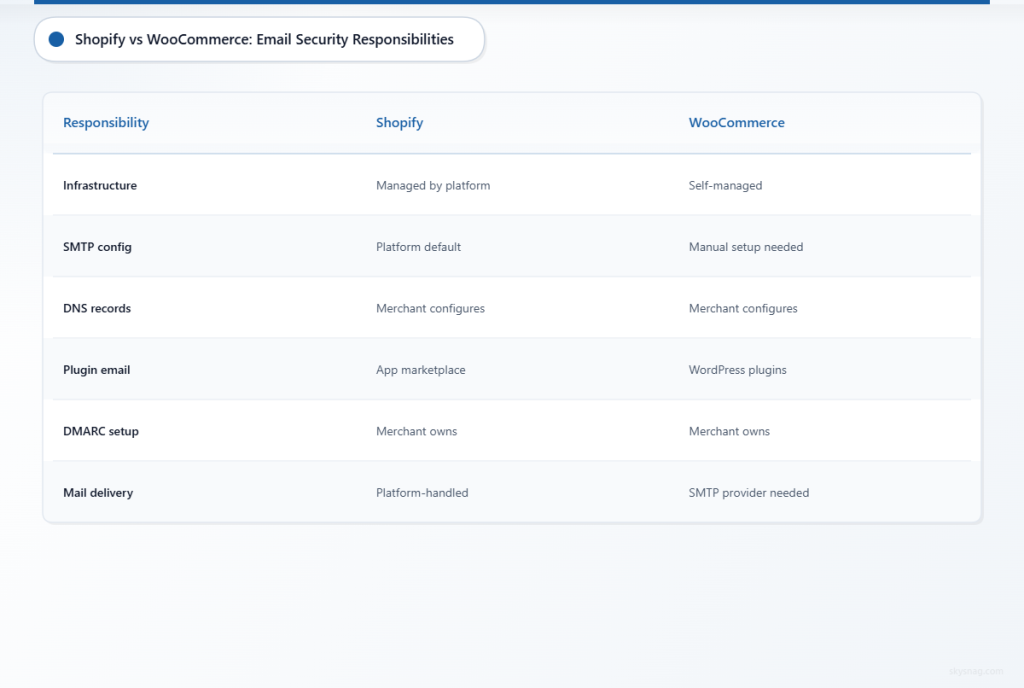
Shopify and WooCommerce have different operating models.
That affects how merchants approach email authentication.
IV. Shopify Email Security Responsibilities
Shopify provides a hosted commerce platform. This reduces infrastructure responsibility for the merchant, but it does not remove the need to manage domain-level email authentication.
Shopify merchants still need to understand:
- Which domain is used for customer-facing email
- Whether Shopify is authorized to send on behalf of the domain
- Whether third-party Shopify apps send email
- Whether marketing platforms use the same domain
- Whether support tools send from the store domain
- Whether DMARC reporting is monitored
- Whether the domain is moving toward enforcement
Shopify handles many platform-level controls, but your domain identity remains your responsibility.
If customers receive email from [email protected], that domain must be protected.
V. WooCommerce Email Security Responsibilities
WooCommerce is usually self-managed through WordPress hosting and connected plugins.
That creates more flexibility, but also more responsibility.
WooCommerce merchants need to manage:
- WordPress mail configuration
- SMTP provider selection
- Plugin-generated emails
- Hosting mail behavior
- Transactional email delivery
- DNS authentication records
- DKIM configuration
- SPF authorization
- DMARC reporting
- Third-party email services
- Security of admin and plugin access
WooCommerce stores should avoid relying on default PHP mail for important transactional emails. A dedicated SMTP or transactional email provider with SPF, DKIM, and DMARC support is usually a safer and more reliable approach.
VI. Step 1: Map All E-commerce Email Flows
Before changing DNS records, map every source that sends email for the store.
Include customer-facing, staff-facing, and vendor-facing messages.
Common sources include:
- Shopify transactional email
- WooCommerce order emails
- WordPress system emails
- SMTP providers
- Marketing platforms
- Abandoned-cart tools
- Review request apps
- Helpdesk and ticketing tools
- CRM platforms
- Shipping and fulfillment tools
- Subscription platforms
- Marketplace plugins
- Invoice and accounting systems
- Payment notification systems
- Security alert tools
- Staff mailbox providers
For each sender, document:
- Sending platform
- Business owner
- Message type
- Sending domain
- Return-Path domain
- DKIM signing domain
- SPF authorization
- DMARC alignment status
- Message volume
- Business criticality
- Vendor support contact
This inventory is the foundation for safe enforcement.
Without it, a merchant may accidentally block legitimate order confirmations, password resets, or support emails.
VII. Step 2: Configure SPF Carefully
SPF identifies which servers are authorized to send email for a domain.
A simplified example might look like this:
v=spf1 include:shops.shopify.com include:_spf.google.com include:sendgrid.net ~allThis is only an example. Merchants should not copy it blindly.
The correct SPF record depends on the actual services sending email for the domain.
Important SPF guidance:
- Include only authorized senders.
- Avoid unnecessary includes.
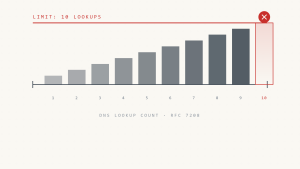
- Stay within the 10 DNS lookup limit.
- Remove old vendors that no longer send email.
- Do not rely on SPF alone for DMARC.
- Move toward
-allonly after legitimate senders are identified and tested.
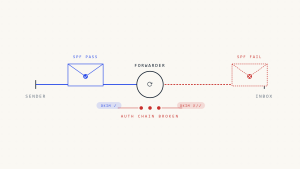
SPF can be fragile because it depends on the Return-Path domain and sending IP. It can also break in forwarding scenarios.
That is why DKIM is often the better long-term foundation for DMARC alignment.
VIII. Step 3: Enable DKIM for Every Major Sender
DKIM adds a cryptographic signature to outgoing email.
For DMARC, the key point is alignment.
The DKIM signing domain should align with the visible From domain whenever possible.
For Shopify merchants, confirm that Shopify and any connected apps or external platforms support authenticated sending for your domain.
For WooCommerce merchants, configure DKIM through the SMTP or transactional email provider. Most professional providers generate DNS records that must be added to the domain.
Common DKIM checks:
- Is DKIM enabled?
- Which selector is being used?
- Does the DKIM
d=domain align with the From domain? - Are third-party senders signing with your domain or their own?
- Are DKIM keys strong enough for current provider standards?
- Is there a documented rotation process?
- Are old selectors removed when no longer used?
A third-party platform may sign with its own domain. That may authenticate the vendor, but it may not help your DMARC result unless the DKIM domain aligns with your visible From domain.
IX. Step 4: Start DMARC Monitoring
DMARC connects SPF and DKIM authentication back to the visible From domain.
A message passes DMARC when at least one of the following is true:
- SPF passes and the SPF-authenticated domain aligns with the visible From domain.
- DKIM passes and the DKIM signing domain aligns with the visible From domain.
Start with monitoring before enforcement.
A traditional static DMARC monitoring record may look like this:
v=DMARC1; p=none; rua=mailto:[email protected]This record can work, but only if reports are actively received, parsed, analyzed, and acted on.
For most merchants, raw DMARC XML reports are difficult to manage manually.

The better approach is to start DMARC monitoring through Skysnag and get a free DMARC record generated for your domain:
Skysnag helps merchants identify legitimate senders, detect unauthorized sources, fix authentication gaps, and move toward enforcement with confidence.
Avoid enabling forensic reports through ruf= by default. Failure reports can create privacy and retention concerns and have limited adoption among major receivers. Use them only after privacy, legal, and security review.
X. Step 5: Configure Shopify Email Authentication
Shopify merchants should begin by reviewing the domain used for store communication.
In Shopify Admin, review your domain settings and confirm which domain is used for customer-facing emails.
Key tasks include:
- Verify custom domain ownership.
- Confirm Shopify is authorized to send mail for the domain.
- Review any DNS records Shopify recommends.
- Confirm whether Shopify emails pass SPF or DKIM alignment.
- Identify Shopify apps that send email separately.
- Ensure marketing and support tools are included in the sender inventory.
- Monitor DMARC reports after DNS changes.
Shopify apps deserve special attention.
Common app categories that may send email include:
- Abandoned-cart apps
- Review request apps
- Loyalty platforms
- Subscription tools
- Customer support apps
- Shipping notification tools
- Invoice tools
- Marketplace or wholesale apps
Each app should either send from an authenticated domain that aligns with your store domain or use its own clearly branded domain where appropriate.
Do not assume every app inherits Shopify’s authentication automatically.
XI. Step 6: Configure WooCommerce Email Authentication
WooCommerce merchants should avoid sending critical email through unauthenticated hosting mail or default PHP mail.
A better approach is to use a dedicated SMTP or transactional email provider.
Common WooCommerce email providers include:
- Amazon SES
- SendGrid
- Mailgun
- Postmark
- SMTP.com
- Brevo
- MailerSend
- Google Workspace SMTP
- Microsoft 365 SMTP
Configuration steps:
- Choose a provider that supports SPF, DKIM, and custom domain authentication.
- Install and configure a trusted SMTP plugin.
- Set the From address to a domain you control.
- Add the provider’s SPF and DKIM DNS records.
- Send test messages to Gmail, Outlook, and other providers.
- Confirm SPF, DKIM, and DMARC alignment.
- Monitor DMARC reports for WooCommerce and plugin-generated emails.
Example SPF record for a WooCommerce SMTP provider:
v=spf1 include:spf.yourprovider.example ~allExample DKIM record format:
selector._domainkey.yourstore.com TXT "v=DKIM1; k=rsa; p=YOUR_PUBLIC_KEY"These examples are placeholders. Use the exact records provided by your email provider.
XII. Step 7: Secure E-commerce Email Content
Email authentication protects domain identity, but merchants should also reduce sensitive data exposure inside emails.
Good practices include:
- Do not include full card numbers in email.
- Avoid exposing unnecessary payment details.
- Use masked payment references where needed.
- Direct customers to secure portals for sensitive account actions.
- Avoid login links that look suspicious or inconsistent.
- Use consistent branding and sender addresses.
- Keep order and refund emails clear and predictable.
- Review email templates after plugin changes.
- Remove unnecessary customer data from templates.
- Avoid including sensitive admin details in internal alerts.
For PCI DSS alignment, email should not become a channel where sensitive payment data is unnecessarily exposed.
XIII. Step 8: Move Toward DMARC Enforcement
Monitoring is not the final goal.
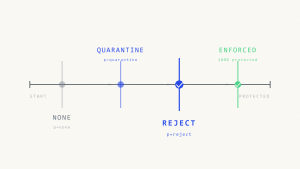
Once legitimate senders are identified and aligned, the store should move toward enforcement.
A practical path:
- Start with DMARC monitoring.
- Identify all legitimate senders.
- Fix SPF and DKIM alignment gaps.
- Review Shopify apps, WooCommerce plugins, and third-party tools.
- Move lower-risk subdomains to
p=quarantine. - Monitor impact.
- Move the main domain to
p=quarantinewhen ready. - Move mature domains to
p=rejectafter sustained confidence.
Before enforcement, confirm:
- Order confirmations pass DMARC.
- Password reset emails pass DMARC.
- Customer support emails pass DMARC.
- Marketing emails pass DMARC or use a separate authenticated domain.
- Third-party apps are documented.
- Vendors are aligned.
- Rollback procedures exist.
- DMARC reports are actively monitored.
Avoid relying on percentage-based rollout as the primary strategy. Current DMARC-aware programs should stage enforcement by domain, subdomain, sender group, and business function.
XIV. Step 9: Add MTA-STS and TLS-RPT
DMARC protects sender authentication. It does not enforce encrypted transport between mail servers.
MTA-STS and TLS-RPT help strengthen the transport layer.
MTA-STS allows a domain to publish a policy requiring supporting mail servers to use TLS when delivering mail to the domain.
TLS-RPT provides reports about TLS delivery issues.
For e-commerce merchants, these controls can support a stronger email trust posture for account, support, order, and operational communications.
Example MTA-STS policy:
version: STSv1
mode: enforce
mx: mail.yourstore.com
max_age: 86400
Example TLS-RPT record:
_smtp._tls.yourstore.com. IN TXT "v=TLSRPTv1; rua=mailto:[email protected]"These should be implemented carefully and tested before enforcement.
XV. Step 10: Maintain PCI DSS Evidence
Email authentication should be documented as part of the broader security program.
Useful evidence may include:
- Domain inventory
- Sender inventory
- SPF, DKIM, and DMARC records
- MTA-STS and TLS-RPT records
- DMARC monitoring reports
- Authentication pass/fail trends
- Unauthorized sender investigations
- Third-party sender reviews
- DNS change records
- Incident response procedures
- Email security testing results
- Vendor documentation
- Security awareness and phishing protection evidence
- Enforcement policy history
For PCI DSS discussions, the safest wording is:
“Email authentication supports anti-phishing, domain protection, and communication integrity controls within the organization’s broader PCI DSS security program.”
Avoid claiming that DMARC alone satisfies PCI DSS.
XVI. Monitoring and Review Schedule
E-commerce environments change constantly.
New apps are installed. Marketing platforms change. Plugins are updated. SMTP providers rotate infrastructure. Agencies launch campaigns. Staff connect new tools.
A review schedule helps prevent drift.
Weekly
- Review DMARC authentication failures.
- Check for unknown sending sources.
- Review delivery issues for order and password reset emails.
- Investigate sudden changes in sending volume.
Monthly
- Review third-party apps and plugins that send email.
- Validate SPF includes and remove unused services.
- Confirm DKIM alignment for major senders.
- Review DMARC enforcement readiness.
Quarterly
- Validate DNS records.
- Review vendor access and sender inventory.
- Test critical email flows.
- Review incident response procedures.
- Update compliance documentation.
Annually
- Reassess email security risks.
- Review PCI DSS evidence.
- Validate all domains and subdomains.
- Review data retention and report handling.
- Confirm enforcement posture remains appropriate.
XVII. Common Mistakes to Avoid
E-commerce merchants often make the same mistakes.
Avoid these:
- Publishing DMARC but never reviewing reports.
- Using
p=noneindefinitely. - Enabling
ruf=without privacy review. - Assuming Shopify apps inherit Shopify authentication.
- Allowing WooCommerce plugins to bypass authenticated SMTP.
- Adding too many SPF includes and exceeding lookup limits.
- Forgetting old campaign or regional domains.
- Using the same domain for all transactional and marketing mail without segmentation.
- Moving to enforcement before password reset and order emails are aligned.
- Treating DMARC as a deliverability fix only.
- Claiming DMARC alone satisfies PCI DSS.
These mistakes create unnecessary risk.
XVIII. How Skysnag Protect Helps E-commerce Merchants
Skysnag Protect helps e-commerce businesses manage DMARC, SPF, DKIM, MTA-STS, TLS-RPT, and enforcement readiness across complex sending environments.
For Shopify and WooCommerce merchants, Skysnag Protect supports:
- DMARC monitoring
- Free DMARC record generation
- Sender discovery
- Unauthorized sender detection
- SPF and DKIM alignment visibility
- Third-party app and vendor review
- Subdomain visibility
- Enforcement readiness tracking
- MTA-STS and TLS-RPT support
- Compliance-facing reporting
- Evidence for security reviews and audits
Instead of manually parsing XML reports or guessing which vendors are sending email, merchants can see which sources are legitimate, which are failing, and which domains are ready for enforcement.
Start DMARC monitoring with Skysnag and get your free DMARC record:
Learn more about Skysnag Protect:
XIX. Implementation Checklist
Use this checklist as a practical starting point.
- [ ] Inventory all domains and subdomains used by the store.
- [ ] Identify all Shopify apps, WooCommerce plugins, and third-party platforms that send email.
- [ ] Document each sender’s business owner, message type, and criticality.
- [ ] Configure SPF for authorized senders only.
- [ ] Review SPF DNS lookup limits.
- [ ] Enable DKIM for Shopify, WooCommerce SMTP providers, and third-party senders.
- [ ] Confirm at least one authentication method aligns with the visible From domain.
- [ ] Start DMARC monitoring through Skysnag or another monitored reporting destination.
- [ ] Avoid forensic reporting unless privacy, legal, and security teams approve it.
- [ ] Review order confirmation, password reset, refund, and support emails.
- [ ] Remediate legitimate senders that fail DMARC.
- [ ] Move mature domains toward
p=quarantine. - [ ] Move to
p=rejectonce legitimate mail is consistently aligned. - [ ] Implement MTA-STS and TLS-RPT where appropriate.
- [ ] Maintain documentation for PCI DSS security reviews.
- [ ] Review authentication posture regularly.
XX. Key Takeaways
Shopify and WooCommerce merchants rely on trusted email for order confirmations, account access, support, refunds, shipping updates, and customer communication.
PCI DSS does not mandate DMARC, SPF, or DKIM by name, but email authentication can support anti-phishing, domain protection, vendor oversight, and communication integrity objectives within a broader PCI DSS security program.
Shopify merchants should review custom domain authentication and third-party app sending behavior.
WooCommerce merchants should use authenticated SMTP or transactional email providers and avoid relying on default WordPress mail for critical customer communication.
DMARC monitoring should be the starting point, not the final state.
The long-term goal for important store domains should be enforcement through p=quarantine or p=reject, once legitimate senders are aligned.
For e-commerce businesses, email authentication is not just a technical DNS task. It is part of protecting customer trust around the payment experience.
Start DMARC monitoring with Skysnag and get your free DMARC record: