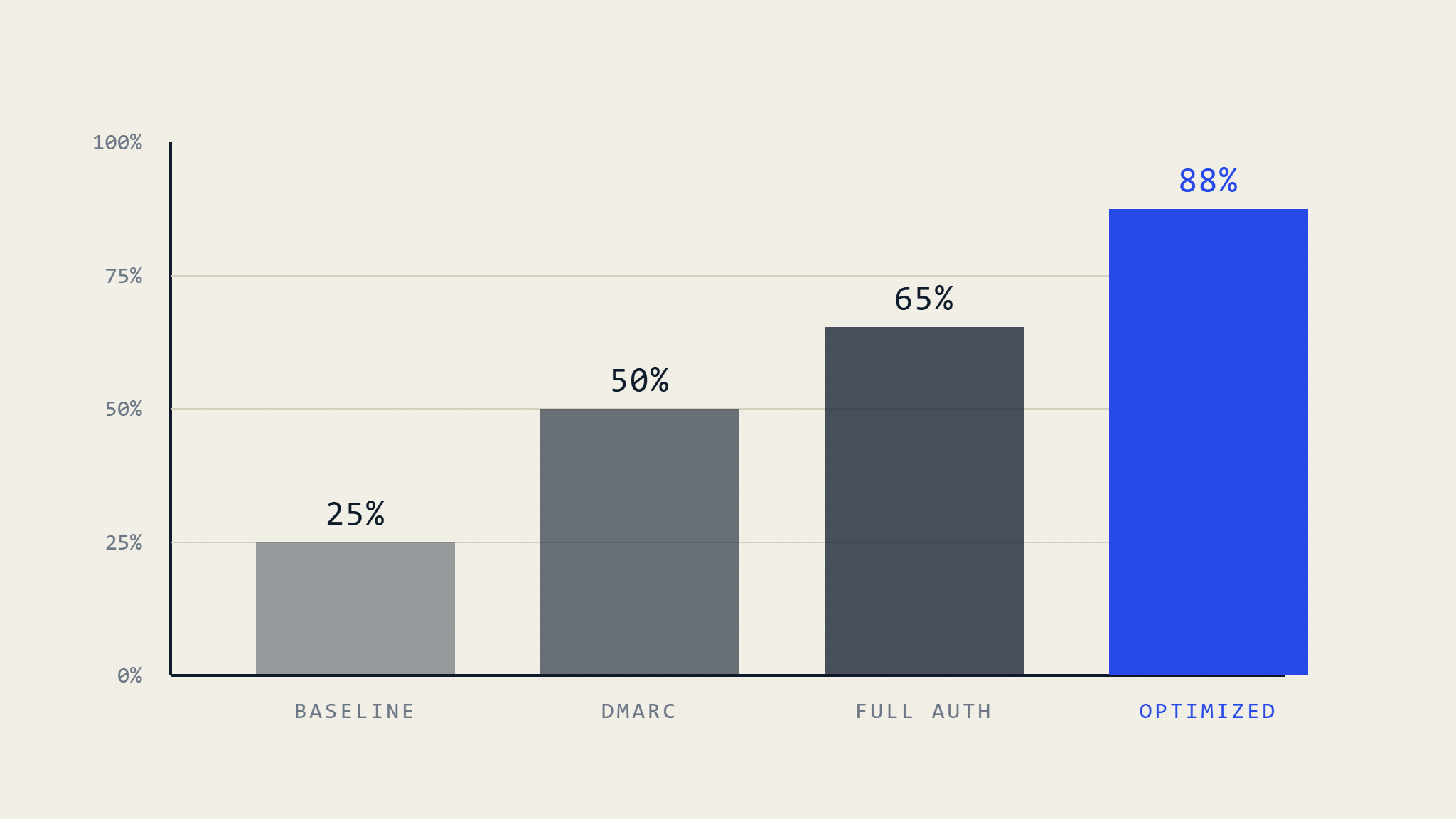
Email marketing campaigns can generate significant ROI, but only if your messages actually reach recipients’ inboxes. Your inbox placement rate directly impacts revenue, customer engagement, and brand reputation. This comprehensive guide reveals data-driven strategies to maximize inbox delivery through proper email authentication and DMARC compliance.
I. What is Inbox Placement Rate and Why It Matters
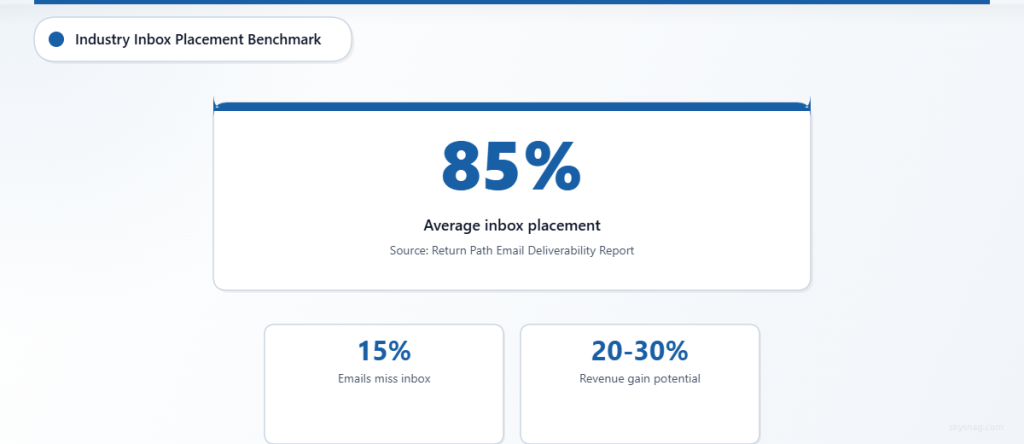
Inbox placement rate measures the percentage of your legitimate emails that successfully land in recipients’ primary inboxes rather than spam folders, promotions tabs, or getting blocked entirely. Unlike delivery rate (which only confirms the email reached the receiving server), inbox placement rate indicates actual visibility to your audience.
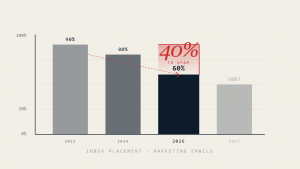
According to Return Path’s Email Deliverability Benchmark Report, the average inbox placement rate across industries hovers around 85%, meaning 15% of legitimate emails never reach their intended destination. For organizations sending high-volume campaigns, this translates to substantial lost opportunities and revenue.
The Business Impact of Poor Inbox Placement
Organizations with low inbox placement rates face multiple challenges:
- Revenue Loss: E-commerce companies report 20-30% revenue increases when improving inbox placement from 70% to 95%
- Customer Experience Issues: Important transactional emails (password resets, order confirmations) may not reach customers
- Brand Trust Erosion: Inconsistent email delivery creates customer frustration and reduces engagement
- Compliance Risks: Regulated industries must ensure critical communications reach recipients reliably
II. Core Factors Affecting Inbox Placement Rate
1. Sender Reputation and Authentication
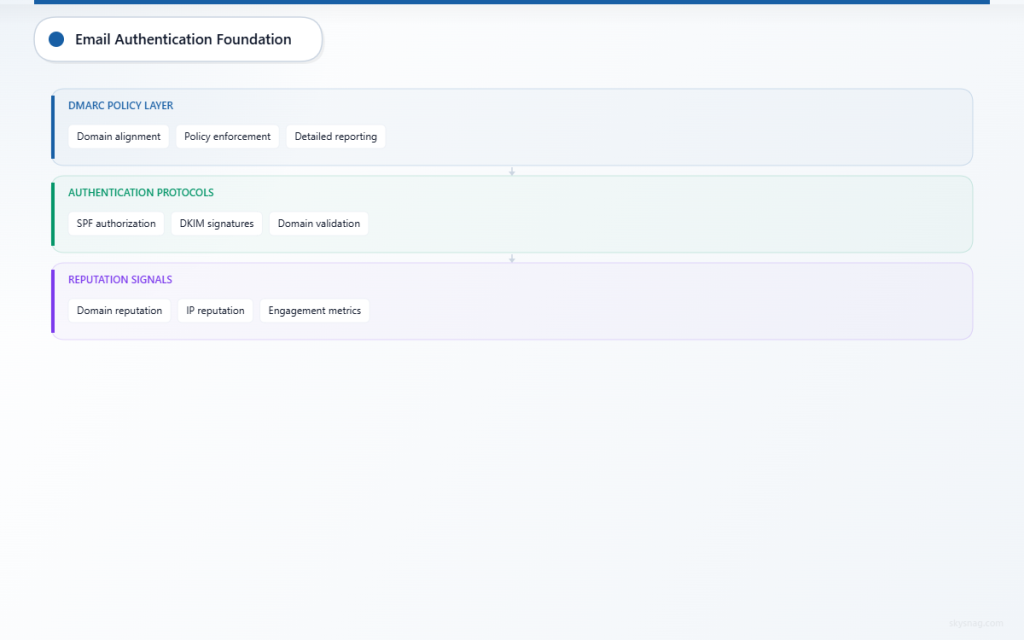
Email service providers (ESPs) evaluate your sender reputation using multiple authentication protocols. Without proper authentication, your emails appear suspicious and face increased filtering.
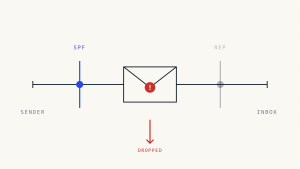
SPF (Sender Policy Framework) authorizes specific IP addresses to send email on your domain’s behalf. However, SPF alone provides limited protection and can break during email forwarding.
DKIM (DomainKeys Identified Mail) adds cryptographic signatures to your emails, proving they originated from your domain and haven’t been tampered with during transit.
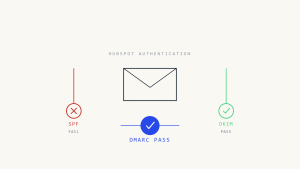
DMARC (Domain-based Message Authentication, Reporting and Conformance) builds upon SPF and DKIM, providing policy instructions to receiving servers and detailed reporting on authentication failures.
2. Domain and IP Reputation
ESPs maintain reputation scores for both sending domains and IP addresses. New domains start with neutral reputations, while established domains with consistent authentication and engagement build positive reputations over time.
Key reputation factors include:
- Authentication consistency (SPF, DKIM, DMARC alignment)
- Bounce rates and complaint rates
- Sending volume patterns and consistency
- List hygiene and engagement metrics
3. Content and Engagement Signals
Modern spam filters analyze content patterns, recipient engagement, and behavioral signals. High-performing emails typically feature:
- Clear, relevant subject lines without spam trigger words
- Balanced text-to-image ratios
- Proper HTML structure and mobile optimization
- Strong recipient engagement (opens, clicks, forwards)
III. Step-by-Step Inbox Placement Optimization
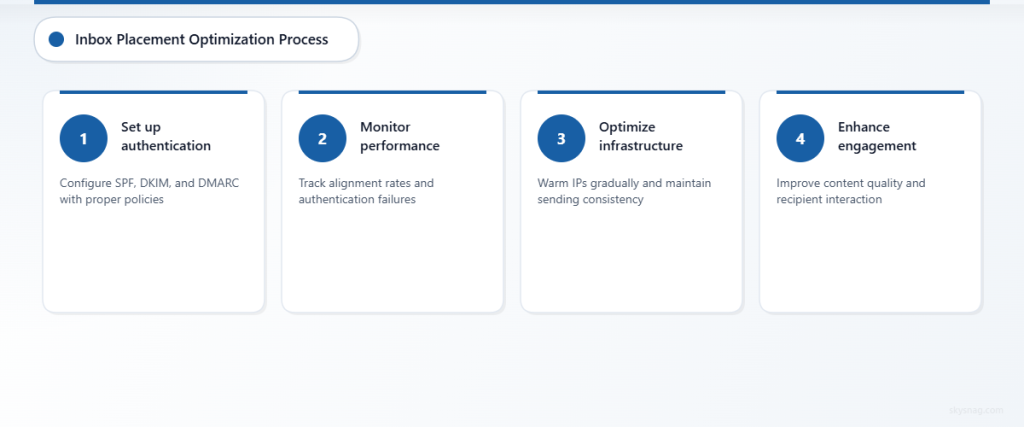
Step 1: Implement Comprehensive Email Authentication
Start with proper SPF, DKIM, and DMARC configuration. Many organizations implement these protocols incorrectly, reducing their effectiveness.
SPF Configuration Best Practices:
- Include only necessary IP addresses and domains
- Use the fewest possible DNS lookups (maximum 10)
- End with “-all” for strict policy enforcement
- Monitor for SPF record length limits
DKIM Implementation:
- Use 2048-bit keys for enhanced security
- Implement key rotation policies
- Sign critical headers including From, To, Subject, and Date
- Test signatures across different email clients
DMARC Policy Progression:
Begin with p=none to collect data without impacting email delivery. Analyze reports to identify legitimate sending sources and authentication failures. Gradually progress to p=quarantine and ultimately p=reject for maximum protection.
Step 2: Monitor Authentication Performance
Regular monitoring reveals authentication issues before they impact inbox placement. Key metrics include:
- DMARC Alignment Rate: Percentage of emails passing DMARC authentication
- Authentication Failure Sources: Identify unauthorized senders using your domain
- Policy Impact Analysis: Measure inbox placement changes during policy adjustments
Tools like Skysnag Protect provide comprehensive DMARC monitoring, automated reporting, and policy optimization recommendations to maintain high authentication rates.
Step 3: Optimize Sending Infrastructure
IP Address Management:
- Warm up new IP addresses gradually over 4-6 weeks
- Maintain consistent sending volumes from each IP
- Monitor IP reputation across major ESPs
- Consider dedicated IPs for high-volume sending
Domain Strategy:
- Use consistent From domains across campaigns
- Implement subdomain strategies for different email types
- Maintain proper DNS hygiene and record management
- Monitor domain reputation across feedback loops
Step 4: Enhance Content and Engagement
Content Optimization:
- Craft compelling subject lines with clear value propositions
- Maintain consistent sender names and From addresses
- Use responsive email templates optimized for mobile devices
- Include clear unsubscribe mechanisms and preference centers
Engagement Improvement:
- Segment audiences based on engagement history
- Implement re-engagement campaigns for inactive subscribers
- Remove chronically unengaged contacts from active lists
- Time campaigns based on recipient behavior patterns
Step 5: Establish Feedback Loop Monitoring
Major ESPs offer feedback loop (FBL) programs that report when recipients mark your emails as spam. This data helps identify content issues and list quality problems.
Configure feedback loops with:
- Gmail Postmaster Tools
- Microsoft SNDS (Smart Network Data Services)
- Yahoo Complaint Feedback Loop
- AOL Feedback Loop
IV. Advanced Inbox Placement Strategies
Reputation Segmentation
Large-volume senders benefit from separating email types across different domains and IP addresses:
- Transactional Domain: Order confirmations, password resets, account notifications
- Marketing Domain: Promotional campaigns, newsletters, product updates
- Bulk Domain: High-volume campaigns with higher risk profiles
This segmentation prevents issues with one email type from affecting others.
Machine Learning Integration
Advanced email platforms use machine learning to optimize send times, content, and recipient selection. These systems analyze:
- Individual recipient engagement patterns
- Optimal send time predictions
- Content performance across segments
- Real-time deliverability adjustments
ISP-Specific Optimization
Different email service providers use varying filtering criteria. Optimize for major ISPs:
Gmail:
- Focus on engagement metrics and user behavior
- Implement proper list-unsubscribe headers
- Monitor Gmail Postmaster Tools data
- Maintain consistent sending patterns
Microsoft (Outlook/Hotmail):
- Emphasize sender reputation and authentication
- Monitor SNDS reputation data
- Focus on content relevance and engagement
- Implement proper bounce handling
V. Measuring and Improving Inbox Placement Rate
Key Performance Indicators
Track these metrics to gauge inbox placement optimization success:
- Overall Inbox Placement Rate: Percentage of emails reaching primary inboxes
- Authentication Pass Rate: Percentage of emails passing SPF, DKIM, and DMARC
- Bounce Rate: Should remain below 2% for healthy lists
- Complaint Rate: Keep spam complaints under 0.1% of sent emails
- Engagement Metrics: Open rates, click rates, and conversion rates
Testing and Optimization Cycles
Implement regular testing cycles to maintain high inbox placement:
Monthly Reviews:
- Analyze DMARC reports for authentication issues
- Review inbox placement rates across ISPs
- Assess engagement trends and list quality
- Update authentication policies as needed
Quarterly Optimizations:
- Conduct comprehensive deliverability audits
- Test new content strategies and sending patterns
- Review and update email templates
- Optimize segmentation and targeting strategies
VI. Common Inbox Placement Mistakes to Avoid
Authentication Misconfigurations
SPF Record Errors:
- Including too many DNS lookups (over 10 limit)
- Using deprecated mechanisms like “ptr”
- Forgetting to update records when changing email providers
- Using “~all” instead of “-all” for strict enforcement
DKIM Problems:
- Using weak 1024-bit keys instead of 2048-bit
- Inconsistent key rotation or management
- Missing critical header signatures
- Selector record misconfigurations
DMARC Policy Issues:
- Rushing to “p=reject” without proper analysis
- Incorrect alignment settings (relaxed vs strict)
- Missing aggregate report analysis
- Inadequate subdomain policy configuration
List Management Failures
Poor list hygiene significantly impacts inbox placement:
- Purchasing email lists instead of building organically
- Failing to remove bounced or inactive contacts
- Ignoring unsubscribe requests or making them difficult
- Not implementing double opt-in for new subscribers
Content and Sending Pattern Problems
Avoid these common content mistakes:
- Excessive use of promotional language or ALL CAPS
- Poor text-to-image ratios or image-only emails
- Inconsistent From names or sending addresses
- Sudden volume spikes without proper warm-up
VII. Key Takeaways
Maximizing inbox placement rate requires a comprehensive approach combining proper authentication, reputation management, and engagement optimization. Organizations that implement DMARC policies see average inbox placement improvements of 10-15%, with some achieving rates above 95%.
Success depends on consistent monitoring, gradual policy implementation, and ongoing optimization based on performance data. Skysnag Protect simplifies this process by providing automated DMARC monitoring, policy recommendations, and detailed reporting to help organizations achieve and maintain optimal inbox placement rates.
Regular testing, authentication monitoring, and engagement analysis ensure your email campaigns reach their intended audiences while building long-term sender reputation and customer trust.