DMARC (Domain-based Message Authentication, Reporting and Conformance) records serve as the cornerstone of email authentication, protecting organizations from sophisticated phishing and spoofing attacks that cost businesses over $12 billion annually. Understanding the precise syntax and configuration options is essential for implementing effective email security policies that safeguard your domain reputation.
A properly configured DMARC record acts as a policy instruction set published in your DNS, telling receiving mail servers how to handle emails that fail authentication checks. This comprehensive guide breaks down every component of DMARC syntax, providing the technical depth needed to configure robust email protection.
I. Understanding DMARC Record Structure
DMARC records follow a specific tag-value format published as TXT records in DNS. The record must be placed at the subdomain _dmarc under your primary domain, creating the full DNS entry _dmarc.yourdomain.com.
Basic DMARC Record Format
v=DMARC1; p=none; rua=mailto:[email protected]Every DMARC record begins with the version tag and includes policy instructions. The semicolon separates each tag-value pair, and spacing after semicolons is optional but recommended for readability.
Required vs Optional Tags
DMARC records contain both mandatory and optional tags:
Required Tags:
v(version)p(policy)
Optional Tags:
rua(aggregate reports URI)ruf(forensic reports URI)fo(forensic options)aspf(ASPF alignment mode)adkim(ADKIM alignment mode)pct(percentage)rf(report format)ri(report interval)sp(subdomain policy)
II. Complete DMARC Tag Reference
Version Tag (v)
Syntax: v=DMARC1
The version tag identifies the DMARC specification version and must always be the first tag in the record. Currently, DMARC1 is the only valid value.
Example:
v=DMARC1; p=quarantine; rua=mailto:[email protected]Validation: The version tag is case-sensitive and must appear exactly as shown. Any deviation will cause the entire DMARC record to be invalid.
Policy Tag (p)
Syntax: p=none|quarantine|reject
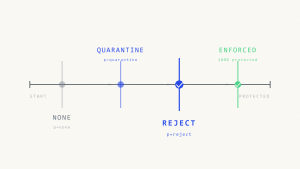
The policy tag specifies the action receiving mail servers should take when messages fail DMARC alignment checks.
Policy Options:
- none: Monitor mode, no action taken on failed messages
- quarantine: Failed messages delivered to spam/junk folder
- reject: Failed messages rejected at SMTP level
Examples:
v=DMARC1; p=none; rua=mailto:[email protected]
v=DMARC1; p=quarantine; pct=25; rua=mailto:[email protected]
v=DMARC1; p=reject; rua=mailto:[email protected]
Best Practice: Start with p=none to monitor traffic patterns, then gradually move to p=quarantine and finally p=reject for maximum protection.
Aggregate Reports URI (rua)
Syntax: rua=mailto:[email protected] or rua=https://example.com/dmarc
The aggregate reports URI specifies where XML aggregate reports should be sent. These reports contain statistical data about message authentication results.
Examples:
rua=mailto:[email protected]
rua=mailto:[email protected],mailto:[email protected]
rua=https://dmarc-collector.example.com/reports
Multiple Recipients: Separate multiple URIs with commas. Each recipient will receive copies of the aggregate reports.
External Recipients: When sending reports to external domains, the receiving domain must publish a DMARC record authorizing report acceptance.
Forensic Reports URI (ruf)
Syntax: ruf=mailto:[email protected]
Forensic reports provide detailed information about individual message failures, including message headers and authentication results.
Examples:
ruf=mailto:[email protected]
ruf=mailto:[email protected],mailto:[email protected]
Privacy Considerations: Forensic reports contain sensitive message content. Ensure proper data handling and privacy compliance when configuring this tag.
Forensic Options (fo)
Syntax: fo=0|1|d|s
The forensic options tag controls when forensic reports are generated for failed messages.
Options:
- 0: Generate reports when both SPF and DKIM fail (default)
- 1: Generate reports when either SPF or DKIM fails
- d: Generate reports when DKIM fails
- s: Generate reports when SPF fails
Examples:
fo=1; ruf=mailto:[email protected]
fo=d:s; ruf=mailto:[email protected]
Alignment Mode Tags
SPF Alignment Mode (aspf)
Syntax: aspf=r|s
Controls SPF alignment checking strictness:
- r: Relaxed mode (default) – allows subdomain alignment
- s: Strict mode – requires exact domain match
DKIM Alignment Mode (adkim)
Syntax: adkim=r|s
Controls DKIM alignment checking strictness:
- r: Relaxed mode (default) – allows subdomain alignment
- s: Strict mode – requires exact domain match
Examples:
v=DMARC1; p=quarantine; aspf=s; adkim=s; rua=mailto:[email protected]
v=DMARC1; p=none; aspf=r; adkim=r; rua=mailto:[email protected]
Percentage Tag (pct)
Syntax: pct=1-100
Specifies the percentage of messages subject to policy enforcement. Useful for gradual policy deployment.
Examples:
v=DMARC1; p=quarantine; pct=10; rua=mailto:[email protected]
v=DMARC1; p=reject; pct=100; rua=mailto:[email protected]
Default: If omitted, defaults to 100 (all messages subject to policy).
Report Format (rf)
Syntax: rf=afrf|iodef
Specifies the format for forensic reports:
- afrf: Authentication Failure Reporting Format (default)
- iodef: Incident Object Description Exchange Format
Report Interval (ri)
Syntax: ri=seconds
Specifies the interval between aggregate reports in seconds. Most receiving systems ignore this tag and send daily reports.
Example:
ri=86400 // 24 hours in secondsSubdomain Policy (sp)
Syntax: sp=none|quarantine|reject
Defines policy for subdomains when no explicit DMARC record exists for the subdomain.
Examples:
v=DMARC1; p=reject; sp=quarantine; rua=mailto:[email protected]
v=DMARC1; p=none; sp=none; rua=mailto:[email protected]
III. Advanced Configuration Examples
Basic Monitoring Configuration
v=DMARC1; p=none; rua=mailto:[email protected]; ruf=mailto:[email protected]; fo=1Strict Policy with Gradual Rollout
v=DMARC1; p=quarantine; pct=25; aspf=s; adkim=s; rua=mailto:[email protected]Maximum Protection Configuration
v=DMARC1; p=reject; sp=reject; aspf=s; adkim=s; rua=mailto:[email protected]; ruf=mailto:[email protected]; fo=1Enterprise Multi-Recipient Setup
v=DMARC1; p=quarantine; rua=mailto:[email protected],mailto:[email protected]; ruf=mailto:[email protected]; pct=50; fo=1IV. Validation and Testing Tools
DNS Query Validation
Use these commands to verify DMARC record publication:
dig TXT _dmarc.example.com
nslookup -type=TXT _dmarc.example.com
Syntax Validation
Tools like Skysnag Protect provide comprehensive DMARC record validation, checking syntax errors, policy conflicts, and configuration recommendations.
Common Validation Errors
- Missing version tag: Record must start with
v=DMARC1 - Invalid policy values: Only
none,quarantine, andrejectare valid - Malformed email addresses: URIs must follow proper mailto: format
- Conflicting alignment modes: Ensure consistency between strict and relaxed modes
- Invalid percentage values: Must be integers between 1-100
V. Edge Cases and Troubleshooting
Multiple DMARC Records
Only one DMARC record per domain is allowed. Multiple records result in DMARC failure for all messages.
Subdomain Inheritance
Subdomains without explicit DMARC records inherit the organizational domain’s policy or the sp tag value if specified.
Record Length Limitations
DNS TXT records have a 255-character limit per string. Long DMARC records may require string concatenation:
"v=DMARC1; p=quarantine; rua=mailto:very-long-email-address@" "example-domain-with-long-name.com; fo=1"Report Delivery Issues
External report destinations require proper DNS authorization. Verify the receiving domain accepts reports from your domain.
VI. Implementation Best Practices
Gradual Deployment Strategy
- Phase 1: Deploy
p=nonewith reporting to establish baseline - Phase 2: Move to
p=quarantinewith low percentage - Phase 3: Increase percentage gradually while monitoring reports
- Phase 4: Implement
p=rejectfor full protection
Monitoring and Maintenance
Regular DMARC report analysis reveals authentication issues, unauthorized sending sources, and potential security threats. Tools like Skysnag Protect automate report processing and provide actionable insights for policy optimization.
Integration with SPF and DKIM
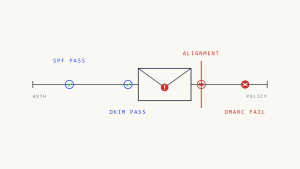
DMARC requires either SPF or DKIM authentication to pass, with proper alignment. Ensure both protocols are correctly configured before implementing strict DMARC policies.
VII. Key Takeaways
DMARC record syntax follows a precise tag-value format with specific validation requirements. Start with monitoring policies and gradually increase protection levels while analyzing aggregate reports. Proper alignment mode configuration and percentage-based rollouts ensure smooth deployment without legitimate email disruption.
Understanding every DMARC tag enables organizations to implement sophisticated email authentication policies tailored to their specific security requirements. Regular validation and monitoring ensure continued protection against evolving email threats.
For comprehensive DMARC management and automated policy optimization, explore Skysnag Protect to streamline your email authentication deployment.