Email remains a primary attack vector in payment processing environments, making robust email security controls essential for organizations handling cardholder data. While PCI DSS 4.0 doesn’t explicitly mandate specific email authentication protocols, implementing comprehensive email security supports multiple requirements within the standard’s framework for protecting sensitive payment information.
This implementation guide walks through establishing email security controls that align with PCI DSS 4.0’s enhanced security posture requirements, helping organizations demonstrate due diligence in protecting their email infrastructure from threats that could compromise payment systems.
I. Understanding PCI DSS 4.0 Email Security Context
PCI DSS 4.0 introduces strengthened requirements around authentication, access controls, and network security that directly impact email infrastructure. Organizations must implement controls that protect against unauthorized access to systems that store, process, or transmit cardholder data.
Email security supports several key PCI DSS 4.0 areas:
- Authentication controls that verify legitimate senders
- Network security measures protecting email traffic
- Access management for email systems handling cardholder data
- Monitoring and logging of email-related security events
The standard emphasizes implementing multiple layers of security controls, making email authentication and protection mechanisms valuable components of a comprehensive PCI compliance program.
II. Pre-Implementation Assessment
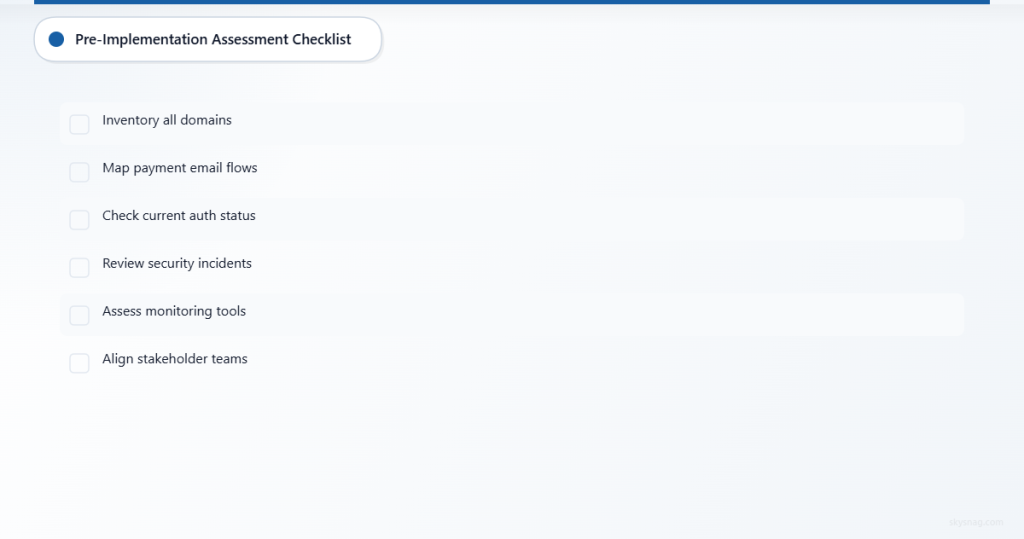
Current Email Infrastructure Audit
Before implementing new security controls, conduct a thorough assessment of your existing email environment:
Domain Inventory
- List all domains sending email from your organization
- Identify domains used in payment processing communications
- Document subdomains and third-party services sending on your behalf
- Map email flows between payment systems and external parties
Authentication Status Check
- Verify existing SPF, DKIM, and DMARC records
- Test current authentication pass rates using email authentication checkers
- Identify domains without any authentication in place
- Document current DMARC policy levels (none, quarantine, reject)
Risk Assessment
- Analyze historical email security incidents
- Review phishing attempts targeting payment processing staff
- Identify email-based social engineering risks to cardholder data access
- Document current email security monitoring capabilities
Stakeholder Alignment
Email security implementation affects multiple teams and processes:
IT Operations Team
- DNS management responsibilities
- Email server configuration requirements
- Monitoring and maintenance procedures
- Integration with existing security tools
Compliance Team
- Evidence collection for PCI audits
- Policy documentation requirements
- Incident response procedures
- Regular assessment scheduling
Business Units
- Payment processing workflow impacts
- Customer communication continuity
- Third-party vendor coordination
- Change management procedures
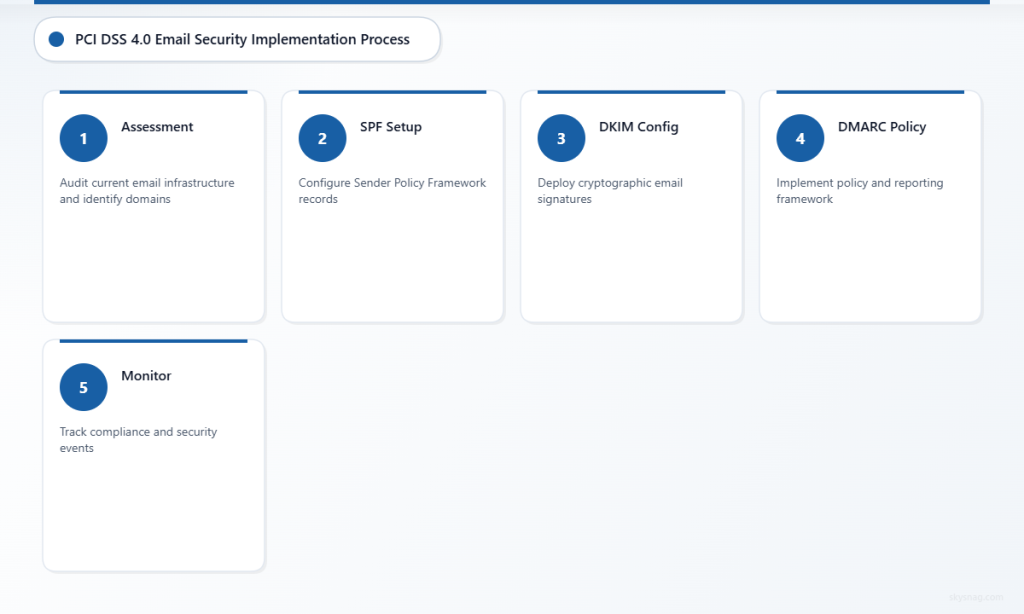
III. Step 1: SPF Record Implementation
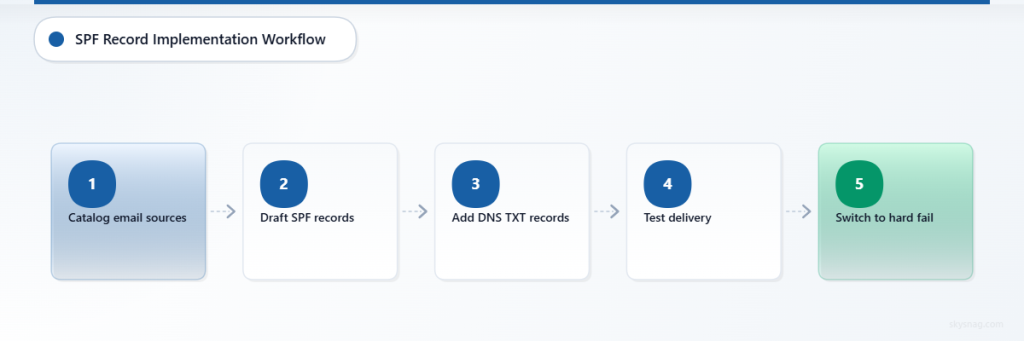
Sender Policy Framework (SPF) provides the foundation for email authentication by specifying which IP addresses are authorized to send email for your domain.
SPF Configuration Process
Identify Authorized Senders
Begin by cataloging all legitimate email sources for each domain:
- Internal mail servers and their IP addresses
- Cloud email services (Microsoft 365, Google Workspace)
- Marketing automation platforms
- Payment notification services
- Customer support systems
- Any third-party services sending transactional emails
Create SPF Records
Draft SPF records for each domain using this structure:
v=spf1 ip4:192.168.1.100 include:_spf.google.com include:spf.protection.outlook.com ~allStart with a soft fail policy (~all) during testing, then transition to hard fail (-all) after validation.
DNS Implementation
- Add SPF records as TXT records in your DNS management system
- Verify records using SPF lookup tools
- Test email delivery from all authorized sources
- Monitor for any delivery issues during the transition period
Validation and Testing
- Send test emails from all authorized services
- Use email authentication testing tools to verify SPF pass rates
- Review email logs for SPF failures that might indicate unauthorized sending attempts
- Document SPF implementation for compliance evidence
IV. Step 2: DKIM Signature Setup
DomainKeys Identified Mail (DKIM) adds cryptographic signatures to outbound emails, providing sender authentication and message integrity verification.
DKIM Configuration Steps
Generate DKIM Keys
Create public/private key pairs for each domain and sending service:
- Use 2048-bit RSA keys for strong security
- Generate separate keys for different email streams if needed
- Store private keys securely on authorized mail servers
- Create corresponding public key DNS records
Configure Mail Servers
Set up DKIM signing on all outbound mail servers:
- Install DKIM signing modules or services
- Configure signing for all domains and subdomains
- Set appropriate selector names for key rotation
- Test signing functionality across all email types
DNS Publication
Publish DKIM public keys in DNS:
selector._domainkey.yourdomain.com IN TXT "v=DKIM1; k=rsa; p=[public-key-data]"Third-Party Service Configuration
Configure DKIM for external email services:
- Marketing platforms requiring DKIM setup
- Customer notification services
- Payment processor communications
- Any outsourced email operations
DKIM Validation
Signature Testing
- Send test messages from all configured sources
- Verify DKIM signatures using email header analysis tools
- Check signature validation at major email providers
- Document successful DKIM implementation across all email streams
Monitoring Setup
- Configure logging for DKIM signing failures
- Set up alerts for signature validation issues
- Establish procedures for key rotation
- Create documentation for ongoing maintenance
V. Step 3: DMARC Policy Deployment
Domain-based Message Authentication, Reporting, and Conformance (DMARC) builds on SPF and DKIM to provide policy enforcement and detailed reporting on email authentication results.
DMARC Implementation Strategy
Phase 1: Monitoring Mode
Start with a monitoring-only DMARC policy:
v=DMARC1; p=none; rua=mailto:[email protected]; ruf=mailto:[email protected]; fo=1This configuration:
- Sets policy to “none” (monitor only)
- Requests aggregate reports (rua)
- Requests forensic reports for failures (ruf)
- Generates reports for all authentication failures (fo=1)
Report Analysis
Collect and analyze DMARC reports for 2-4 weeks:
- Identify all legitimate email sources
- Discover unauthorized sending attempts
- Verify SPF and DKIM alignment rates
- Document any authentication gaps requiring attention
Phase 2: Quarantine Policy
After resolving authentication issues, implement quarantine policy:
v=DMARC1; p=quarantine; rua=mailto:[email protected]; pct=25- Start with partial enforcement (pct=25)
- Gradually increase percentage as confidence grows
- Continue monitoring reports for delivery impacts
- Address any legitimate email being quarantined
Phase 3: Reject Policy
Deploy reject policy for maximum protection:
v=DMARC1; p=reject; rua=mailto:[email protected]- Implement only after achieving high authentication pass rates
- Monitor for any impact on legitimate email delivery
- Maintain documentation of policy progression for compliance evidence
Subdomain Protection
Extend DMARC coverage to all subdomains used in your organization:
- Configure subdomain policies using sp=reject
- Verify coverage of payment-related subdomains
- Test subdomain policy inheritance
- Document comprehensive domain protection
VI. Step 4: Advanced Email Security Controls
Email Gateway Configuration
Implement enterprise email security gateways that integrate with your authentication framework:
Inbound Filtering
- Configure strict SPF, DKIM, and DMARC checking
- Implement additional anti-phishing detection
- Set up quarantine procedures for suspicious messages
- Create allow-lists for critical payment processing communications
Outbound Security
- Enforce DKIM signing on all outbound messages
- Implement data loss prevention scanning
- Monitor for potential cardholder data in email content
- Log all outbound email activity for compliance tracking
Security Monitoring Integration
SIEM Integration
Connect email security events to your Security Information and Event Management system:
- Forward email authentication failures
- Track email-based attack attempts
- Correlate email threats with other security events
- Generate compliance reports from centralized logging
Threat Intelligence
- Subscribe to email threat intelligence feeds
- Implement reputation-based filtering
- Monitor for domain spoofing attempts
- Track emerging email-based payment fraud techniques
VII. Step 5: Monitoring and Reporting Framework
Compliance Reporting Setup
Establish regular reporting processes to support PCI DSS 4.0 compliance evidence:
Authentication Metrics
- SPF pass/fail rates by domain
- DKIM signature success percentages
- DMARC policy compliance statistics
- Authentication failure trend analysis
Security Event Tracking
- Email-based attack attempt logs
- Blocked phishing message counts
- Domain spoofing incident reports
- Response time metrics for security events
Quarterly Reviews
- Authentication configuration assessments
- Policy effectiveness evaluations
- Threat landscape analysis
- Compliance gap identification
Automated Monitoring
Alert Configuration
Set up automated alerts for critical email security events:
- DMARC authentication failure spikes
- New unauthorized sending sources
- DNS record modification attempts
- Email gateway policy violations
Performance Tracking
- Monitor email delivery rates after authentication deployment
- Track legitimate email false positive rates
- Measure threat detection effectiveness
- Document security control performance metrics
VIII. Implementation Timeline and Best Practices
Phased Deployment Schedule
Week 1-2: Assessment and Planning
- Complete domain inventory and current state analysis
- Identify all email sending sources
- Prepare implementation team and stakeholder communications
- Document baseline metrics
Week 3-4: SPF and DKIM Implementation
- Deploy SPF records for all domains
- Configure DKIM signing across email infrastructure
- Test authentication functionality
- Begin initial monitoring
Week 5-8: DMARC Monitoring Phase
- Deploy DMARC policies in monitoring mode
- Collect and analyze aggregate reports
- Identify and resolve authentication issues
- Prepare for policy enforcement
Week 9-12: Policy Enforcement
- Gradually implement DMARC quarantine and reject policies
- Monitor for delivery impacts
- Fine-tune configurations based on results
- Complete compliance documentation
Common Implementation Pitfalls
Incomplete Sender Identification
Failing to identify all legitimate email sources before enforcement can disrupt business operations. Maintain comprehensive sender inventories and test thoroughly before policy enforcement.
Rushed Policy Deployment
Moving too quickly from monitoring to enforcement can cause legitimate email delivery issues. Allow sufficient time for report analysis and gradual policy implementation.
Inadequate Monitoring
Without proper monitoring and alerting, organizations may miss authentication failures or security incidents. Implement comprehensive logging and regular report review processes.
IX. Compliance Evidence and Documentation
PCI DSS 4.0 Evidence Collection
Maintain documentation that demonstrates your email security controls support PCI compliance requirements:
Configuration Evidence
- DNS record configurations for SPF, DKIM, and DMARC
- Email server authentication settings
- Security gateway policy configurations
- Third-party service authentication setup
Operational Evidence
- Regular authentication success rate reports
- Security incident logs and response procedures
- Monitoring and alerting configuration
- Staff training and awareness programs
Assessment Records
- Quarterly email security assessments
- Authentication configuration reviews
- Threat landscape analysis reports
- Compliance gap remediation tracking
Audit Preparation
Documentation Organization
- Maintain current network diagrams showing email infrastructure
- Keep authentication configuration change logs
- Document all email sending sources and their authentication status
- Prepare evidence of regular monitoring and maintenance activities
Testing Procedures
- Establish regular authentication testing schedules
- Document testing methodologies and results
- Maintain evidence of policy effectiveness
- Track remediation of identified issues
X. Advanced Configuration Scenarios
Multi-Domain Organizations
Organizations managing multiple domains require coordinated authentication strategies:
Centralized Management
- Implement consistent authentication policies across all domains
- Use centralized DNS management for authentication records
- Coordinate DMARC reporting and analysis
- Maintain unified security monitoring
Brand Protection
- Monitor for unauthorized use of all organizational domains
- Implement strict DMARC policies for all brand domains
- Track and respond to domain spoofing attempts
- Coordinate with legal teams on brand protection efforts
Third-Party Email Services
Many organizations rely on external services for various email functions:
Vendor Authentication Requirements
- Verify all vendors support proper email authentication
- Configure DKIM signing for third-party services
- Include vendor IP ranges in SPF records
- Monitor vendor authentication performance
Service Provider Coordination
- Maintain documentation of all third-party email services
- Establish authentication requirements in vendor contracts
- Regular review vendor security practices
- Plan for vendor changes or service transitions
XI. Key Takeaways
Implementing comprehensive email security controls supports PCI DSS 4.0 compliance by strengthening authentication, access controls, and monitoring capabilities. Success requires careful planning, phased deployment, and ongoing monitoring to maintain both security effectiveness and business continuity.
Start with thorough assessment and stakeholder alignment, implement authentication protocols systematically, and maintain robust documentation throughout the process. Regular monitoring and reporting ensure continued effectiveness and provide the evidence needed for compliance demonstrations.
Skysnag Protect simplifies PCI DSS email security implementation by providing automated DMARC deployment, comprehensive reporting, and ongoing monitoring capabilities. The platform streamlines the complex process of email authentication while maintaining the documentation and evidence needed for compliance programs.
Ready to implement email security controls that support your PCI DSS 4.0 compliance program? Start with Skysnag Protect to automate your email authentication deployment and monitoring.