DKIM is specified in RFC 6376, and it is used by a number of email service providers, including Google, Yahoo, and Microsoft. DKIM is designed to address some of the flaws in the existing email system, such as spoofing, phishing, and message tampering. It allows email senders to digitally sign their messages in a way that can be verified by email receivers. This allows receivers to verify that the message truly came from the sender, and has not been tampered with.
I. Steps to Configure DKIM for Feedblitz
- Select on the drop-down menu next to your profile icon.
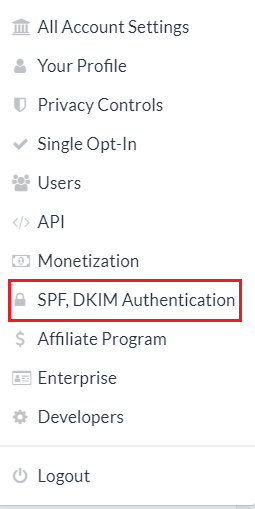
- From the menu, choose SPF, DKIM Authentication.
- Select the “DKIM Authentication” tab in the center.

- Enter your domain name in the “Domain” section at the bottom of the page.
- Insert “feedblitz” in the DKIM selection field.
- Select “Create a New DKIM Profile” from the menu.
- The page will display your DKIM DNS records, which you must publish on your DNS server, and your initial DKIM profile will be set to inactive.
II. How to Get Your DKIM Public Key Available for Feedblitz
- Sign in as the administrator to your DNS provider’s administration console.
- Go to the DNS records section of each of your domains.
- Depending on the type of DKIM record that has been provided to you, generate a TXT or CNAME record.
- Copy and paste the hostname and value
- Save your record’s modifications and wait 48–72 hours for your DNS to take effect.
Your DKIM status on your Feedblitz account should now be active.
You can use Skysnag’s free DKIM Checker to check the health of your DKIM record here
Enable DMARC for your domains to protect against spoofing. Sign up for a free trial today!
For more information on Feedblitz DKIM setup, you can refer to their reference documentation