Managing DMARC deployments across hundreds of client domains presents unique challenges that single-tenant environments rarely encounter. When authentication failures cascade across multiple clients simultaneously, MSPs need systematic troubleshooting workflows that can quickly isolate root causes and restore email security without disrupting business operations.
DMARC deployment errors in multi-tenant environments often stem from configuration conflicts, DNS propagation issues, or authentication misalignments that affect multiple domains simultaneously. Unlike single-domain troubleshooting, MSP environments require workflows that can rapidly identify whether issues are client-specific, infrastructure-wide, or related to upstream email services.
I. Common Multi-Tenant DMARC Deployment Challenges
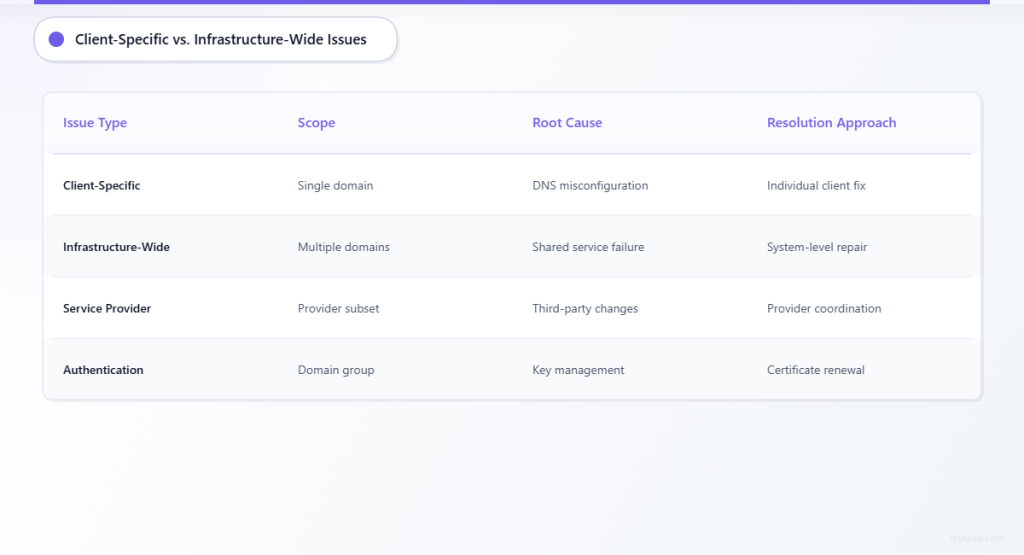
Infrastructure-Level Configuration Conflicts
Multi-tenant DMARC management introduces complexity when shared infrastructure components affect multiple client domains. DNS server configurations, email relay settings, and authentication server policies can create cascading failures across client portfolios.
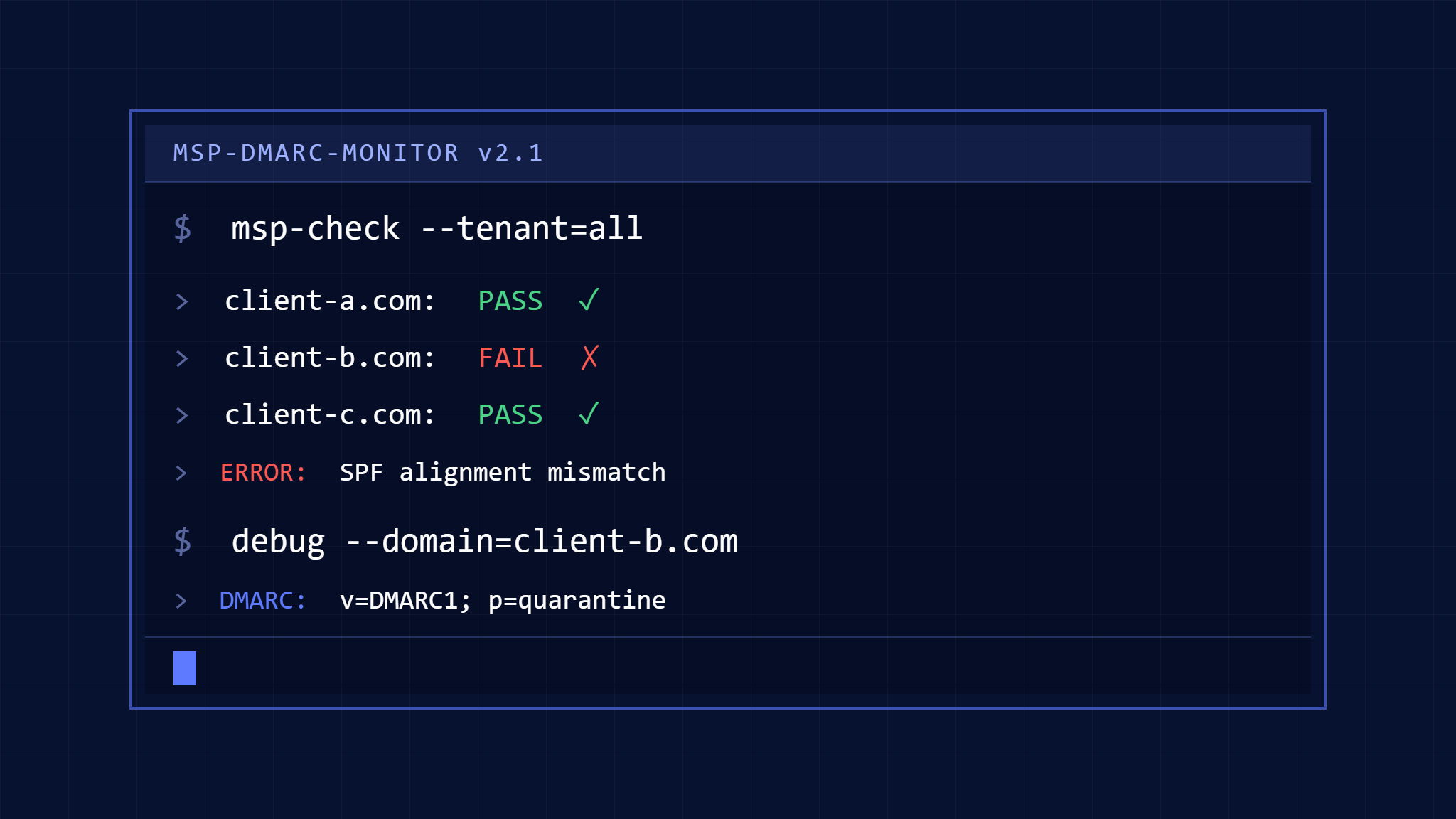
Authentication server misconfigurations often manifest as SPF alignment failures across multiple domains sharing the same email infrastructure. When MSPs utilize centralized email services for multiple clients, a single SPF record error can trigger DMARC failures for dozens of domains simultaneously.
DKIM key management becomes particularly complex in multi-tenant environments where different clients may use varying email services while sharing DNS infrastructure. Key rotation schedules, selector conflicts, and certificate management require coordination across multiple client environments.
Client-Specific vs. Systemic Issues
Distinguishing between client-specific problems and systemic infrastructure issues requires structured diagnostic approaches. Individual client DNS misconfigurations can appear as widespread problems when monitoring systems aggregate failure data across multiple domains.
Email service provider changes by individual clients can create authentication failures that appear to indicate broader infrastructure problems. MSPs need workflows that quickly identify whether DMARC failures originate from client-side changes or infrastructure-level issues.
Third-party email service integrations present ongoing challenges when clients independently modify their email configurations without MSP coordination. These changes can break DMARC alignment and trigger false positive alerts in monitoring systems.
II. Systematic Multi-Tenant Troubleshooting Workflow
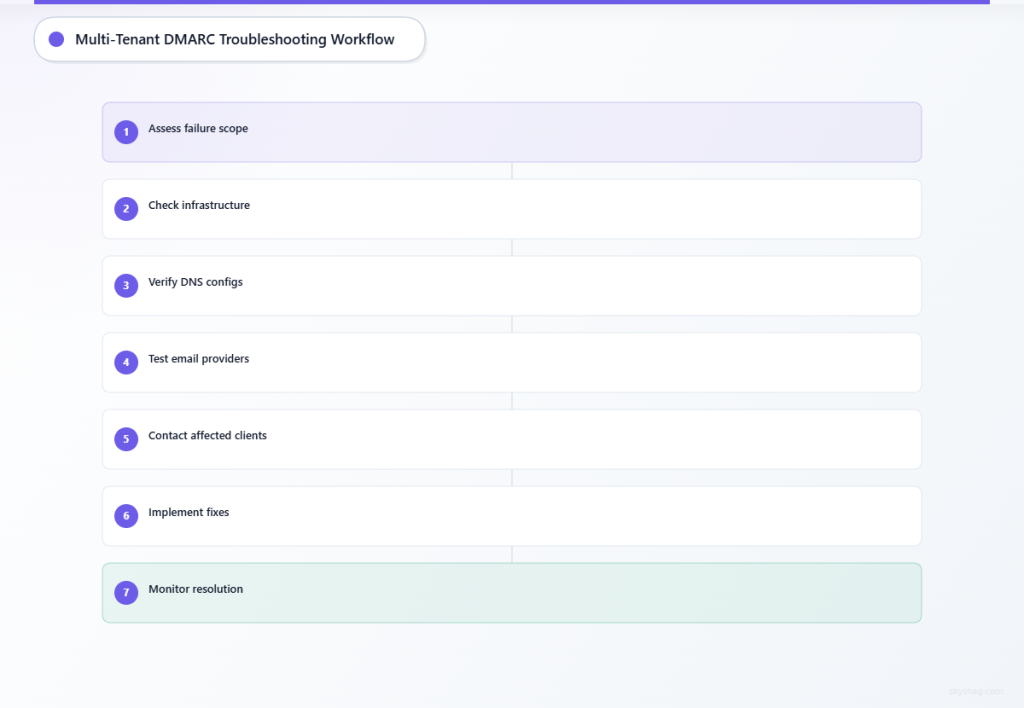
Phase 1: Initial Problem Classification
Step 1: Scope Assessment
Begin troubleshooting by determining whether DMARC failures affect single clients, multiple clients sharing infrastructure, or all managed domains. Review failure reports across your client portfolio to identify patterns.
Check your centralized monitoring dashboard to determine if failures correlate with specific time periods, geographic regions, or email service providers. This initial assessment helps classify whether issues are client-specific, infrastructure-related, or caused by external factors.
Document the scope of affected domains and the types of authentication failures observed. Note whether failures involve SPF alignment, DKIM verification, or both, as this information guides subsequent troubleshooting steps.
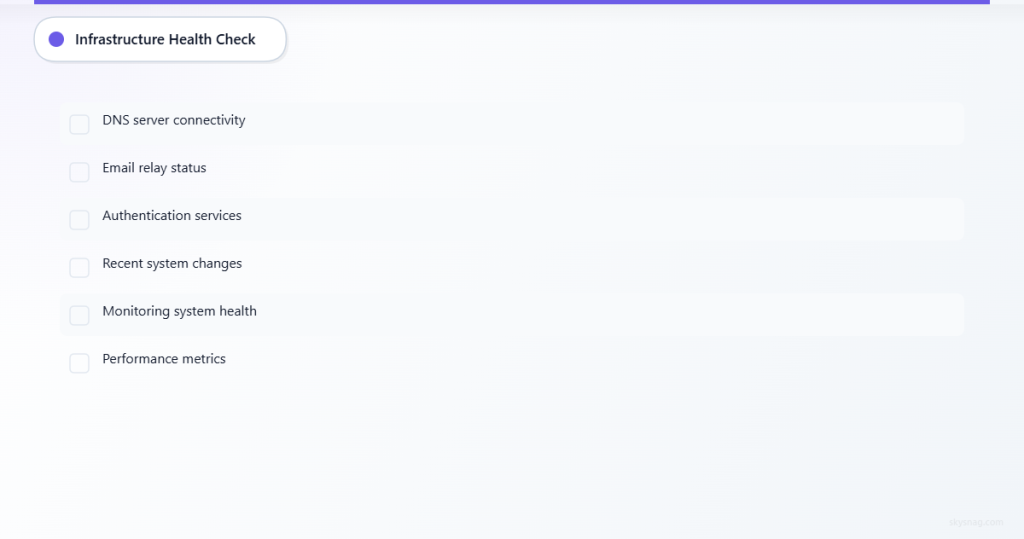
Step 2: Infrastructure Health Check
Verify the operational status of shared infrastructure components including DNS servers, email relays, and authentication services. Test connectivity and response times for critical infrastructure elements.
Review recent infrastructure changes, maintenance activities, or software updates that might correlate with the onset of DMARC failures. Check system logs for error messages or performance degradation indicators.
Validate that centralized DMARC monitoring and reporting systems are functioning correctly and receiving data from all monitored domains. Confirm that the monitoring infrastructure itself is not contributing to reported failures.
Phase 2: DNS and Authentication Validation
Step 3: DNS Configuration Verification
Perform DNS lookups for DMARC, SPF, and DKIM records across affected domains using external DNS resolution services. Compare results from multiple DNS servers to identify propagation issues or configuration inconsistencies.
Verify that DNS changes implemented for clients have propagated correctly across major DNS providers. Use multiple geographic locations for DNS testing to identify regional propagation issues.
Check for DNS record conflicts or malformed entries that could cause authentication failures. Pay particular attention to SPF record length limits and DKIM selector conflicts in multi-tenant environments.
Step 4: Email Service Provider Integration
Review email service provider configurations for affected clients, focusing on SPF inclusion mechanisms and DKIM signing configurations. Verify that shared email infrastructure properly handles authentication for all client domains.
Test email authentication from various sending sources including client email systems, shared infrastructure, and third-party services. Document which authentication mechanisms succeed or fail for each sending source.
Validate DKIM signature generation and verification across different email paths. Ensure that email routing through shared infrastructure maintains proper signature validity and alignment.
Phase 3: Client Communication and Resolution
Step 5: Client Impact Assessment
Contact affected clients to gather information about recent email configuration changes, new software deployments, or modifications to email service providers. Document any client-side changes that might contribute to authentication failures.
Assess the business impact of DMARC failures on each affected client, prioritizing resolution based on email volume, business criticality, and regulatory requirements. Some clients may require immediate attention while others can be addressed systematically.
Provide preliminary status updates to affected clients, explaining the troubleshooting process and expected resolution timeline. Maintain regular communication throughout the resolution process to manage client expectations.
Step 6: Coordinated Resolution Implementation
Implement fixes systematically, starting with infrastructure-level issues that affect multiple clients, then addressing client-specific problems. Test each fix in a controlled manner to avoid creating additional problems.
Monitor DMARC authentication results in real-time as fixes are implemented. Use your centralized monitoring platform to validate that authentication success rates improve across affected domains.
Document all changes made during the troubleshooting process, including configuration modifications, DNS updates, and communication with clients. This documentation supports post-incident analysis and future troubleshooting efforts.
III. Leveraging Skysnag MSP/MSSP Comply for Multi-Tenant Management
Skysnag MSP/MSSP Comply provides centralized visibility across multi-tenant DMARC deployments, enabling rapid identification of authentication issues across client portfolios. The platform’s multi-tenant dashboard helps distinguish between client-specific problems and systemic infrastructure issues.
The solution’s automated monitoring and alerting capabilities help MSPs identify DMARC deployment errors before they impact client email delivery. Real-time failure analysis and detailed reporting support rapid troubleshooting and client communication.
Skysnag’s multi-tenant reporting features enable MSPs to provide clients with detailed authentication status updates while maintaining operational visibility across their entire managed domain portfolio. This comprehensive approach supports both proactive monitoring and reactive troubleshooting workflows.
IV. Best Practices for Prevention
Implement standardized DMARC deployment procedures across all client domains to reduce configuration inconsistencies. Document approved email service providers and authentication configurations for each client environment.
Establish regular monitoring schedules for DNS record validation and email authentication testing across your client portfolio. Proactive monitoring helps identify potential issues before they affect email delivery.
Create client communication protocols for email configuration changes, ensuring that modifications to email services or DNS settings are coordinated with your MSP team. This coordination prevents authentication failures caused by uncoordinated client changes.
Maintain current documentation of email service provider integrations and authentication requirements for each client. Regular documentation updates support faster troubleshooting and more effective client communication during incidents.
V. Key Takeaways
Multi-tenant DMARC troubleshooting requires systematic workflows that can quickly distinguish between client-specific issues and infrastructure-wide problems. Effective troubleshooting combines centralized monitoring with structured diagnostic procedures.
Success in multi-tenant environments depends on maintaining comprehensive documentation, implementing standardized procedures, and coordinating closely with clients on email configuration changes. Proactive monitoring and clear communication protocols prevent many common deployment errors.
MSPs managing multiple client domains need specialized tools and processes that support both individual client needs and portfolio-wide operational efficiency. Centralized monitoring platforms like Skysnag MSP/MSSP Comply enable effective multi-tenant DMARC management while supporting rapid issue resolution.
Ready to streamline your multi-tenant DMARC troubleshooting workflow? Explore Skysnag MSP/MSSP Comply and discover how centralized monitoring and automated reporting can improve your client service delivery while reducing operational complexity.