When cybercriminals target your organization, they don’t just focus on your main domain. They exploit subdomains like newsletters.company.com, support.company.com, or mail.company.com to bypass email security measures and launch sophisticated phishing attacks. This is where DMARC subdomain policy becomes your critical line of defense.
A DMARC subdomain policy extends your domain’s email authentication protection to all subdomains, ensuring consistent security across your entire email infrastructure. While your primary DMARC policy protects your main domain, the subdomain policy (sp tag) determines how receiving email servers should handle messages from your subdomains when authentication fails.
I. Understanding DMARC Subdomain Policy Fundamentals
What Is DMARC Subdomain Policy?
DMARC subdomain policy is a specific component of your DMARC record that controls how email authentication is applied to all subdomains under your primary domain. Unlike the main DMARC policy that only affects the exact domain where it’s published, the subdomain policy creates a security umbrella that covers every subdomain within your organization’s email ecosystem.
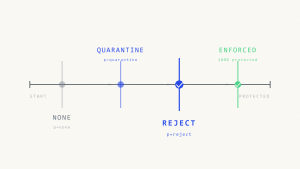
The subdomain policy operates through the “sp” tag in your DMARC record, which can be set to three values: none, quarantine, or reject. This policy determines the action receiving mail servers should take when emails from your subdomains fail DMARC authentication checks.
How DMARC Inheritance Works
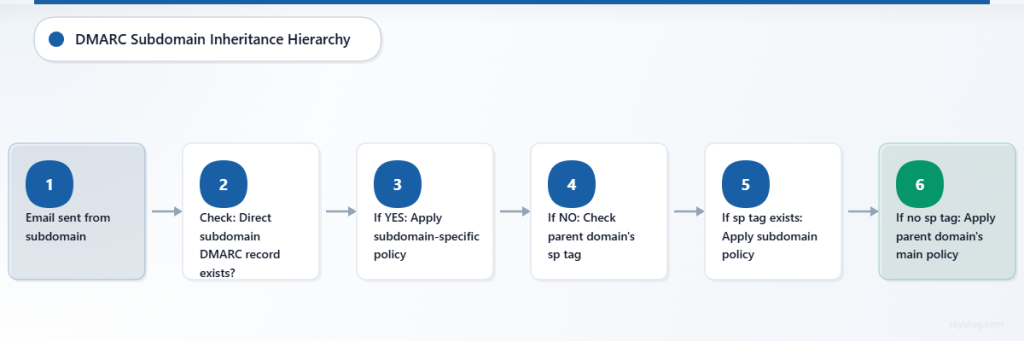
DMARC inheritance follows a hierarchical structure that determines which policy applies to subdomain email traffic. When an email is sent from a subdomain, receiving servers first check if that specific subdomain has its own DMARC record. If no subdomain-specific DMARC record exists, the server looks to the organizational domain’s DMARC record.
Here’s the inheritance priority order:
- Direct subdomain DMARC record (highest priority)
- Parent domain’s subdomain policy (sp tag)
- Parent domain’s main policy (p tag) (lowest priority)
This inheritance system allows organizations to maintain centralized control while providing flexibility for specific subdomains that may require different authentication policies.
The Critical Security Gap Subdomains Create
According to recent cybersecurity research, over 60% of successful email-based attacks leverage subdomain spoofing techniques. Attackers exploit the common misconception that subdomains inherit the same security protections as the main domain, when in reality, many organizations leave subdomains completely unprotected.
Without proper subdomain policies, cybercriminals can easily create spoofed emails from legitimate-looking addresses like security-alert.yourcompany.com or invoice.yourcompany.com, bypassing traditional email filters and deceiving recipients who trust the familiar domain structure.
II. Configuring DMARC Subdomain Policy: The SP Tag
Understanding SP Tag Options
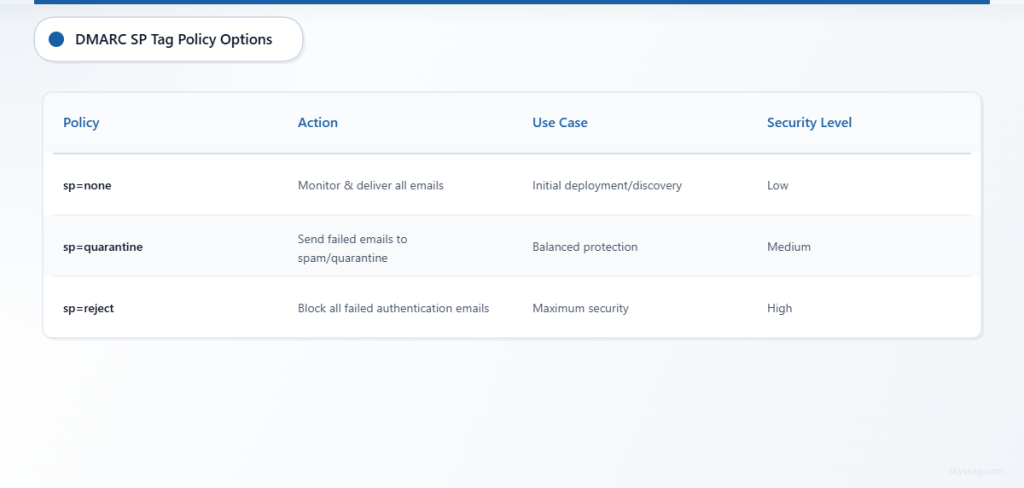
The sp (subdomain policy) tag in your DMARC record accepts three distinct values, each providing different levels of protection:
sp=none: This monitoring mode allows all subdomain emails to be delivered regardless of authentication status while collecting valuable data about email sources. Use this setting during initial deployment or when discovering unknown legitimate email sources from subdomains.
sp=quarantine: This protective mode directs receiving servers to treat failed authentication emails from subdomains as suspicious, typically routing them to spam or quarantine folders. This setting provides strong protection while maintaining some deliverability for legitimate emails that may have authentication issues.
sp=reject: This enforced mode instructs receiving servers to completely block emails from subdomains that fail DMARC authentication. This provides the strongest security but requires absolute certainty that all legitimate subdomain email sources are properly authenticated.
Sample DMARC Records with Subdomain Policies
Here are practical examples of DMARC records incorporating subdomain policies:
Monitoring Phase Configuration:
v=DMARC1; p=quarantine; sp=none; rua=mailto:[email protected]; ruf=mailto:[email protected]; fo=1Balanced Protection Configuration:
v=DMARC1; p=reject; sp=quarantine; rua=mailto:[email protected]; pct=100; adkim=s; aspf=sMaximum Security Configuration:
v=DMARC1; p=reject; sp=reject; rua=mailto:[email protected]; ruf=mailto:[email protected]; pct=100; adkim=s; aspf=sAdvanced Configuration Strategies
Organizations with complex email infrastructures should implement graduated subdomain policies that reflect their specific risk profiles and operational requirements. Consider creating a subdomain categorization system:
Public-facing subdomains (marketing.company.com, newsletter.company.com) should typically use sp=quarantine or sp=reject due to high spoofing risk and well-defined email sources.
Internal service subdomains (monitoring.company.com, alerts.company.com) might start with sp=none during discovery phases before moving to stricter policies once all legitimate sources are identified.
Customer-facing subdomains (support.company.com, billing.company.com) require sp=reject policies due to their high value as phishing targets and critical role in customer communications.
III. Implementing Subdomain Protection Strategies
Comprehensive Subdomain Discovery
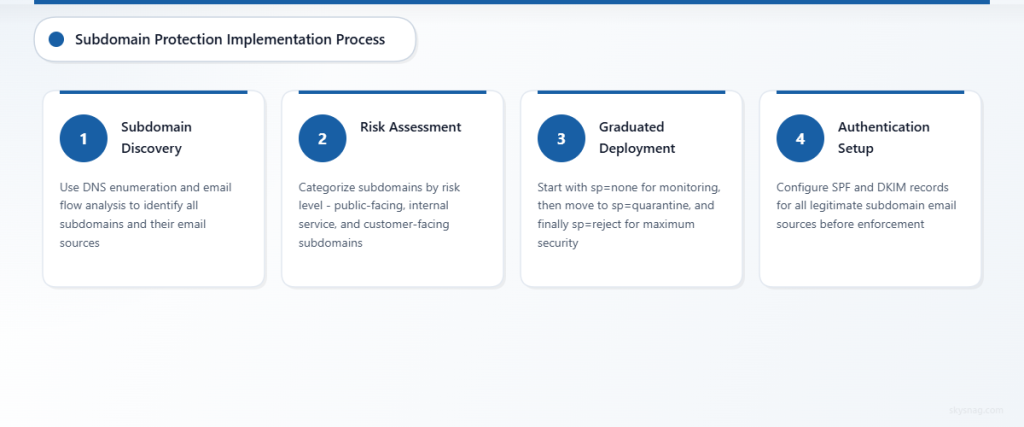
Before implementing restrictive subdomain policies, organizations must conduct thorough subdomain discovery to identify all potential email sources. This process involves:
DNS enumeration to identify all configured subdomains across your domain infrastructure, including both active and historical subdomains that might still be referenced in legacy systems or third-party configurations.
Email flow analysis using existing DMARC reports to identify subdomain usage patterns and authentication status across your email ecosystem. Skysnag Protect provides comprehensive subdomain visibility through advanced DMARC reporting that automatically identifies all subdomains sending email on your behalf.
Third-party service audit to catalog all external services authorized to send email from your subdomains, including marketing platforms, customer support systems, and automated notification services.
Staged Implementation Approach
Successful subdomain policy deployment requires a methodical approach that minimizes business disruption while maximizing security benefits:
Phase 1: Discovery (sp=none for 30-45 days): Deploy monitoring mode to collect comprehensive data about all subdomain email sources and authentication status. Analyze reports to identify legitimate sources and potential security gaps.
Phase 2: Gradual Enforcement (sp=quarantine for 30-60 days): Implement quarantine mode to provide protection while maintaining visibility into email delivery issues. Monitor delivery reports and user feedback to identify any legitimate emails being affected.
Phase 3: Full Protection (sp=reject): Deploy maximum security mode once confident that all legitimate subdomain email sources are properly authenticated and monitored.
Subdomain-Specific DMARC Records
For subdomains requiring different policies than your organizational default, implement specific DMARC records directly on those subdomains. This approach provides granular control while maintaining centralized oversight.
High-volume email subdomains like marketing.company.com might benefit from dedicated DMARC records with customized reporting addresses and policy settings that reflect their specific operational requirements and risk tolerance.
IV. Monitoring and Maintaining Subdomain Policies
Essential Reporting and Analysis
Effective subdomain protection requires continuous monitoring through comprehensive DMARC reports that provide visibility into authentication status, volume trends, and potential security incidents across your entire subdomain infrastructure.
Key metrics to monitor include subdomain authentication pass/fail rates, source IP diversity, message volume trends, and policy override instances. Regular analysis helps identify both security threats and legitimate email sources that may require policy adjustments.
Common Implementation Challenges
Organizations frequently encounter subdomain policy challenges including incomplete subdomain discovery, legacy system integration issues, and third-party service authentication problems. Address these challenges through systematic documentation, stakeholder communication, and gradual policy enforcement.
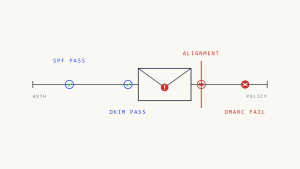
Authentication alignment issues often arise when subdomains use different SPF or DKIM configurations than expected. Resolve these through careful DNS record management and coordination with all email sending services.
Automated Management Solutions
As subdomain infrastructures grow complex, manual policy management becomes inefficient and error-prone. Skysnag Protect offers automated subdomain policy management that continuously monitors your entire domain ecosystem, identifies new subdomains, and provides intelligent policy recommendations based on observed email patterns.
Automated solutions also provide real-time alerting for authentication failures, policy violations, and potential security incidents across all subdomains, enabling rapid response to emerging threats.
V. Advanced Subdomain Security Strategies
Multi-Tenant and Partner Domain Management
Organizations managing multiple brands or partner domains should implement coordinated subdomain policies that maintain consistent security standards while accommodating diverse operational requirements. This includes establishing domain governance frameworks and centralized policy management systems.
Integration with Threat Intelligence
Modern subdomain protection strategies incorporate threat intelligence feeds that provide early warning about subdomain spoofing attempts, trending attack patterns, and emerging threat vectors specific to your industry or organization type.
Compliance and Regulatory Considerations
Many regulatory frameworks now specifically address email authentication requirements, including subdomain protection mandates. Ensure your subdomain policies meet relevant compliance requirements for your industry and geographic regions.
Ready to implement comprehensive DMARC subdomain protection? Skysnag Protect provides automated subdomain discovery, intelligent policy recommendations, and continuous monitoring to secure your entire email ecosystem.
VI. Key Takeaways
- DMARC subdomain policy (sp tag) extends email authentication protection to all subdomains under your primary domain
- Subdomain policies follow inheritance rules: direct subdomain DMARC record takes precedence, followed by parent domain’s sp tag, then parent domain’s main policy
- Implement subdomain policies gradually: start with sp=none for discovery, progress to sp=quarantine for protection, and advance to sp=reject for maximum security
- Comprehensive subdomain discovery is essential before implementing restrictive policies to avoid blocking legitimate email sources
- Advanced organizations benefit from subdomain-specific DMARC records for granular control over different email sources and use cases
- Continuous monitoring and automated management solutions help maintain effective subdomain protection as your email infrastructure evolves